
Bogar Infra's public site has six discipline pages, fourteen sector pages and a profile for each of the firm's five directors. Nobody who visits it ever signs in. Behind it, in the same codebase, sits an admin panel where partners move enquiries across a board, read the firm's mail, publish project albums, issue private progress links to clients and restyle the whole site. One of those halves is a website. The other is a web app. They were planned, priced and tested as two different things, and walking through where one stops and the other starts is the clearest way we know to answer the question in the title.
The one-line version first. A website mostly tells visitors things. A web app lets signed-in people do things, and has to remember what each of them did. The test we use with clients is a single question: does the system need to know who this person is? If not, you're building a website. If what they see or can do depends on who they are, it's an app.
The website half: content and structure
The firm had changed what it sells faster than its old site. The previous build, a template from around 2019, described a turnkey contractor. The firm now wanted to be seen as a focused engineering company delivering structure, MEP, HVAC, fire and solar as one integrated building.
Almost none of the work on the public side was engineering in the hard sense. It was structure. The site is organised on two axes: what the firm does (six disciplines) and the building types it does it for (fourteen sectors). Each discipline page lists only the sectors it applies to. That exists because buyers search for "data-centre construction" or "operation theatre MEP", not for an engineering firm's name.
The ordering mattered more than we expected. Fourteen sectors in a row read as if canteens were a speciality, so the list now leads with the niche ones the firm actually focuses on (data centres, operation theatres, solar power plants) with an "Also" group after. Every count on the site is derived from those lists, so the number 14 can't drift out of date when a sector is added. Retired disciplines' old addresses redirect permanently, so links and search rankings don't fall into a 404.
Then the dull, important part. The design mock-ups carried sample project values, areas and completion figures next to real company names, plus a sample testimonial. None of that could go live as fact. All of it sits in one file behind a flag, and the production build check fails while that flag is on. It's one line of configuration that stops a placeholder from becoming a claim.
That's a website project: content, structure, speed and search. Our website development page covers how we approach it, and the SEO for apps and websites page covers the search side.
The seam: one contact form
The line between the two halves runs straight through the contact form. On the visitor's side it's a website feature: validated, rate-limited and honeypotted, it notifies the firm and acknowledges the sender.
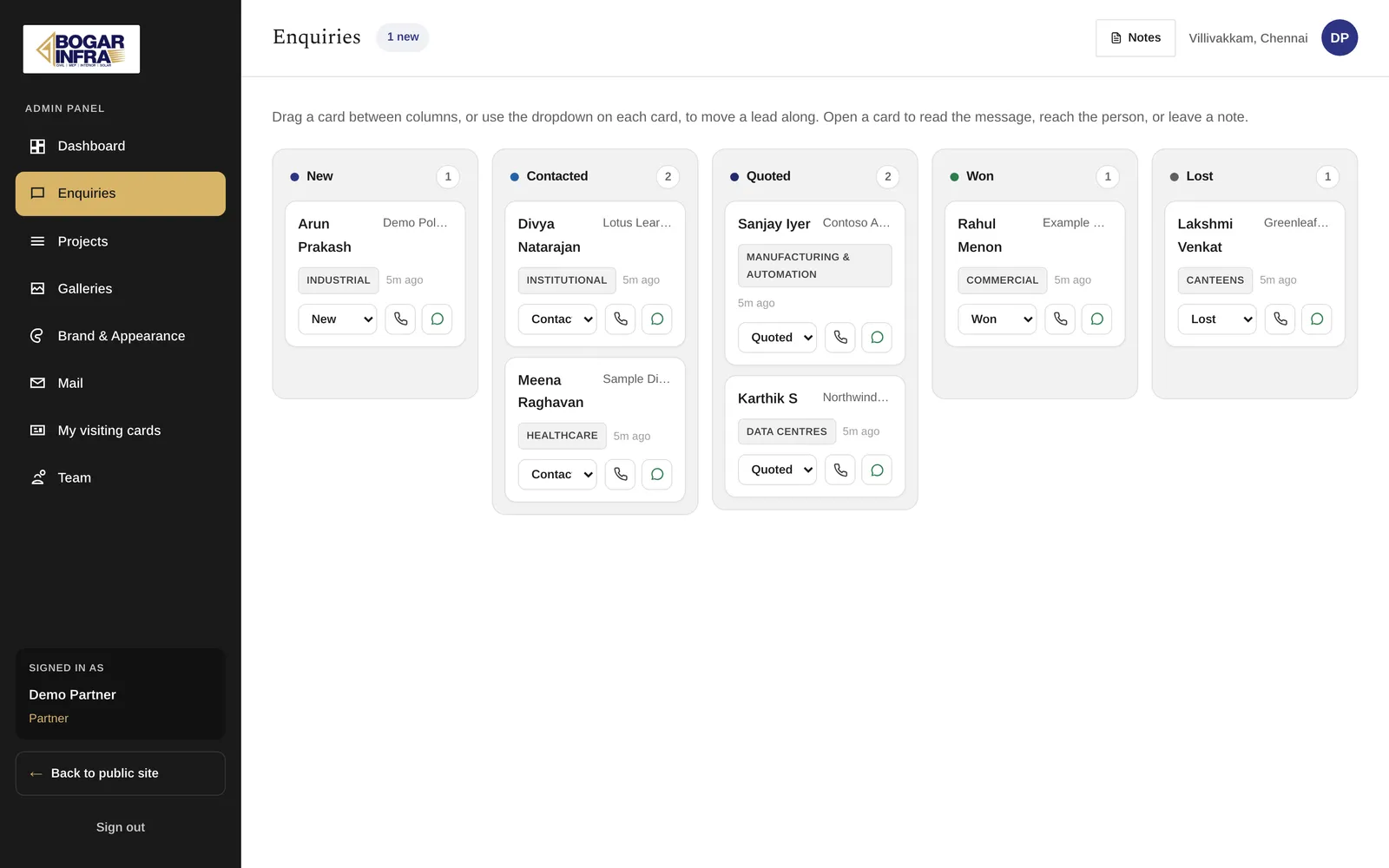
On the firm's side, the moment it's submitted, it's app data. The enquiry lands on a five-stage board (New, Contacted, Quoted, Won, Lost), with drag-and-drop on a desktop, a dropdown on a touch screen and one-tap call and WhatsApp. Now someone owns it, someone moves it, and the system has to remember who did what.
Most "website" briefs we receive contain a seam like this somewhere. Spotting it early is most of the job.
The web-app half: rules and failure paths
Everything behind the login was planned as an app, because that's what it is.
Mail. Partners' personal and shared mailboxes open inside the panel with their real folders, drafts and attachments. We made a choice here: no mail is stored in the panel's database. It talks live to the firm's own mail servers, so phones and desktop mail keep working as before, mail passwords are encrypted, and sends are logged as metadata only. That choice had a cost later. When the firm reported emails that wouldn't open, we traced it to one message stored without its envelope, which wedged a whole mailbox connection. The fix was five changes, including a 45-second limit on every mail operation (under the web server's 60 seconds), ten new unit tests (five of which failed first, which is how you know they test the bug) and 50 live scenarios run against the real mailboxes with tagged test mail. A website never has a week like that.
Progress links. A partner creates a report link per project with a passcode the server generates. The token is unguessable, and a wrong link returns "not found" rather than hinting that something exists. Site staff without a login get a separate update link to post notes and up to six photos from a phone. That link can never change a project's status or percent complete. Those are secure share links, and each rule in that paragraph had to be written down before it was built.
The public projects page. This is the one we'd point any founder at. The public projects page received whole project records from the API and displayed three fields. Nothing showed on screen, but the rest was in the response for anyone who looked. The public API now returns name, sector and photos only, and a test pins it so a later change can't quietly widen it again. That's the difference between a website bug and an app bug: one is wrong in public and gets fixed in an afternoon, the other can be wrong in private for months. Our pre-launch security checklist exists for the second kind.
Appearance. Partners can switch between five colour palettes and five font sets and preview the real public site in a frame before anything changes for visitors. One colour token declared twice once turned body text white on near-white in three of four themes, while every check stayed green. Now each palette must define all 33 colour roles and a token check fails the build. A design system inside an admin panel is still app work.
The Bogar Infra case study covers the whole build.
What the split did to the plan
Here's how the two halves compared on the same project:
| Public website | Admin web app | |
|---|---|---|
| Who uses it | Anonymous visitors | Partners and staff with accounts and roles |
| What it holds | Content the firm publishes | Enquiries, mail, projects, links people create and change |
| Where the effort went | Structure, ordering, redirects, placeholder gate | Permissions, failure paths, what the API returns |
| How we tested it | Pages, forms, devices, the build check | Each role, each route, live scenarios on real mailboxes |
| Upkeep | Content updates and light patching | Security updates, backups, monitoring, support |
A website project lives or dies on content and structure. An app lives or dies on its rules: who may do what, what happens when a request half-fails, what leaves the server. Quote the second as if it were the first and the rules arrive later as change requests.
When the answer is just a website
Often it is. We've built one-page static sites for professionals that load fast, cost very little to host and need no database at all. For someone who wants to be found and contacted, anything heavier would be waste.
A website on its own is right when the content changes a few times a month, nobody needs an account, the only action is a form, a call or a link, and your team can edit text and images without a developer. Then there's a smaller choice to make: a static site if it changes rarely, a familiar editor if people publish weekly, and a custom CMS only if the content has real structure, like Bogar's projects with albums and sectors generated from data.
Phrases in a brief that mean app work
When we read a brief, these phrases change the quote:
- "Customers can log in to see…"
- "Only managers can approve…"
- "Track the status of…"
- "Book a slot", "pay online", "upload documents"
- "Send a reminder when…"
- "Export a report of…"
None of them is a reason not to build. They're a reason to plan it as an app: roles enforced on the server (role-based access control, not a hidden button), validation on the server because anyone can send a request without your screens, an audit trail, backups that are actually restored now and then. On Pakka's web platform we exercised 260 of 270 API routes with real requests before launch, because the route nobody tried is the one that leaks.
If the list of "can…" sentences is long and describes how your business runs day to day, you may be looking at custom business software rather than a website with extras. If people will sign in at a desk and on a phone every day, an installable web app often does the job without a store app at all; our web app development page explains where that line sits.
Starting with one and adding the other
You can start with a website and add the app later, and it's often the sensible order if the business isn't ready to define its rules yet. A static site is perfect until someone needs a login; at that point moving it onto an app framework rebuilds the site, though not its content.
When we can see the app coming, we build the website on the stack the app will use. That's what happened at Bogar: one front end serving both the public pages and the panel, one API behind it. The admin joined the project instead of sitting next to it, and partners publish projects and albums to the public site from the panel, with a project's address locked once it's published.
So, before you ask anyone for a quote, read your own brief and underline every sentence where a person does something rather than reads something. If there are none, you need a website. If there are a few, you need a website with a small app behind it, priced as both. If the underlining covers the page, you're building software, and the website is the smaller job. Our deployment and hosting page shows what each one needs to keep running after launch.