
Open the spreadsheet your team quotes from. Not the tidy one you'd show an investor; the one someone actually updates on a Tuesday afternoon, with the hidden columns and the tab called "final v3". That file will answer the buy-or-build question better than any ERP demo, and this post is a worksheet for reading it.
We've mapped the work of three Indian businesses that sat on exactly this question: a kitchen-equipment fabricator, a fire-protection contractor and a customs broker. None of them is a large company. All three had outgrown spreadsheets, and all three had been shown a package. Our answer was different each time, which is the point. The short version, if you're in a hurry: buy the parts of the business that work like everyone else's, and build the part that is the reason customers pick you.
Trace one real job
Pick a job from last month that went roughly normally. Trace it on paper from the first enquiry to the final payment. Every time it changed hands, write down who had it, what they needed to know and where that knowledge lived.
When we did this with Firetrix, the trace ran from enquiry through design and costing, a priced offer, a purchase order, buying, deliveries to stores and then to site, installation, and a joint measurement before the final bill. Seven teams touched it, plus the client and a list of suppliers and transporters. The status of a project lived with whoever was handling it that week. One pipe line could be bought from two vendors at two rates, arrive short at the gate, sit in stores and then measure longer on site than the quantity sold. Nobody was doing anything wrong. The paper just didn't have a place to hold all of that.
Your trace will look different. What matters is that you now have something concrete to put in front of a package vendor, which is far more useful than a feature list.
Score it against eight statements
Go through the trace and score each statement below. Two points if it's clearly true for you, one if it's partly true, zero if not.
| Statement | Points toward | |
|---|---|---|
| A | Our process is standard for our industry, and we'd happily adopt a package's way of doing it | Buy |
| B | The main need is accounts, GST, payroll or stock in a conventional shape | Buy |
| C | We don't want to own software, ever | Buy |
| D | What we sell is a specification, not an item with a price | Build |
| E | Some teams must never see certain numbers (margin, offer rates) | Build |
| F | Quantities should come from events (bought, received, issued, installed), not from someone typing them | Build |
| G | Key people work on site, from phones, with poor signal | Build |
| H | Our workarounds have names: "the sheet", "the register", "the group" | Build |
If A to C outscore D to H by a wide margin, buy a package and spend your energy configuring it well. A package brings years of other customers' edge cases and an upgrade path you don't pay for. Renting that is usually cheaper than rebuilding it.
If D to H win, keep reading. If it's close, you're like most of the businesses we talk to, and the answer is probably the middle path, further down.
What the "build" statements look like in practice
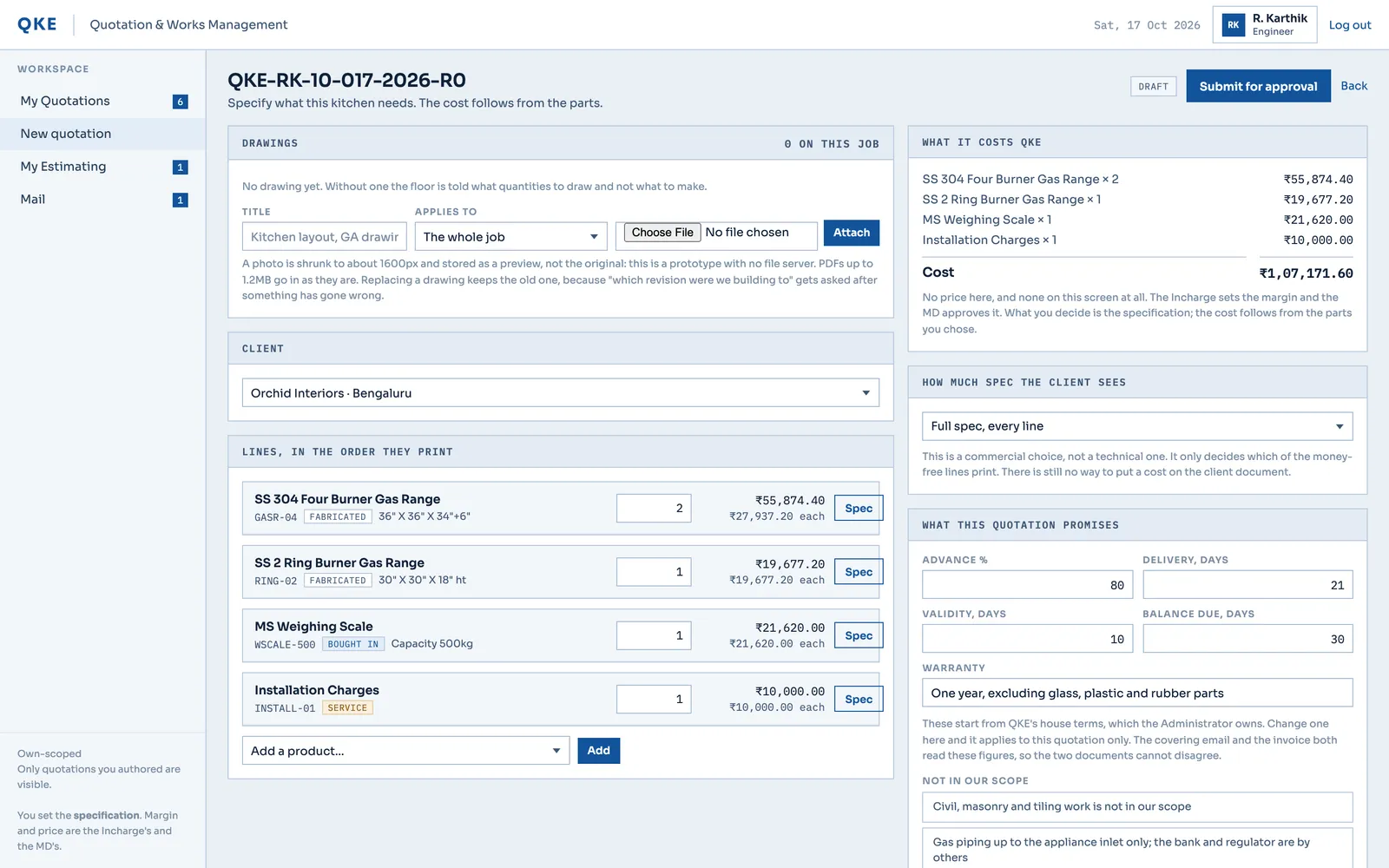
Statement D is the one we see most, and it's the one packages handle worst. QKE, a Chennai fabricator of commercial-kitchen equipment, doesn't sell from a catalogue. A gas range is a standard steel body, a gas trim and a few counted parts such as burners; a one-burner and a three-burner range share the same body, with only the burner counts changing. The quotation prints quality statements like "1.5 mm top sheet", not weights. Yet the business still needs to know what each product costs to make and what to buy when an order lands.
A package that wants a priced SKU for everything pushes the real quotation back into a spreadsheet. So in the QKE design, a product is a spec sheet built from reusable spec groups and parts. Its cost falls out of the parts it uses, and the margin lives on the quotation, not on the product. Fix a shared spec group once and every product using it is fixed. We worked that model out against the 243 spec lines of one real quotation before anyone relied on it.
Statement E sounds small and isn't. In the Firetrix plan, procurement, finance and stores never see the margin or the offer rates. The same project line shows the same numbers on every role's board, minus what that role may not see. In a package that kind of rule is often a paid customisation. In a custom build it's a basic role-based access rule enforced on the server, which is a different thing from hiding a column on screen.
Statement F is the quiet one. Both the QKE and Firetrix designs calculate what has been bought, received, issued and installed from recorded events. Nobody types a stock figure. It's more work up front than an editable field, and it means the totals add up by construction instead of by someone being careful at month end.
Show the trace to a vendor
Now take the paper trace to a package demo and ask them to run your job, not theirs. Watch for the moment the salesperson says "you could handle that with a custom field". Count those moments.
If the job runs with settings and a supported add-on, buy. Honestly, we'd rather you did than pay us to rebuild something a package does well. If every second step needs a workaround, you've found the part worth building, and you've also found it cheaply.
The middle path
Most of the time the answer isn't one or the other. Keep the packages that do commodity jobs well and build the part that's specific to how you operate, connected to them.
The customs broker is the clearest case. They were replacing a legacy ERP of more than 400 screens and about 20 integrations, much of it showing no use. Air export, air import, sea export, sea import, customs import and customs export each had their own lists and tracking screens. Our proposed phase one doesn't touch the ledger. Vouchers go out as a Tally export, because the accounts team already trusts Tally. GST e-invoices and e-way bills go through a GST Suvidha Provider adapter instead of custom tax code, so the software stays current when the rules change. Our GST e-invoicing guide covers when that applies.
The custom part is the work itself: one job engine instead of hundreds of screens. A job has a type, mode-specific fields show only where they apply, and milestone templates drive the status, the alerts and the daily report. That's 22 entities in the proposed data model, which is a lot less than 400 screens. Nothing has been built yet, and nothing should have been: the mapping ended with ten questions the client has to answer before anyone can give a firm price. You can read the customs broker discovery for the full map.
What moves the effort if you build
We don't publish price bands for business software. A quotation tool for one department and a job engine replacing a legacy ERP are both called "custom ERP", and a single range covering both would be useless to you. What we can tell you is what makes a project bigger:
- the length of the chain (quotation alone is one thing; quotation through purchase, stores, installation and final bill is five things that have to agree);
- the number of roles, and how strict their visibility rules are;
- integrations, because each outside system is a contract that needs building and testing;
- data migration, which is the line people underestimate most, every time;
- a phone portal for site staff, which is a second interface with its own design.
A fixed price comes after the mapping. That's what our Discovery Sprint is for, and once the scope is written down we work in fixed-price milestones.
If you do build, build in vertical slices. QKE's real application went in role-complete slices, data before the screens that read it: sign-in, the team panel, the role shell, then the parts, product and vendor masters, nine slices built and verified so far. The full nine-role workflow ran first as a clickable prototype with 389 verification checks passing, and after walking through it QKE asked for four additions. That kind of feedback is cheap at prototype stage and expensive after go-live.
Where it usually goes wrong
Not in the software, in our experience. In the week staff stop using the old way.
Move one chain at a time, starting where the pain is sharpest. Load real master data early, because item lists and vendor lists are always messier than anyone admits. Run old and new side by side for a short, fixed period, long enough to compare totals and short enough that nobody settles into doing everything twice. Train people on their own work: a store keeper needs to receive goods and issue stock, not a tour of every module.
And name an owner inside the business who decides when the new system is right and the old habit is wrong. Bought or built, no system survives without that person.
A note on no-code
For a small team with a simple process, a no-code tool or a well-kept spreadsheet is a sensible first system, and we'll say so. It breaks in the same places a package does, only sooner: strict visibility, derived quantities, phone portals, Indian tax integrations. Our no-code vs custom comparison goes through where. Using no-code to learn your process and building once the workarounds have names is a perfectly respectable route.
Whichever way the score falls, keep one thing in your contract: your data leaves the system in a usable format whenever you ask. That's the cheapest protection against vendor lock-in, whether the vendor is a package company or a studio like us. Our custom business software page explains how we design and build these systems, and after launch most of them move onto a maintenance plan run by the people who built them.