Ship · Maintenance & support

App maintenance and support services: updates, fixes and upgrades every month, from engineers who read the code

App maintenance and support services: monthly security and dependency updates, OS and store upgrades, fixes and small features, with a report every month. A live app does not stay finished. Libraries publish security fixes, Google and Apple raise their requirements every year, and your users ask for small changes. We keep up with all three on a monthly rhythm, so the app stays secure, accepted by the stores and moving forward, and a deadline never turns into an emergency.

Updated

  • Feb Play: 16 KB page sizes
  • Apr Apple SDK · Node.js end of life
  • Jun Next iOS announced
  • Aug Play target API
  • Sep New iOS released
  • Oct New Node.js LTS
38
dependency findings cleared on one backend, none suppressed
27
months we maintained Flying Pup Films' site and admin
7
platform dates on our calendar, August 2026 to August 2027

At a glance

Every month
Dependency and security updates, monitoring, a backup check, fixes and small features
Upgrades
Android, iOS, store and framework upgrades before their deadlines
Reporting
A month-end report: what shipped, what was patched, hours used
Cover
Indian working hours; no 24/7 on-call
Apps we did not build
Start with a code audit, so both sides know what is being maintained
Plans and pricing
On the maintenance plans page; this page explains the work
Last verified
4 November 2026

When you need this

Where is your app on the gauge? Maintenance costs least at the top

Every live product sits somewhere between freshly launched and on fire. The further down it slides, the more each fix costs, because changes pile up and nobody remembers the code. Find your app on the gauge. Wherever it sits, the way back up is the same: catch up on what has drifted, put tests where changes are risky, and then keep a steady monthly rhythm so it does not slide again.

  1. Just launched

    Everything works and nothing has changed yet. This is the cheapest moment to start maintenance: the code is fresh, the people who wrote it remember it, and the first updates are small. The first real platform deadline is usually less than a year away.

    What we do: Start the monthly rhythm now, while the gaps are small.

  2. Drifting

    The app works, but its libraries are months behind and the dependency audit shows warnings nobody has read. Each month of waiting makes the eventual upgrade bigger, and some fixes now need code changes rather than a version bump.

    What we do: A first month spent catching up, biggest risks first, then the normal rhythm.

  3. Stuck

    Small requests take weeks because nobody is sure what a change will break. There are few tests, the original developer has moved on, and the team works around the app rather than improving it.

    What we do: A health check of the code first, then tests around the parts that change most, so changes can be made with confidence again.

  4. Breaking

    A store deadline is weeks away, a new Android or iOS version crashes the app, or a security advisory names a library you use. The work is no longer optional and the date is not yours.

    What we do: The urgent fix comes first, scoped on its own; maintenance follows so it does not happen again.

  5. On fire

    The app is down, pulled from a store or losing data. A maintenance plan is not the first tool here, and anyone who sells you one at this point is selling the wrong thing.

    What we do: Talk to us about a rescue; once it is stable, a plan keeps it that way.

What skipping maintenance usually costs

Blocked releases
Miss a store's target or SDK date and the next update cannot be published until the upgrade is done, including the bug fix you urgently need.
Bigger upgrades
Libraries several major versions behind come back as projects with forced code changes, instead of small monthly steps.
Known holes
Security fixes are published for current versions. Fall far enough behind and the fix for a known vulnerability simply does not exist for your version.
Lost knowledge
Every month nobody touches the code, fewer people remember how it works, and every later change starts with rediscovering it.
Surprise outages
Full disks, expired certificates and failed backups do not announce themselves. They are found by users, at the worst time.

What you get each month

The same list every month, ticked, with a report at the bottom

Maintenance is easy to sell vaguely and hard to check. So we make it a list: the work below happens every month, and the month-end report shows each line done, what it found and the hours it used. Hours and response times differ by plan; the work does not. If a line could not be done one month, the report says so and why, rather than quietly leaving it off. Over a year, the reports become a history of the product that any future engineer can read.

How a dependency update is done without breaking the app

  1. Read the audit. Every advisory is read for what it affects. A vulnerability in a feature the app never uses is still fixed, but it is not an emergency; one in the sign-in path is.
  2. Prefer the smallest real fix. A compatible patch release first. No forced upgrades that jump major versions just to silence a warning, because those are the upgrades that break apps quietly.
  3. Plan the majors. Where only a major version fixes the issue, it becomes a planned task: what changed in the library, which of our files it touches, and the tests that prove the change.
  4. Test on a copy. The update is installed from the lockfile on a copy, built with production settings, and checked against the live version page by page and endpoint by endpoint.
  5. Release one app at a time. Each app is released on its own, checked again, and rolled back on its own if anything differs. Nothing is updated across every app at once.
  6. Write it down. The report lists each advisory, what we did about it, and anything deliberately left for a planned upgrade, with the reason.

What maintenance is not

  • New products or large features. Anything bigger than the month's hours is estimated and agreed separately as build work.
  • A redesign. Small screen changes fit; a new look for the app is design work with its own plan.
  • Round-the-clock operations. We answer in Indian working hours and say so.
  • Silent rewrites. We do not rebuild working parts of your app because we would have written them differently.
  • Maintenance of code nobody has read. An app we did not build starts with an audit, so the plan is based on facts.
  • A way to lock you in. Store, server and domain accounts stay in your company's name, the runbook is yours to keep, and you can stop with 30 days' notice after the minimum term.

Monthly service sheet

  • Dependency and security updatesApplied, tested on a copy and deployed; majors planned, never forced
  • Uptime monitoringChecks on the pages and endpoints that matter, with alerts to us
  • Backup checkBackups confirmed running and restorable
  • FixesBugs you report and bugs we find, in priority order
  • Small featuresChanges that fit in the month's hours, agreed before they start
  • Platform upgradesAndroid, iOS, store and React Native upgrades on the plans that include them
  • Health notesAnything we noticed that will need time later, with an estimate
  • Month-end reportWhat shipped, what was patched, hours used, what is coming

Checked by

How a month runs

Four weeks, four lanes: updates, requests, checks and the report

A maintenance month has a shape, so you always know what is happening and when your request will be looked at. The first month is different: it starts with onboarding, access, monitoring and a health check of the code and its dependencies. After that the weeks repeat, which is the point: a predictable month is one where nothing important depends on someone remembering to do it, and where you can plan your own releases and announcements around ours.

If we built the app

Onboarding is short. We already hold the code, the runbook and the history, so week one is setting up monitoring and alerts against the live app, confirming access to the stores and servers in your name, and writing the first month's plan.

If someone else built it

The audit comes first, so we both know what is being maintained. Then access to code, servers and store accounts, monitoring, a dependency health check, and a runbook started from what we find. Anything the audit marks urgent is fixed before the rhythm begins.

The same engineers look after your product month after month: a core of 2 to 5 people from our team of 10, chosen for the stack your app is built on. You talk to the people doing the work, not to an account manager relaying messages. If we built the app, it is often the same people who built it: see mobile app development and web app development.

Week 1

UpdatesDependency audit; patch plan written; anything critical applied at once

Your requestsNew requests triaged and agreed in priority order

ChecksUptime alerts reviewed; backups confirmed

ReportingPlan for the month shared

Week 2

UpdatesPatches tested on a copy, then released one app at a time

Your requestsTop requests built and tested

ChecksError logs read for new patterns

Week 3

UpdatesPlatform deadlines in the next quarter checked; upgrades scheduled

Your requestsNext requests built; earlier ones released

ChecksStore reviews and crash reports read

Week 4

UpdatesRemaining patches released; nothing left half-done over the month end

Your requestsAnything that did not fit the hours moved to next month, with your agreement

ChecksRelease checks on everything shipped this month

ReportingMonth-end report: shipped, patched, hours used, coming next

What the month-end report says

  • Shipped: every change released this month, in plain words, with the date it went live.
  • Patched: each security advisory handled, and any left for a planned upgrade with the reason.
  • Checked: uptime alerts, backup restore, error logs and store reviews, with anything unusual.
  • Hours: used against the month's allowance, split by app, website and backend.
  • Coming: platform deadlines in the next quarter and the work we propose for each.
  • Notes: anything that will need time later, with an honest estimate, so nothing arrives as a surprise.

The deadlines nobody sends you

Platform dates that force changes to a live app, and what we do about each

Google, Apple and the open-source projects your app is built on all have calendars. They announce changes in blog posts and developer pages, not in an email to you. Miss one and the next update cannot be released, or the app stops working on new phones. These are the dates on our calendar now. Each one becomes a planned task months ahead, so it lands in a normal maintenance month instead of a scramble the week before the cut-off. The store-side detail is in our Google Play launch checklist and App Store launch checklist.

Platform dates that force changes, checked October 2026
WhenWhoWhat changesWhat we do
31 Aug 2026Google PlayNew apps and updates must target Android 16 (API level 36); extensions ran to 1 November 2026.Raise the target, retest permissions and background work, release before the cut-off.
9 Sep 2026AppleiOS and iPadOS uploads must target iOS 13 or later.Check the minimum version in every app we look after.
1 Feb 2027Google PlayUpdates to apps with native libraries that target Android 15 or higher must support 16 KB memory pages.Check every native library, including React Native itself, and upgrade those that do not comply.
Apr 2027AppleBuilds must use the iOS 27 SDK. Apps built with it must adopt the scene lifecycle or they crash at launch.Upgrade the SDK early and test on a real iPhone; we have already seen this crash and fixed it.
30 Apr 2027Node.jsNode.js 22 reaches end of life and gets no more security fixes.Move each server app to a supported line, one app at a time, with the old runtime kept for rollback.
Aug 2027Google PlayGoogle's blog says API level 37 becomes mandatory.Plan the upgrade in the spring, not in August.
Every SeptemberAppleA new iOS version reaches users' phones within days of release.Test on the beta in summer, so release week is quiet.

Websites and web apps have fewer hard deadlines but the same drift. Frameworks such as Next.js publish security releases that need applying, older major versions stop getting fixes, runtimes reach end of life, and browsers change what they allow. We track those the same way: on the calendar, planned, tested on a copy and released one app at a time.

Upgrade, not suppress

How we cleared 38 security findings on a live backend without hiding one

We maintained Flying Pup Films' website and content system from March 2024 to June 2026, including its move to Next.js 15. On 16 June 2026 the dependency audit reported 38 vulnerabilities on the backend and 2 on the website. The rule was simple: every finding closed by a real upgrade, a maintained replacement or removing an unused package. Nothing ignored, nothing suppressed. It is a larger version of what a normal maintenance month does, and it shows why small monthly steps are cheaper: most of the work below was forced by versions that had drifted far behind.

Before

  • 1critical
  • 11high
  • 22moderate
  • 4low

Backend audit, 16 June 2026, plus 2 low findings on the website.

After

  • 0findings on either

The 1,071-line integration test suite, about 130 assertions, kept and upgraded rather than deleted.

  1. Removed

    Two packages that were installed but never imported. The server already used Node's own cluster module.

  2. Replaced

    The old cloud storage SDK, in maintenance mode, swapped for its modular successor, with the upload library moved to match.

  3. Upgraded

    The database library from version 5 to 8, which closed the critical finding, plus the token, email, upload, sign-in and ID libraries.

  4. Rewritten

    The code the upgrades forced: query callbacks became async/await, removed methods were replaced, and the storage calls moved to the new API.

Two things made this safe. First, the backend had a real integration test suite, so every upgrade could be proved against the same 1,071 lines of tests before and after. Second, each finding was handled on its own merits: asked what it was, whether the app used the affected feature, whether a compatible fix existed and whether a better-maintained package did. That order is the same one we follow every month, on every app.

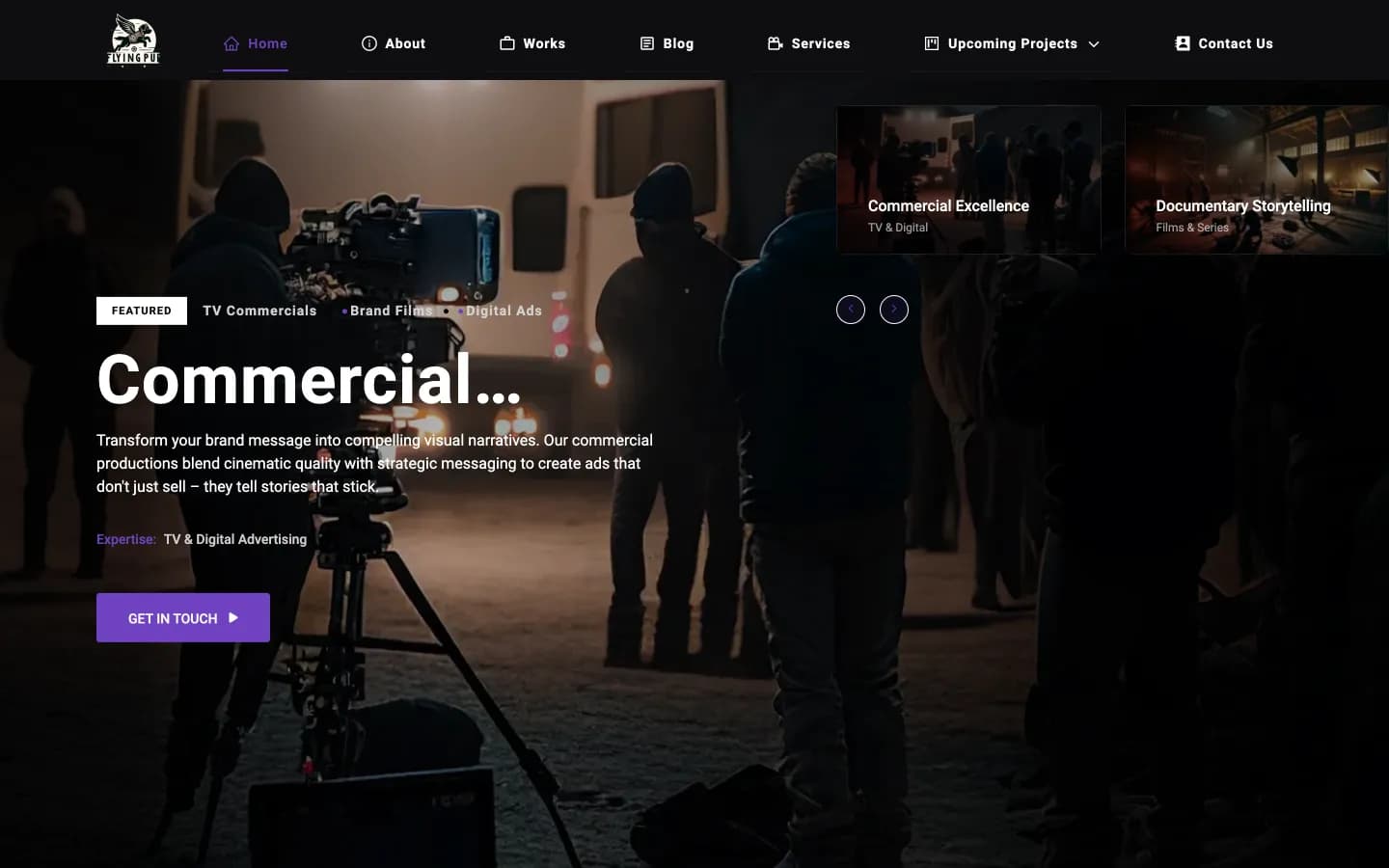
Flying Pup Films live home page with a film-set photo and a Get in touch button
The live site, served from the content system we maintained
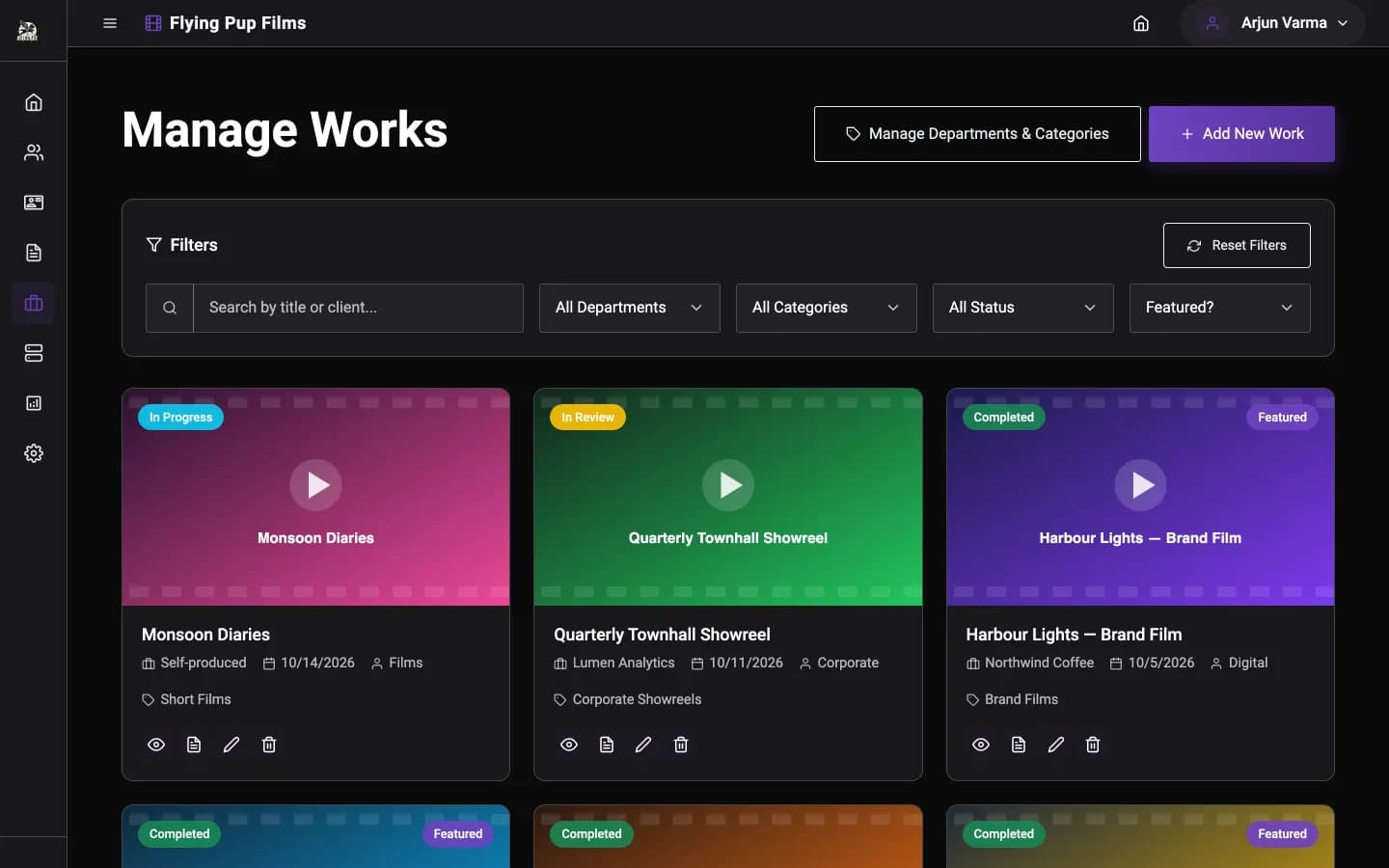
Flying Pup Films admin panel listing portfolio works with status badges and filters
The admin panel the studio uses to publish new films

The full account is in the Flying Pup Films case study, including the two judgement calls on the website side.

How requests are prioritised

Four priority levels, decided by what the problem costs you

Not every request is urgent, and treating everything as urgent means nothing is. Each request gets a level when it arrives, and the level decides the order of work. How quickly a critical issue is answered depends on your plan, from the next working day to within four business hours, always in Indian working time. You can raise the level of any request yourself; we will only ever suggest lowering one, and say why.

  1. Critical

    The product is down, payments are failing, data is at risk, or a store has pulled the app. For example: checkout returns an error for every customer.

    Other work stops. A fix or a rollback first, the full explanation after.

  2. High

    A main journey is broken for some users, or a store or platform deadline is weeks away. For example: sign-in fails on one Android version.

    Next in line, ahead of any feature work, and released on its own if needed.

  3. Normal

    Bugs with a workaround, and the small features you have asked for. For example: an export misses one column.

    Worked in the order you set, within the month's hours.

  4. Low

    Polish, ideas and nice-to-haves. For example: a smoother animation on a settings screen.

    Batched, and raised in the monthly report when there is room.

We do not run a night-time on-call rota. Alerts reach us at any hour, and the runbook for your product says how to roll back the last release if something breaks while we are offline. Critical issues are reviewed afterwards: what happened, why, and what we changed so it does not happen again. Response targets by plan are on the plans page; what a response target means is explained under SLA, and how we spot problems before users do under error monitoring.

From request to release

Every request travels the same board, and you can see where it is

Requests live on one board you can read at any time. Nothing gets lost in an email thread, and the month-end report is simply the board's last column. The cards below are examples of the kind of work that moves across it in a typical month. A card only moves to Shipped once it is live and checked, not when the code is written, so the board never claims more than your users can see. Anything that has waited longer than a month is raised with you rather than left to age.

Inbox2

  • Add a GST number field to invoices
  • Login screen slow on old Android phones

Agreed2

  • Raise Android target before the Play deadline
  • Export bookings as CSV

Building1

  • Replace a deprecated payment SDK call

In test1

  • Fix keyboard covering the code field on new Android

Shipped2

  • Monthly dependency updates
  • Backup restore checked

What makes a request quick to act on

  • What you expected to happen, and what happened instead.
  • Where: the screen, the device and its Android or iOS version, or the browser.
  • How often: every time, sometimes, or once.
  • Who it affects: one customer, a type of user, or everyone.
  • A screenshot or a short screen recording, if you have one.

None of it is required, and a one-line request is fine. Each of these simply saves a round of questions, which on a small fix can be most of the time it takes.

Questions about app maintenance and support

What does app maintenance actually include each month?

Dependency and security updates applied and tested, uptime monitoring with alerts to us, a backup check, fixes and small features within the month's hours, platform upgrades on the plans that include them, and a month-end report of what shipped, what was patched and the hours used. Plans and prices are on our maintenance plans page; the work itself is the same list every month. What changes between plans is how many hours there are for your requests and how quickly a critical issue is answered.

How many hours of maintenance does an app need each month?

It depends on how much changes around the app and how much you want to change in it. An app with few users and no new features needs a few hours for updates and checks (our maintenance cost calculator gives a first estimate). One that is growing, with requests every week, needs more. Our maintenance cost calculator gives a starting estimate, and the first month's health check tells us both what is realistic. If the hours turn out wrong in either direction, you can move plans from the next month after the minimum term.

What happens in the first month of maintaining an app built by someone else?

It starts with a code audit, so we both know what is being maintained. Then onboarding: access to the code, servers and store accounts, monitoring set up, and a health check of the code and its dependencies. Anything urgent the audit finds is fixed first. The normal monthly rhythm starts once the floor is solid.

What happens when Google or Apple change their requirements?

We see it coming. Platform dates live on our calendar, so a target API change or a new store requirement is planned months ahead, tested on a copy and released before the cut-off. You hear about it in the monthly report as a line item, not as an urgent email the week before. When a change needs more than the month's hours, such as a large SDK upgrade, we estimate it separately and agree it with you first.

How do we ask for a fix or a small feature?

Write it down in one line on the shared board, or send it and we will put it there. We give it a priority level, agree it with you, and it moves across the board from inbox to shipped. If it is bigger than the month's hours allow, we say so and estimate it separately before anything starts. You can see every request's status on the board at any time, without having to ask.

What if something breaks at night or over the weekend?

Alerts reach us at any hour, but we answer in Indian working hours; we do not offer round-the-clock on-call cover. For the worst cases, the runbook for your product explains how to roll back the last release, which is the most common fix. If your product needs night cover, we will tell you honestly and help you find it. Either way, anything that happened overnight is the first thing we look at the next working morning.

Why update dependencies if the app works fine today?

Because the cost of an update grows with the gap. A library one version behind is a small change; five versions behind is a project, often with forced code changes, as the Flying Pup clean-up showed. Security fixes also only exist for current versions, so falling behind eventually means running known vulnerabilities with no patch available. Small monthly steps are also easier to test, and easier to roll back if one of them misbehaves.

Can maintenance cover our website and admin console as well as the app?

Yes. Most products are several pieces: a mobile app, a backend, an admin console and a website. Maintenance covers whichever of them you choose, with the same monthly list for each, and the report shows the hours by piece so you can see where the effort goes. The servers they run on can be included too, with security updates and backup checks on the same monthly rhythm.

Month 1

Pick the month we start

Tell us what the app is, what it runs on, who built it and what is bothering you about it now. An engineer replies with what the first month would cover, and whether an audit should come first.

Moving maintenance from another team? Our agency handover checklist lists what to collect from them first.