Build · Flutter apps

Flutter app development: new Flutter apps, and the Flutter app you already have

We build Android and iPhone apps in Flutter for teams that have chosen it, and we take over, fix and extend Flutter apps that someone else started. The app comes with what most Flutter projects are missing: the backend and API it talks to, the admin console your team runs the business from, the store listings and review, and the care after launch. One team in Bengaluru does all of it, and the same process runs every project: plan and screens first, then the build in milestones you can install.

To be straight with you: every phone app we have shipped so far is React Native, and for a brand-new product with no reason to prefer Flutter, that is still what we recommend. This page is for teams that have a reason: a Flutter codebase, a Flutter team, or a product where Flutter is the better fit.

Updated

Is Flutter the right choice for your app?

Flutter and React Native both produce one codebase for Android and iPhone, and both are good. The choice is rarely about speed or quality on day one; it is about your people, your existing code and what the app has to look like. Answer the questions and watch where the beam settles. Every answer is explained underneath, so you can disagree with us.

  1. Flutter fits your situation. The questions that tipped it are the ones about people and existing code, and those are the ones that matter most.
  2. It is close. Either framework would serve this app, so let the people who will maintain it decide. A Discovery Sprint settles it with a written recommendation.
  3. React Native fits your situation better. That is our main stack for phone apps; the mobile app development page covers how we build with it.

0 of 7 answered

  1. 1Do you already have a Flutter app or Flutter code?

    A yes points to Flutter

    Existing working code is the strongest reason of all. Rewriting a healthy Flutter app in another framework costs months and buys you little; extending it is almost always right.

  2. 2Will your own developers maintain it in Dart later?

    A yes points to Flutter

    The app outlives the build. If the people who will own it after handover write Dart, give them Dart. If your team writes JavaScript or TypeScript for the web, React Native lets them share skills and code.

  3. 3Must the app look identical on Android and iPhone, down to the pixel?

    A yes points to Flutter

    Flutter draws every pixel itself, so a custom, heavily branded interface looks the same on both platforms. React Native uses each platform's own controls, which feel native but differ slightly between Android and iPhone.

  4. 4Do you already have a React or Next.js web app that should share code with the phone app?

    A yes points to React Native

    React Native shares a language, libraries and sometimes components with a React web app. Flutter can target the web too, but it is a different stack from the web app you already run.

  5. 5Does the app lean on many native SDKs, such as payments, maps, background location or device hardware?

    Neither, on its own

    Both frameworks reach native code: Flutter through platform channels, React Native through native modules. What matters is whether a maintained package exists for each SDK you need in that framework, which we check one by one before we recommend either.

  6. 6Do you need desktop apps from the same codebase as well?

    A yes points to Flutter

    Flutter's desktop targets are mature enough for internal tools and kiosks from the same code. React Native's desktop options exist but are less common.

  7. 7Do you want the stack with the most shipped apps behind the team you hire?

    A yes points to React Native

    With us, that is React Native: every app we have shipped is built on it. If our track record matters more to you than the framework, that is an honest reason to choose it.

How Flutter puts pixels on the screen, and why it matters to you

The real difference between Flutter and React Native is not the language. It is who draws the interface. That one fact explains most of the trade-offs people argue about, so it is worth two minutes before you decide anything.

Flutter

  1. Your Dart widgets
  2. Flutter framework
  3. Flutter's own rendering engine
  4. Pixels on a canvas

Flutter ships its own rendering engine inside your app and paints every pixel itself, the way a game engine does. The button on Android and the button on iPhone are the same drawing, so a custom design looks identical on both and behaves the same way when it animates.

What it means for your app

  • A heavily branded interface is cheaper to keep consistent across platforms.
  • Platform look-and-feel, such as iPhone-style controls, is recreated by Flutter rather than borrowed from the system, so it can lag behind a new iOS or Android design.
  • The engine adds to the download size of a small app.

React Native

  1. Your JavaScript components
  2. React Native framework
  3. Platform UI toolkit
  4. Native views

React Native describes the interface in JavaScript and asks each platform to draw it with its own native controls. A text field on iPhone is Apple's text field. The app feels at home on each platform, and the two versions differ in small ways because the platforms do.

What it means for your app

  • Each platform's new controls and accessibility behaviour arrive with the operating system.
  • Pixel-identical custom designs take more care, because two toolkits draw them.
  • Skills and libraries are shared with React on the web.

Neither approach is better in general. If your product's identity lives in a custom, animated interface that must match everywhere, Flutter's approach is a genuine advantage. If it should feel like a native citizen of each phone and share code with a React web app, React Native's is. Most business apps work well either way, which is why we weigh your people and your existing code first.

What you get

A Flutter project with us ends with the same things in your hands as any app we build. Here they are laid out as the project you receive, folder by folder, because each one is something you can open and check rather than a promise in a proposal.

  • your_app/One Flutter codebase for Android and iPhone, built on the stable channel with null safety and the analyser's lints on.
  • design/User flows, every screen with its empty, loading and error states, and the design tokens the app's theme is built from.
  • lib/features/Code organised by feature, with one documented state-management pattern, so a new developer finds things where they expect them.
  • lib/platform/Native Kotlin or Swift only where no maintained package exists, each behind a single Dart interface.
  • test/Automated tests on the business logic and key widgets, run on every change.
  • flavors/Separate development, staging and production builds, so a test build never touches real customers or real money.
  • backend/The API the app talks to, scheduled jobs and push notifications, if you do not already have them.
  • admin/A web console your team runs the business from: users, orders, content, refunds, reports.
  • release/Store listings, privacy answers, signing set up in your own accounts, and a written release and rollback routine.

How a Flutter project runs

The framework does not change how we run a project. Design, app, backend and testing run as four lanes side by side, and every milestone ends in a build you can install on your own phone. The shape below is typical for a first version; your plan, with dates, comes out of the first two weeks.

Week123456789101112
You approve the screens and the planFirst build on your phoneFeature-complete, release testingLive on the stores
DesignDiscovery: flows, screens, prototypeScreens ahead of each milestone
Flutter appSkeleton: navigation, theme, sign-inFeature milestones
Backend & adminAPI, data, authPayments, notifications, admin console
QA & releaseTest builds to your phoneStore review and launch
  • Plan before code

    The first two weeks are a Discovery Sprint: user flows, the screens with their empty, loading and error states, a clickable prototype and the architecture. You see what you are buying before a line of Dart is written.

  • The skeleton comes first

    Navigation, the theme, sign-in and the first API call are built before any feature. It feels slow for a week and saves weeks later, because every feature lands in a structure that already works.

  • Builds on your phone

    Test builds reach you through Google Play's internal testing and Apple's TestFlight as features land. You judge progress by using the app, not by reading a status report.

  • Release testing is its own phase

    Before store submission we walk every screen by hand on real Android phones and iPhones, including small screens, slow networks and denied permissions, and fix what we find before reviewers or users do.

The Flutter jobs we take on

Flutter work arrives in a few recognisable shapes. Each starts differently and needs a different first week, so here is how we approach each one.

  • Work order 01

    A new app, Flutter already decided

    You have chosen Flutter for good reasons and need the app designed and built. We run the same process as any product: two weeks of flows, screens and architecture, then milestones you install. The difference is only the language the app is written in.

    Starts withDiscovery Sprint
  • Work order 02

    The developer left mid-build

    Half an app, no documentation and a deadline. We read what exists, build it on a clean machine, list what works and what does not, and give you a plan to finish that reuses everything worth keeping. Finishing is almost always cheaper than starting again.

    Starts withRead-only code review
  • Work order 03

    Rejected by Google Play or the App Store

    Most rejections are about target SDK levels, privacy forms, permission explanations, account deletion, login for reviewers or signing, not the Flutter code. We fix the cause, write the reviewer notes and resubmit, then tell you what else is likely to come up at the next review.

    Starts withThe rejection notice
  • Work order 04

    An old app that will not build any more

    The app was fine two years ago, and now it will not compile on current tools or meet the stores' current requirements. We upgrade in steps on a branch, replace abandoned packages, and keep a working build at every step so you can still ship an urgent fix.

    Starts withUpgrade plan
  • Work order 05

    Slow screens and crashes

    Jank, slow lists, memory growth and crashes on particular phones. We measure with Flutter's profiling tools and crash reports on the phones your users have, fix the causes in order of how many people they hit, and add the checks that stop them coming back.

    Starts withProfiling on real phones
  • Work order 06

    The app needs a real backend

    Many Flutter apps start on a backend-as-a-service and outgrow it: payments, roles, reports, admin tools. We design and build the custom API and admin console, migrate the data and move the app across without a big-bang switch.

    Starts withAPI review

Taking over a Flutter app someone else built

Many Flutter enquiries are not new builds. The app exists, the original developer has gone, and something is wrong: it fails store review, crashes on some phones, takes too long to change, or no one is sure what state it is in. We start by reading it, and we tell you what we find before we quote for anything.

  1. Does it build?

    We build it from a clean checkout on current Flutter, for both platforms. Many takeovers stall right here on old dependencies, missing signing files or settings that only existed on one laptop.

  2. Dependencies

    We list every package with its version, its last release and whether it is still maintained. Abandoned packages that touch payments, sign-in or the camera go to the top of the list.

  3. Flutter and Dart versions

    How far behind the app is, and what upgrading involves: null safety, renamed APIs, Android Gradle and iOS deployment-target changes.

  4. State and structure

    Which state management approach is used, whether it is used consistently, and where business logic has leaked into widgets, which is what makes changes slow.

  5. Native code

    What lives in platform channels and native folders, whether it matches the Dart side, and what each store's current rules require of it.

  6. Store standing

    The current listings, rejections, privacy answers, target SDK requirements and signing keys, and who controls the developer accounts.

  7. Tests and release

    What is tested, how builds are made and released, and whether anyone could ship a fix tomorrow if they had to.

You get a written report ranked by severity, with each finding pointing at the file and line, and a recommendation: fix in place, refactor the parts that hurt, or rebuild. Rebuilding is the rarest answer; most Flutter apps are worth keeping. Our code audit offer is the fixed-scope version of this.

See the code audit →

If you have Flutter developers of your own

Plenty of our Flutter conversations start with a team that already writes Dart and needs more hands, a backend or a release process. We fit around your team rather than replacing it.

Your conventions first
We read your codebase's patterns, lint rules and folder structure and follow them. A second style inside one app is a cost you would pay for years.
Reviews both ways
Our changes go through your review and yours can go through ours, so knowledge moves in both directions and nobody is surprised by a merge.
Clear seams
When we split work, we split it along clean lines, such as the backend and admin console with us and features in the app with you, with the API contract agreed in writing first.
Handover as a habit
Decisions, runbooks and release steps are written down as we go, not at the end. When the engagement stops, your team carries on without a gap.

Decisions you will make, and what we recommend

Every Flutter app passes the same handful of forks in the road. Making them deliberately at the start is cheaper than discovering them halfway through. These are the ones we put in front of you, with our default and when we would change it.

State management
OptionWhen it fitsOur default
One documented patternAlways. The pattern matters less than using one consistently.Default
Lightweight (Provider-style)Small apps with few screens and little shared state.
Structured (Riverpod or Bloc-style)Apps with real business logic, many screens and a team that will grow.Usual choice
Whatever the existing app usesTakeovers, unless it is causing the problems you hired us to fix.Takeovers
Backend
OptionWhen it fitsOur default
Custom API (Node.js, MongoDB)Payments, marketplaces, bookings, anything with rules your business owns. This is what we build for every app we ship.Default
Backend-as-a-servicePrototypes and simple apps where speed beats control, with a plan for when you outgrow it.
Your existing APIWhen the business already runs on one. We integrate, and tell you what it is missing.
Native features
OptionWhen it fitsOur default
Maintained packageWhen a well-kept package covers the SDK: payments, maps, notifications, camera.Default
Platform channelWhen no package exists or the available ones are abandoned. Isolated behind one Dart interface.
Avoid the featureSometimes the right call. We will say so when a feature costs more in maintenance than it earns.
Web and desktop
OptionWhen it fitsOur default
Phone onlyMost consumer apps. Your website and admin console are better as real web apps.Default
Flutter webLogged-in tools that should match the app exactly. Not for pages that need to rank in search.
Flutter desktopInternal tools, kiosks and point-of-sale screens that share the phone app's logic.
Testing
OptionWhen it fitsOur default
Unit tests on business logicAlways: prices, permissions, state changes and anything that touches money.Default
Widget tests on key screensSign-in, checkout, booking and the screens that break most when someone changes a shared component.Default
Integration tests on journeysThe two or three journeys the business depends on, run before every release.
Hand-run passes on real phonesBefore every store submission, on small and large, old and new Android phones and iPhones.Always
Size and speed
OptionWhen it fitsOur default
Measure on low-end phonesAlways, because your users are not all on new flagships.Default
Trim packages and assetsWhen download size matters, which in many markets it does.
Profile before optimisingJank is found with Flutter's own profiling tools, not guessed at.

Releasing a Flutter app: the pre-flight checks

Release is where Flutter projects most often stumble, because it sits half in Dart and half in the Android and iOS project folders that many Flutter developers rarely open. Before any submission, we go through the same checks, and each one is written into the release routine you keep.

  1. Signing in your accounts

    The Android upload key and the Apple certificates live in your developer accounts, with access you control, not on one developer's laptop.

  2. Version and build numbers

    Every release increases the build number on both platforms, set from one place, so the stores accept it and crash reports point at the right version.

  3. Flavours and settings

    The production build talks to the production API with production keys, and nothing from staging leaks in. We check the built app, not just the source.

  4. Crash reports you can read

    Release builds are obfuscated, and the symbol files that turn crash reports back into readable code are uploaded with every build.

  5. Permissions and privacy answers

    Each permission the app asks for has a reason shown to the user, and the store privacy forms match what the app and its packages really collect.

  6. Target requirements

    The Android target SDK and the iOS deployment target meet the stores' current rules, which change every year.

  7. Reviewer access

    Reviewers get a working demo account and notes that explain anything unusual, which is the simplest way to avoid a rejection for something that works fine.

  8. Staged rollout

    Android releases go out to a small share of users first and widen as crash numbers stay flat; iPhone releases can be phased the same way.

What carries over from the apps we have shipped

We will not show you Flutter apps we have not built. What we can show you is everything around the app, which is most of the work on any project and does not care which framework draws the screens.

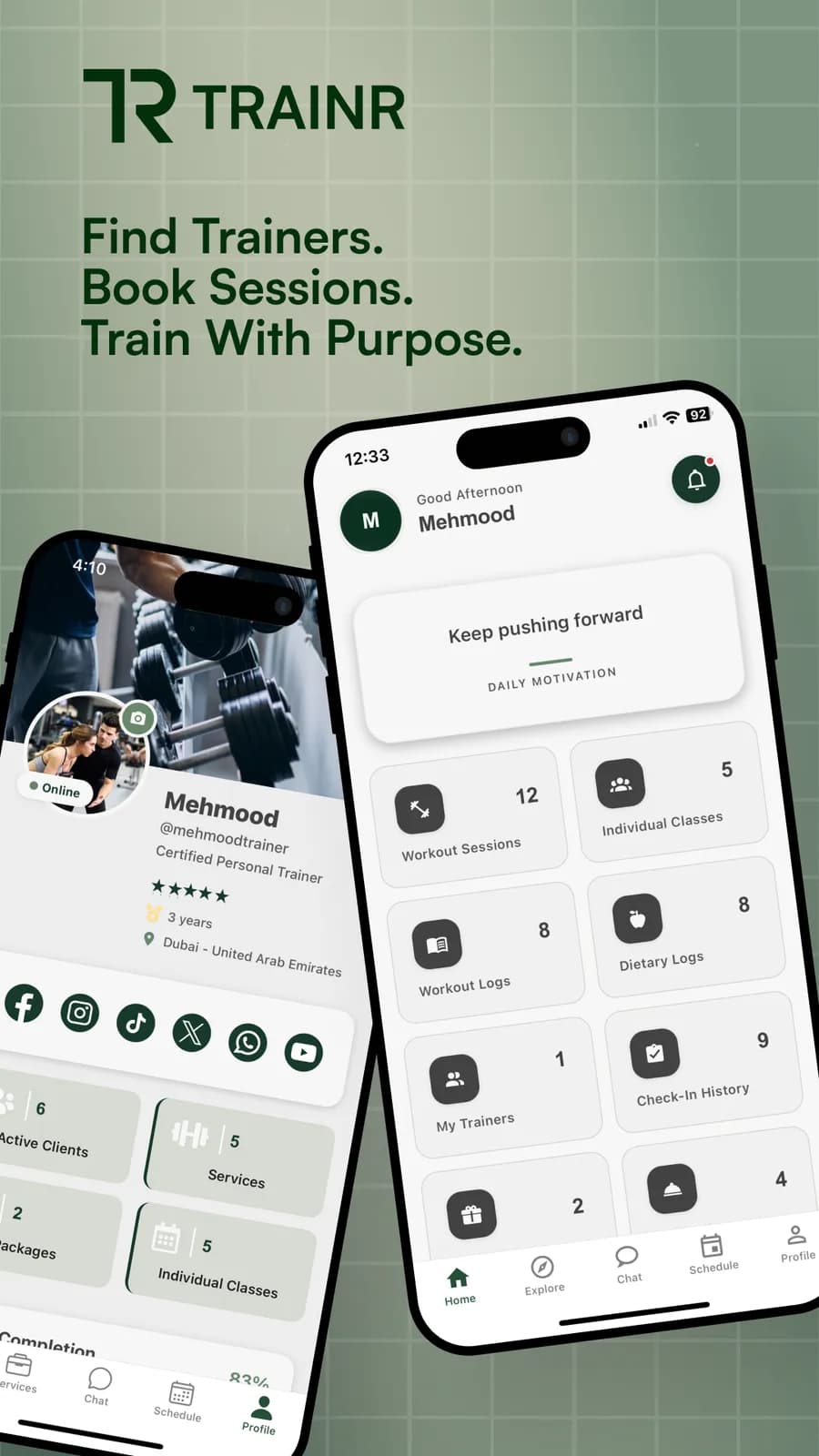
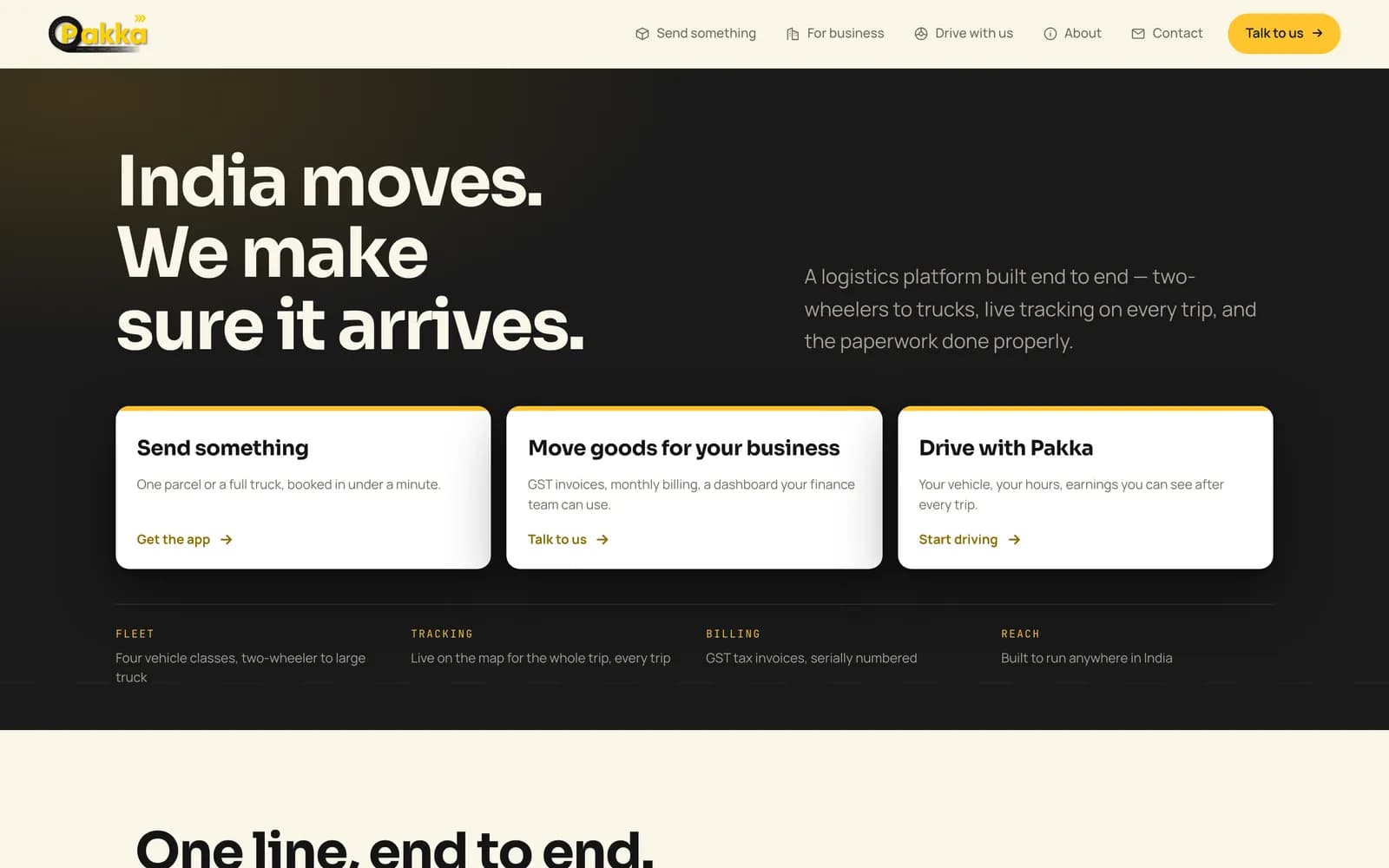
  • Pakka's delivery platform: customer and driver apps with a business portal

    Pakka

    Two apps on Google Play, live tracking, a business portal and a SuperAdmin console on two backends.

  • Trainr's fitness marketplace app: trainer discovery, bookings and programs

    Trainr

    A two-sided marketplace with bookings, card payments, realtime chat, payouts and an operations console.

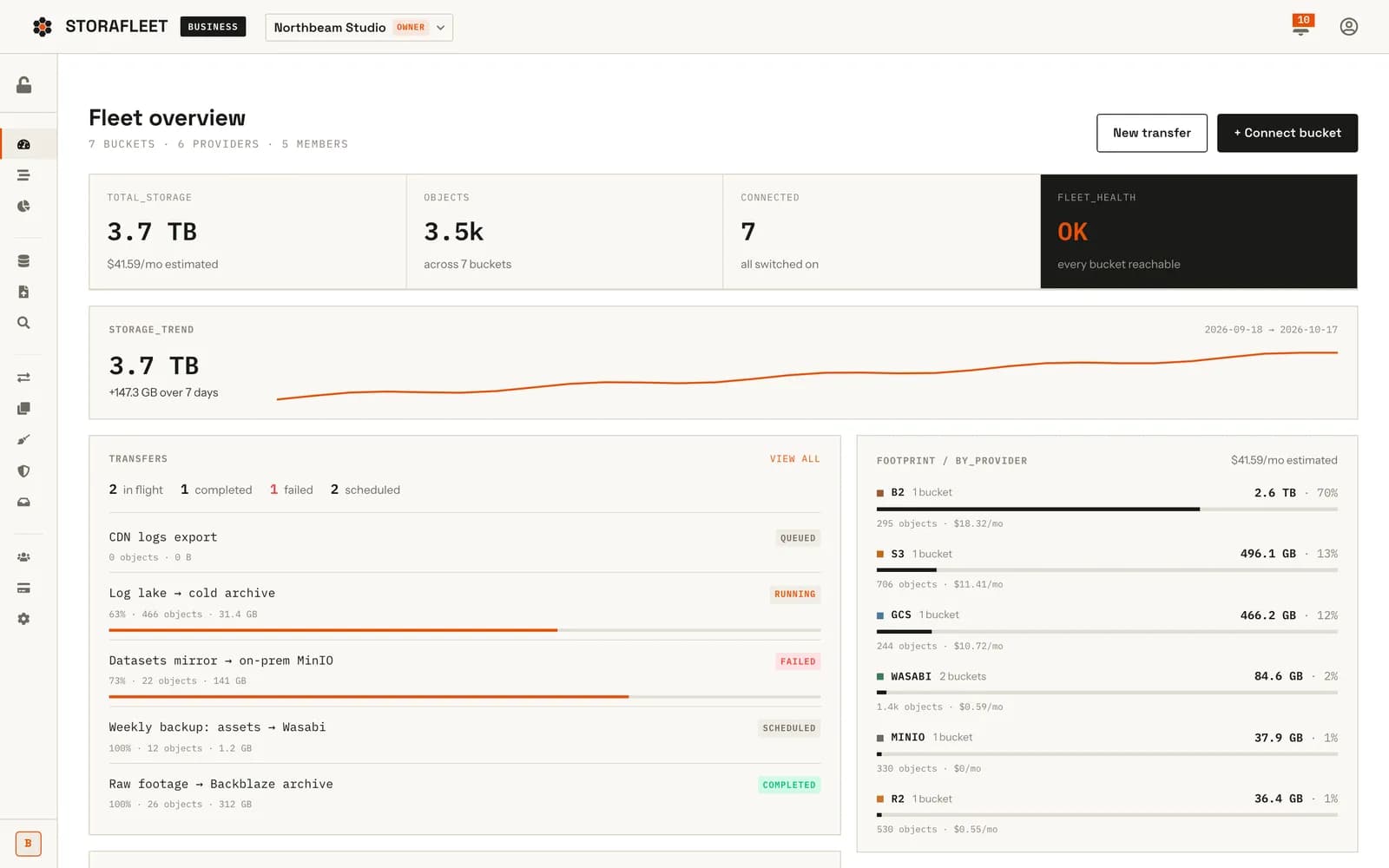
  • Storafleet's fleet overview dashboard

    Storafleet

    A SaaS backend with team workspaces and an operator console, the kind of API a Flutter app plugs straight into.

These are React Native and web projects. The backends, consoles, store work and testing are what we bring to a Flutter app; the Dart code is new work under the same process.

Where a Flutter build sits in Design, Build, Ship

A Flutter app is the Build stage. What comes before and after it decides whether it succeeds, and with one team there is no gap where things fall between agencies.

  1. Design

    Passes on: Flows, screens and design tokens

    Flutter's custom rendering rewards a real design system: the tokens become the app's theme directly.

  2. Build

    Passes on: The app, the API and the admin console

    Milestones you can install, backend and app built together so they never disagree.

  3. Ship

    Passes on: Store listings, signing and the release routine

    Google Play and App Store review, then updates when Android, iOS or Flutter itself moves on.

Questions about Flutter app development

Have you shipped Flutter apps before?

No. Every phone app we have shipped so far is React Native, and we would rather say so than show you work that is not ours. We take on Flutter work for teams that have chosen it or have a Flutter app to extend, and we bring everything around the app that we have shipped many times: backends, admin consoles, store review and release testing.

Should I choose Flutter or React Native for a new app?

If you have no Flutter code and no Dart developers, we recommend React Native, because that is where our shipped record is and it shares skills with React web apps. If you have Flutter code, a Dart team, a heavily custom interface or desktop targets, Flutter is a good choice and we will build it well.

Can you fix a Flutter app that fails Google Play or App Store review?

Usually, yes. Most rejections come from target SDK requirements, missing privacy answers, permission explanations or signing problems rather than the Flutter code itself. We read the rejection, the listing and the build, fix the cause and resubmit.

How do you upgrade an old Flutter app to the current version?

In steps, not one leap, the same way we take over any inherited app. We build it on its current version first, update the Dart SDK constraints and packages in groups, handle null safety and renamed APIs, then the Android Gradle and iOS settings, testing on real phones after each step. Abandoned packages are replaced before they block the upgrade.

Can a Flutter app use our existing backend?

Yes. Flutter talks to any HTTP or realtime API. We read your API first and list what the app will need that it does not offer yet, such as push notification tokens, pagination or file uploads, so there are no surprises mid-build.

Does Flutter work for apps that need payments, maps and notifications?

Yes, through packages for each service. We check before recommending anything that a maintained package exists for every SDK you need. Where one does not, we write a small platform channel to the native SDK and keep it behind a single Dart interface.

Can Flutter screens be added to an existing native Android or iPhone app?

Yes. Flutter can be embedded in an existing native app one screen or one flow at a time, which lets a team move gradually instead of rewriting. It adds build complexity and app size, so we only recommend it when a gradual move is worth that cost, and we plan where the native and Flutter parts meet before starting.

How much code is shared between the Android and iPhone versions of a Flutter app?

Almost all of the interface and business logic. What stays platform-specific is configuration such as signing, permissions text and store settings, plus any native code written for an SDK that has no Flutter package. We keep those platform parts small and documented so a change on one side is not forgotten on the other.

Will we be able to maintain the Flutter app ourselves after handover?

That is the goal. You get a readable codebase with one documented state pattern, separate test and production builds, automated tests, signing set up in your accounts and a written release routine. If you would rather we kept it current, a monthly maintenance plan covers that.

Two ways to start

You have a Flutter app, or Flutter is decided

Tell us what exists and what needs to happen next: a new build, a takeover, an upgrade or a store problem. We read before we quote.

Talk about your Flutter app

You are not sure which framework

A Discovery Sprint ends with your screens, your plan and a written recommendation on Flutter or React Native, with the reasons, before anything is built.

See the Discovery Sprint