Ship · App rescue & takeover

App rescue and takeover: we take over an app another team built, without losing what already works

App rescue and takeover: when another team built your app and left, we audit the code, recover the accounts and keys, stabilise it and take it forward. It starts with five working days of reading the code on read-only access, so you get facts instead of opinions: what is broken, what is risky, and for each part of the app whether to fix it, refactor it or rebuild it. Then we take it over in a planned order, keeping what works and releasing nothing we cannot roll back.

Updated

  • Code & history
  • Store accounts
  • Signing keys
  • Servers
  • Domain & DNS
  • Data
  • Secrets
Everything here should end up in your company's name.
5
working days for the code audit that starts every takeover
27
claims in a client's technical review we checked at file and line
3
verdicts for each part of the app: fix, refactor or rebuild

At a glance

Starts with
A five-day code audit on read-only access; nothing is changed
Stacks
JavaScript and TypeScript: Node.js, React, Next.js, React Native, MongoDB; Flutter apps too
Confidential
We sign your NDA before access; the report goes only to you
Accounts
Moved into your company's name, never ours
Outcome
A verdict per area, a takeover plan and a fixed quote
Not included
A formal penetration test with a certificate; that is a specialist's job
Last verified
4 November 2026

Sounds familiar?

Six situations that bring an app to us, and what is usually behind each

Apps arrive for a takeover in a handful of predictable ways. None of them means the app is worthless; most of the code in most rescued apps is worth keeping. Each situation has a usual cause and a sensible first step.

The developer stopped replying

Usually behind it: A freelancer or agency moved on, often with the only copy of something important: a signing key, a server password, a store account in their name. Until those are back in your hands, every update depends on someone who has left.

First step: List what is in your name today, then audit what is in the code.

Every fix breaks something else

Usually behind it: No automated tests, tightly coupled code and no staging copy, so every change is tried for the first time in production, by your users.

First step: Tests around the paths that break most, before any more fixes.

The stores keep rejecting it

Usually behind it: A permission without a reason, a missing account-deletion flow, payments taken the wrong way, or a reviewer who cannot sign in. Each resubmission costs days of review.

First step: Read the rejection against the rules and the code; fix the cause, not the wording.

We do not have the keys

Usually behind it: The store account, domain, server or code repository belongs to the previous team, not to your company. Whoever holds them can, in practice, switch your product off.

First step: Recover what can be recovered, in your name, before anything else changes.

It is slow and getting slower

Usually behind it: Queries without indexes, everything loaded at once, work done on every request that should run in the background. It gets worse with every new user.

First step: Measure the slow paths on real data before changing a line.

We were quoted a rewrite

Usually behind it: Rewrites are sometimes right and often not. A quote to rebuild everything rarely comes with the reasons for each part, or with what the old code does that nobody wrote down.

First step: A second opinion, area by area, with the evidence written down.

What you need from the old team

The takeover inventory: tick what you already hold

A takeover is only as good as what the previous team hands over. Some items are critical: without them, updates stall or the app cannot be rebuilt. Others save weeks. Tick what your company holds today, in its own name. The list is the same one we hand over when a project leaves us. If you can tick every critical item, a takeover can start with the audit; if not, recovering them is the first job, and it is worth doing whoever ends up maintaining the app. The full version, item by item, is our agency handover checklist.

What to send the previous team, in one message

Please move every code repository, with its full history, into our company's organisation, and transfer ownership of the store, domain, server and third-party accounts that are still in your name. Send the Android upload key and iOS signing material with their passwords through a password manager, the list of environment variable names, your deploy and rollback notes, and the list of known bugs. We will change every password and secret once the handover is done.

Most departing teams are cooperative when the request is specific and complete. If some items never arrive, the audit tells you which ones matter most and what can be rebuilt or reset without them. Words that come up here are explained in our glossary: handover, app signing and secrets management.

The five-day audit

Five working days of reading the code before anyone quotes a fix

Every takeover starts with an audit, because a quote made without reading the code is a guess. Read-only access is enough, nothing is changed, and you get findings with the file and line they come from.

  1. Day 1

    Access and worries

    Read-only access to the repositories, and a short call about what worries you: the crash, the rejection, the slowness, the bill. Your worries decide where we read first. We also try to build and run the app from its source, because whether that works is itself a finding.

  2. Day 2

    Architecture and data

    How the app is put together, how data is modelled and moves, where the business rules live, and what happens at the edges: errors, retries, time zones, money. This is where most expensive problems hide.

  3. Day 3

    Security, dependencies, tests

    Sign-in and permissions, secrets in the code, known vulnerabilities in dependencies, outdated packages, and what the tests actually prove, as opposed to what their names suggest.

  4. Day 4

    Findings, ranked

    Each finding written with its file and line, ranked by severity, with the effort to fix it. A verdict for each area: fix, refactor or rebuild. Anything urgent is flagged to you the same day, not saved for the report.

  5. Day 5

    Walkthrough and quote

    A walkthrough with your team, questions answered, and a fixed quote to fix the app or take the project over. The report is yours to take to any team, and you are under no obligation to hire us for the work.

What one finding in the report looks like

Severity
Critical, high, medium or low, judged by what it can cost you, not by how ugly the code is.
Where
The file and line it comes from, so any engineer can check it without taking our word for it.
What
The problem in one or two plain sentences.
Why it matters
What could happen to users, data or money if it is left alone.
Effort
How long the fix takes, as a range, and whether it needs other fixes first.
Verdict
Fix, refactor or rebuild for the area it sits in.

A standard audit covers one app or one backend of up to about 50,000 lines; an app and its backend together take a little longer. The price and the larger size are on the code audit page. See the code audit. It is a careful code review at the scale of a whole product, with the technical debt priced rather than just named.

Fix, refactor or rebuild

Three verdicts, given part by part, never for the whole app at once

Whole-app verdicts are almost always wrong. A sign-in flow can be fine while the payment code needs rebuilding. So each area gets its own verdict, with the evidence and the effort, and you decide in what order to spend. The doors below are the three options; the table says when each one is right and what it risks.

FixKeep it, correct itRefactorKeep what it does, change howRebuildReplace it, area by area
Choose it whenThe structure is sound and the problems are specific bugsIt works, but every change is slow and riskyThe design cannot do what the product now needs
Typical signsClear code, a few broken paths, missing checksDuplicated logic, giant files, no tests, tangled modulesWrong data model, security built on sand, a dead framework
What happens nextFixes released one by one, each with a testTests first, then the code reshaped behind themA new version built beside the old, data migrated, then switched
Main riskFixing symptoms of a deeper problemChanging behaviour by accidentLosing the hidden rules the old code got right

The areas we give verdicts on

  • Sign-in, accounts and permissions
  • Payments, wallets, refunds and invoices
  • The data model and its migrations
  • Background jobs, schedules and notifications
  • The admin console and staff tools
  • Mobile app screens and navigation
  • Builds, releases and store configuration
  • Servers, secrets and deployment

Effort is given as a range for each area, with what would move it up or down. A range is honest: an estimate for code someone else wrote carries more uncertainty than one for code we wrote, and the report says where that uncertainty lives instead of hiding it in one confident number.

A rebuilt area usually means moving data across, which is planned like any data migration: copied, checked and switched with a way back. When the verdict for most areas is rebuild, the work becomes a build project; see web app development or Flutter app development.

The first 90 days

A typical takeover in three lines: stabilise, settle, improve

After the audit, the takeover runs in a fixed order. New features come last on purpose: a team that ships features on an app it cannot yet rebuild or roll back is gambling with your users. Your plan is written for your app; this is its usual shape. Small apps move through it faster and large ones slower, but the order does not change.

  1. Stabilise Days 1–30

    1. Accounts and keys in your name; old passwords and secrets rotated
    2. The app rebuilt from source by us, so we know we can release it
    3. Monitoring and error alerts switched on
    4. Urgent fixes from the audit released, each with a rollback
  2. Settle Days 31–60

    1. Tests around the riskiest paths: payments, sign-in, data changes
    2. Dependencies brought up to date in planned steps
    3. A runbook written from what we learned
    4. Store and platform deadlines scheduled
  3. Improve Days 61–90

    1. Refactors the audit recommended, behind tests
    2. The first new features
    3. A monthly rhythm agreed, or a handover to your own team

What we need from you during a takeover

  • One decision-maker. Someone who can say yes or no on priorities within a day, so recovered access and urgent fixes are not left waiting.
  • Approvals for access. Store, domain and cloud transfers often need the account owner to click a link or sign a form. Only you can do those.
  • Someone who uses the app. A person from your side who knows how the product is meant to work, to check fixes against real use, not just against the code.
  • Patience in month one. The first month is mostly invisible work: keys, rebuilds, monitoring, tests. It is what makes the visible work afterwards safe.

What we look for in the first weeks, because it hides

Jobs nobody listed
Scheduled tasks on the old server that send reminders, renew subscriptions or clean data. Move the app without them and something quietly stops.
Hard-coded addresses
API addresses, bucket names and callback URLs written into the code or the mobile build, which break the day anything moves.
Test keys in production
Payment or messaging keys from a sandbox left in the live app, so money or messages do not actually go anywhere.
Half-finished migrations
Data changes started but never completed, leaving old and new shapes of the same record side by side.
Expiring things
Certificates, domains, push credentials and store agreements with dates nobody is watching.
Personal accounts
A service signed up on a former developer's email, which will stop the day their card or address changes.
Unpinned dependencies
No lockfile, or one nobody uses, so two builds of the same code install different libraries and behave differently.
Personal data in logs
Phone numbers, emails or tokens written to logs and kept for ever, which is both a security risk and a privacy problem.
Secrets in the repository
Keys committed to the code at some point in its history. Deleting the file is not enough; the key itself has to be changed.

Every week of a takeover you get a short note: what we recovered, what we changed, what we found and what is next. Nothing is changed without a way back, and anything that could interrupt your users is scheduled with you first. Servers come with the takeover too: see deployment and hosting. Tests are written alongside, and a fresh QA pass before the first big release is cheap insurance; automated tests keep it that way.

Evidence, not opinions

How we read someone else's verdict on code, and what we hand over ourselves

We have not published a client takeover yet, so we will not pretend to. What we can show is the work a takeover is made of: reading claims about code against the code, untangling problems nobody could explain, clearing security findings without hiding them, and handing a platform over with nothing lost. Each note links to where the full story is written, so you can check it rather than take our word for it.

  • Review answered

    27 claims, each checked at file and line

    In July 2026 Trainr commissioned a technical review of the marketplace we built. We checked every one of its 27 claims at the exact file and line it cited, answered each with a verdict and a time to close, and dismissed none without a code-level check. We also reported a problem the review had missed.

    Trainr case study
  • Features, not defects

    Telling the two apart

    Two of the review's items were new features rather than defects: push notifications and UAE VAT. For VAT we listed the decisions the business had to make first, rather than guessing at tax rules in code. Separating defects from wishes is half of any takeover: it decides what is fixed now and what is planned as new work.

    Trainr case study
  • Mystery solved

    An upload error that was not what it seemed

    Trainr's iPhone uploads had failed since 25 May 2026 with what looked like a permissions problem. Reading the app record through the App Store Connect API showed a renamed identifier. Reverting it fixed the uploads. The lesson for takeovers: read the system of record before trusting an error message.

    Store launch service
  • Nothing suppressed

    38 security findings to zero

    On a backend we maintained, every dependency finding was closed by an upgrade, a replacement or removing an unused package, with the integration tests kept passing.

    Maintenance and support
  • Rejection reversed

    A store rejection fixed at its cause

    When Google rejected Pakka's driver app because the reviewer was locked out by a one-time-code limit, the fix was on the server, not in the app. The same bundle was resubmitted the next day, and the app is live on Google Play.

    Store launch service
  • Handed over

    The inventory, from the other side

    On 13 August 2026 we handed Trainr to the client's own developer: accounts, signing material, deploy and rollback runbooks, environment templates for all four repositories, and a full export of the media bucket.

    Agency handover checklist
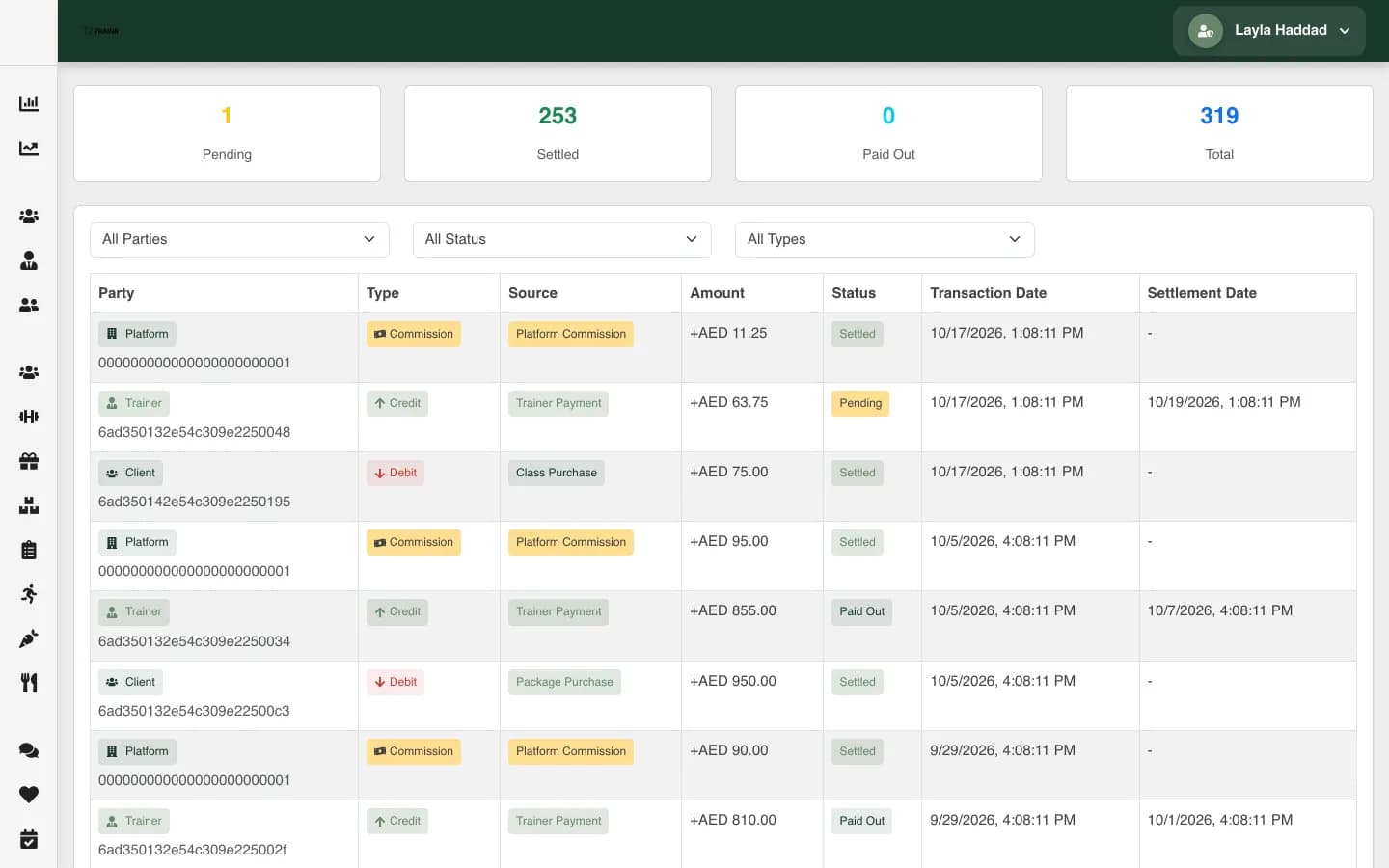
Trainr console unified ledger with summary counters and transaction rows
Trainr's operations console, handed over with a written record
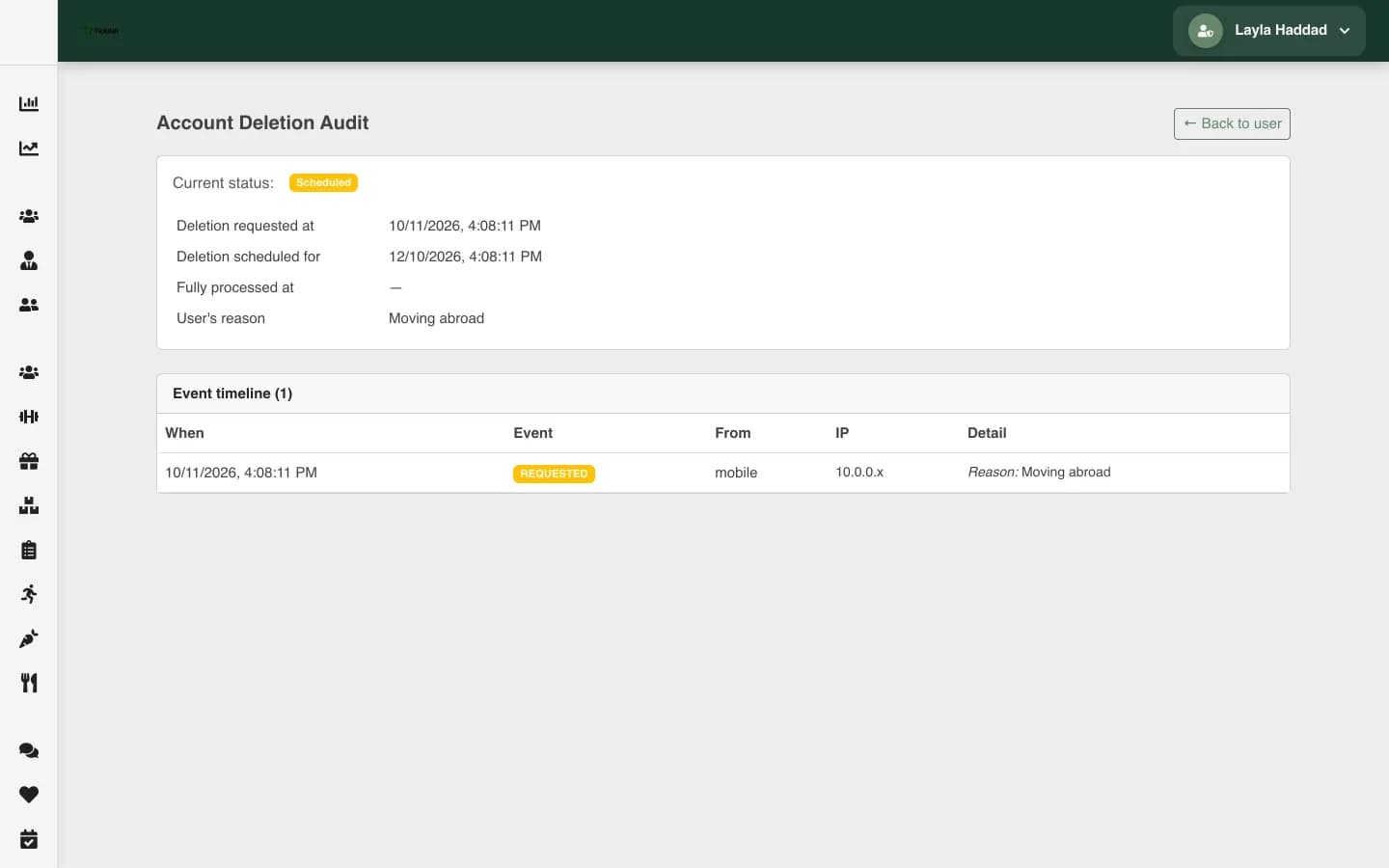
Trainr console account deletion audit page with a grace window and an event timeline
An audit trail screen from the same console

After the takeover

Three ways forward once the app is stable, and you choose

A takeover ends with a stable app, a runbook and a choice. None of the three is the default; the right one depends on how much the product needs to change and who you want changing it. Whichever you pick, the accounts, keys and documents stay in your company's name, so the choice can change later without another rescue.

  1. Monthly maintenance

    The app keeps working, stays accepted by the stores and gets small improvements every month, from the engineers who now know it. Platform deadlines are planned months ahead, and you get a report every month.

    Maintenance and support
  2. Build what is next

    Larger features, or the areas the audit marked for rebuilding, planned and built as proper projects with designs first. The takeover's tests and runbook mean the new work starts on solid ground.

    Mobile app development
  3. Hand it to your team

    If you are hiring your own developers, we hand the app over the way we would want to receive it: accounts, keys, runbooks and a written record of what is open, with time set aside for their questions.

    Agency handover checklist

Signs a takeover is going well

  • Every account and key is in your company's name, and the old passwords no longer work.
  • A release can be built from source and rolled back by someone other than the person who built it.
  • Alerts tell you about problems before your users do.
  • Each week you know what changed, and nothing changed that you did not hear about.
  • The list of known risks is getting shorter, not longer.

Questions about taking over an app

  1. How do you take over an app from another developer?

    In a fixed order. First a five-day audit on read-only access, so both sides know what is being taken over. Then accounts and keys moved into your company's name and old secrets rotated, then the app rebuilt from source by us so we know we can release it, then monitoring, then urgent fixes. Only after that do refactors and new features start. You get a short written note every week, so you can see what was recovered and changed, and nothing goes live without a way back.

  2. What if the previous developer will not hand over the code?

    Start with what is already in your company's name: store accounts, domain, servers. Our agency handover checklist lists the rest. A compiled app from the store is not source code, so code that only exists on someone else's machine cannot be recovered by us. Who must hand over what is usually set by your contract, which is a question for a lawyer; we will tell you exactly what we need and why, so that conversation is short.

  3. Should we fix our app or rebuild it from scratch?

    Usually neither for the whole app. Most rescued apps have parts worth keeping and parts that are not, so we give a verdict per area: fix, refactor or rebuild, each with its effort and its risk. Rebuilding everything throws away the business rules the old code got right, which are often the hardest part to rediscover. When a rebuild is right, we rebuild one area at a time beside the old one, so the product keeps working while it changes underneath.

  4. Can you rescue an app that keeps failing store review?

    Yes. Repeated rejections usually come from a few causes: permissions without a stated reason, a missing account-deletion flow, payments taken through the wrong system, or a reviewer who cannot sign in. We read the rejections against the store rules and the code, fix the causes and resubmit with a clear note. If the store accounts are not in your name yet, moving them comes first, because a resubmission from the wrong account only delays the real fix.

  5. Which technologies can you take over?

    JavaScript and TypeScript codebases: Node.js and Express backends, React and Next.js web apps, React Native mobile apps and MongoDB data, plus Flutter apps. If your app is built on something else, we say so before the audit rather than learn on your product.

  6. How soon after a takeover can you release the first fix?

    Once we can rebuild and release the app from source ourselves, which is the first job after the audit. Until then, any release is a gamble on build steps nobody has written down. Urgent fixes found by the audit go out first, each with a way back. If something is actively harming users, such as a failing payment, we can usually contain it on the server side while the full release path is being rebuilt.

  7. Will you tell us whether our previous developer did a bad job?

    We tell you what the code says: what works, what is risky and what it costs to fix. We do not write reports about people. Most problems in rescued apps (the technical debt) come from deadlines, changing requirements and missing tests, not from bad intentions, and blame does not make the app any better. If you are in a dispute with the previous team, the report is factual and dated, which is usually more useful to you than an opinion would be.

  8. Can you take over only the backend, or only the mobile app?

    Yes. Many takeovers are partial: a backend whose developer left while an in-house team keeps the app, or the reverse. The audit then covers the part we take over and the points where it meets the rest, because most takeover surprises live at those boundaries. We agree with your team who owns each side of the API, so a change on one side never breaks the other unannounced.

Send us what you have, even if it is not much

A link to the app, the repositories if you hold them, what the previous team left and what worries you most. An engineer replies with the first step, which is often a list of what to collect before anything else.

Want to see how we work first? Read how a project runs or browse what we have built.