Ship · QA & testing

QA and app testing services: find what breaks before your users do

We test Android and iPhone apps, web apps and the APIs behind them the way your users will meet them: every role, every screen, on real phones and browsers, against a safe copy of your product. You get a ranked defect list with steps to reproduce each problem, API checks route by route, automated tests for the parts that must never break again, and a plain release verdict: ship, ship with known issues, or hold.

Testing is the part of a project most teams compress when the deadline moves. It is also the part that decides whether launch week is spent on the next feature or on apologising. We run QA as its own piece of work with its own plan and its own sign-off, whether we built the product or another team did.

Updated

  • CustomerSign up with email, verify, land on homepass
  • CustomerPay for an order, then lose network mid-paymentlogged
  • DriverAccept a job with location permission deniedpass
  • AdminRefund half an order and read the ledgerpass
  • APICall an admin route with a customer tokenpass
  • CustomerRotate the phone on the checkout screenlogged
  • VendorUpload a 40 MB image on a slow connectionpass
An example run: each check is one role doing one thing. Passes are recorded; anything else becomes a finding in the defect register.

When you need this

Which situation sounds like yours?

QA is not one job. A product two weeks from launch needs something different from a live app whose releases keep breaking old features. Pick the closest line and you will see what we would test first.

Launching soon, with no test plan

A full pass before the stores and your first users see it

The build is feature-complete and the team has been testing their own work, which means the happy paths work and nobody has tried the unhappy ones. We write the plan from the product itself, walk every role end to end and focus on the places launch weeks go wrong: sign-up, payments, permissions, notifications and the admin tools your team will need on day one.

What we look at first

  1. Sign-up and sign-in for every role
  2. Payments, refunds and what the ledger says afterwards
  3. Permission prompts and denied permissions
  4. Store-review paths: account deletion, privacy answers, demo access

First step: Send us a test build or staging link and a list of the roles in the product.

Send it to us

Users report bugs nobody can reproduce

Turn vague reports into steps anyone can follow

"It just stopped working" usually means a specific device, a specific network or a specific order of taps. We collect the reports, group them, reproduce each one on the device class it came from and write the exact steps, the expected result and what actually happened, so a developer can fix it in an afternoon instead of guessing for a week.

What we look at first

  1. Group reports by screen and device class
  2. Reproduce on the same OS version and network conditions
  3. Check error monitoring and logs for the same moments
  4. Write steps a developer can follow cold

First step: Send us five recent user complaints, word for word.

Send it to us

Another team built it and we don't trust it

Find out what really works before you build on top of it

When a product changes hands, the new owner usually knows what it is supposed to do, not what it does. We test it as a user would, then read the code behind anything that fails, so every finding comes with the place to look first. If the code itself is the worry, the fixed-price code audit goes further.

What we look at first

  1. A full role-by-role walkthrough against the product's own claims
  2. API routes checked for missing permission checks
  3. Money and data flows checked end to end
  4. A findings list ranked by who it hurts

First step: Send us the build, an admin login for a test account and the list of features you were promised.

Send it to us

Every release breaks something old

Automated checks on the paths that keep breaking

If fixing one screen breaks another, the product is missing a safety net, not a tester. We find the paths that matter most and keep breaking, write automated tests for them at the API and browser level, and wire them into the build so a change that breaks them cannot be merged without someone noticing.

What we look at first

  1. List the last ten regressions and the code they touched
  2. API tests for money, permissions and data rules
  3. Browser tests for the two or three journeys that pay the bills
  4. Tests run on every change, before merge

First step: Send us your last few release notes and the bugs that followed them.

Send it to us

The app keeps failing store review

Test against the reviewer's checklist, not just yours

Apple and Google reviewers follow their own scripts: they sign in with the demo account you gave them, look for account deletion, read your privacy answers and tap through the purchase screens. We run the same script before you submit, so a rejection becomes a fix you made last week instead of a four-day round trip.

What we look at first

  1. Demo account access and the reviewer notes
  2. Account deletion, in the app and on the web
  3. Privacy and data-safety answers against what the app really collects
  4. In-app purchase and subscription screens

First step: Send us the last rejection message and the build that received it.

Send it to us

A big release, and a small team

Extra hands for the release that can't go wrong

A redesign, a new payment flow or a move to a new backend touches everything at once, and a small team cannot test everything it changed while it is still changing it. We test alongside your developers during the release window: new features as they land, the old journeys around them, and a final pass on the release build before it goes out in stages.

What we look at first

  1. What changed, from the release notes and the code
  2. Old journeys that share screens or data with the new ones
  3. Data created before the release, opened after it
  4. A staged rollout plan with a way back

First step: Send us the release plan and the date it has to ship.

Send it to us

What you get

The test pack: seven things you keep

Everything we produce is written for the people who will act on it: the developer fixing the bug, the founder deciding whether to launch and whoever tests the next release. Nothing lives only in our heads or only in a tool you cannot open.

  1. Test plan

    What we will test, on what, and what "done" means

    Written from the product, not from a template: the roles, the journeys each role depends on, the devices and browsers that matter for your users, the test data we need and the order we will work in. You approve it before testing starts, so nobody is surprised by what was left out.

  2. Role-by-role walkthrough

    Every screen, as every kind of user

    A customer, a vendor, a driver, an admin and a support agent see different products. We walk each one end to end with realistic data, capture the screens as we go and note anything confusing, slow or broken, even if it is not strictly a bug.

  3. Defect register

    Ranked, reproducible, with a place to look first

    Each finding has a number, what showed, how to reproduce it, what should have happened, the device and build, a severity and, where we have the code, the file or component to look at first. The list is ordered by who it hurts and how often, not by when we found it.

  4. API checks

    Route by route, including the ones the app never calls

    We call the backend directly: wrong tokens, missing fields, someone else's IDs, the same request twice. Most serious problems in apps live here, because the app's screens hide them. The output is a table of routes with what we sent, what came back and what it should have been.

  5. Device and browser matrix

    What was tested where

    A grid of the OS versions, screen sizes and browsers we covered, chosen from your audience rather than from a list of every phone ever made, with the result for each journey. It is the answer when someone asks whether you tested on an older Android phone.

  6. Regression suite

    Automated tests that stay with the code

    For the paths that must never break again, we write automated tests: API tests with Jest and Supertest for Node backends, browser tests with Playwright for web journeys. They live in your repository and run on every change, so the next developer inherits the safety net.

  7. Release verdict

    Ship, ship with known issues, or hold

    A one-page decision with the reasons: what is fixed, what is still open, what each open item means for a real user and whether it should block the release. You make the call. We make sure it is an informed one.

How we run it

How a QA engagement runs, step by step

The same seven steps whether the product has twelve screens or two hundred. The difference is how long each step takes, not whether it happens.

  1. Map the product

    We list every role, every journey and every outside service the product talks to: payments, maps, mail, push notifications, storage. We take this from the product and its admin console, and from the code where we have it, because written specs are usually a version behind.

    Output Role and journey map

  2. Build a safe copy to test on

    Testing never touches your real users or real money. We run the product against a fresh database seeded with realistic demo data, send outgoing email to a sink nobody receives, use the payment provider's test mode or a mock, and leave live keys blank. When we run the products in our own case studies this way, the logs confirm that no mail left and no payment gateway was called.

    Output A test environment you can reuse

  3. Walk every feature, as every role

    Screen by screen, with the screens captured as we go. In our own feature-by-feature runs that has meant 55 screens for Temphera, 42 for EverybodysPet and 41 for LetSlic. We try the paths users actually take: going back mid-flow, losing network, denying a permission, switching apps during payment, using a tiny phone and a large one.

    Output Annotated walkthrough with screens

  4. Hit the API directly

    We call each route with the wrong user's token, with someone else's record IDs, with missing and oversized fields, and twice in a row. This is where permission holes, double charges and data leaks hide, because the app's screens never send those requests.

    Output Route-by-route results table

  5. Rank what we found

    Severity comes from who it hits and how often. A broken first screen after sign-up outranks a clipped label on a settings page, however ugly the label is. Anything that touches money, personal data or account access goes to the top, whatever else is on the list.

    Output Defect register in priority order

  6. Write it so it can be fixed

    Steps to reproduce, the expected result, the actual result, the build and device, and where we have the code, the file or component to look at first. We write findings for the developer who will open them on a Monday morning without us in the room.

    Output Findings a developer can act on cold

  7. Retest, then lock it in

    When fixes land, we retest each one on the device where it failed and run the journeys around it, because fixes break neighbours. The paths that matter most then get automated tests that run before every merge, so the same bug cannot quietly come back.

    Output Retest log and regression suite

What a finding looks like

Anatomy of a defect report

A finding that says "checkout is broken" costs a developer a day. One written like this costs them an hour. This is the format every finding follows; the example is illustrative, not taken from a client project.

D-07Format example

Coupon discount applied twice after going back

High

It costs money on every order where it happens

What showed
A 10% coupon is applied, the customer goes back to the cart and returns to checkout, and the total now shows 20% off.
Steps
1. Add two items. 2. Apply a 10% coupon. 3. Tap back to the cart. 4. Tap checkout again. 5. Read the total.
Expected
One 10% discount, however many times checkout is opened.
Where to look first
The checkout screen recalculates from the already-discounted total instead of the cart subtotal. The server accepts the client's total without recalculating it.
Seen on
Android 14 and iOS 18, test build 1.4.2. Reproduced 5 of 5 times.
  • One finding, one problem

    Two bugs in one ticket get half-fixed. We split them.

  • Severity is about people

    Who it hits and how often, not how much it annoyed the tester.

  • Where to look first

    A starting point for the developer, not an accusation. We say when it is a guess.

  • Evidence attached

    Screens or a short recording, the exact build and the device.

Where bugs hide

Nine places we always test, because screens hide them

Most of a product's risk sits where nobody looks during a demo: in the background, on the server, or in the second week of use. We test these on purpose, however small the product.

  • Money

    Prices, discounts, taxes, refunds, partial refunds, payouts and the ledger that records them. We buy, cancel, refund and retry, then check that the totals on the receipt, in the admin console and in the payment provider's dashboard agree to the last paisa or cent. Rounding and double-submits are the usual suspects.

  • Permissions

    Who can see and change which records. We sign in as each role and try to open, edit and delete things that belong to someone else, through the screens and directly through the API. A hidden button is not a permission check; the server has to say no.

  • Notifications and background jobs

    Push notifications, emails, reminders, scheduled reports and anything that runs at night. We check that each one fires once, at the right time, in the right time zone, to the right person, and that turning a notification off really turns it off.

  • Interrupted journeys

    Real users get phone calls mid-payment, lose signal in a lift, switch apps to copy an OTP and press back at the worst moment. We interrupt every important journey on purpose and check that the product recovers without double charges, lost drafts or stuck screens.

  • Data over time

    A screen that looks fine with three items breaks with three hundred. We test with a heavy account as well as an empty one: long lists, long names, old records, many photos and a year of history, because that is what the product looks like after its first good month.

  • Dates and time zones

    Bookings, deadlines, reminders and reports all depend on dates, and dates break at boundaries: midnight, month end, daylight-saving changes and users in another country. We change the device's time zone and clock, book across midnight and run reports for the last day of the month.

  • Uploads and media

    Photos from a phone camera, large PDFs, unusual file types, a slow connection and an upload cancelled halfway. We check what the user sees, what is stored, whether images are resized and rotated correctly, and whether a failed upload can be retried without creating duplicates.

  • Search, filters and sorting

    Search that ignores a typo, a filter that forgets itself when you go back, sorting that breaks on the second page. We test with real-looking data, odd characters and empty results, and check that what the list says matches what the detail screen shows.

  • Account deletion and privacy

    Store reviewers and privacy laws both expect users to be able to leave cleanly. We delete accounts and check what really happens to the data, check that exports contain what they should, and compare the privacy answers in the store listings with what the app actually collects.

Risk meters show where we most often find serious problems; they are our judgement, not a survey.

Decisions you will face

What should be tested by hand, and what should be automated?

Teams usually get this backwards: they automate the screens, which change every week, and test the money rules by hand, which never change and must never break. Our default split:

Tested by hand

Where judgement, real devices and fresh eyes matter

  • New features, before their design settles
  • Layout, text and visual polish on small and large screens
  • Device behaviour: permissions, background, camera, notifications
  • Store-review paths, which reviewers walk by hand too
  • Anything a user would describe as confusing rather than broken

Automated

Where the rule is stable and a break is expensive

  • Money: prices, discounts, refunds, payouts, ledgers
  • Permissions: who can read and change which records
  • API contracts the apps depend on
  • The two or three journeys that pay the bills
  • Every bug that has already come back once

How we choose devices

Not every phone ever made. We start from who your users are and add the edge cases that break apps most often.

AreaWhat we coverWhy
AndroidA recent flagship, a mid-range phone two years old and the oldest OS version you supportMost Android crashes come from older OS versions and low-memory phones
iPhoneThe current iOS and the previous one, on a small and a large screenLayout problems show up on the smallest supported screen first
WebChrome, Safari and Firefox on desktop, and Safari and Chrome on phonesSafari on iPhone is where web apps most often behave differently
NetworkFast Wi-Fi, a throttled mobile connection and a drop mid-requestPayment and upload flows fail on slow or broken connections, not fast ones
AccountsA brand-new user, a heavy user with lots of data and a user with nothing set upEmpty states and long lists are where screens break

Release controls

Testing doesn't stop at launch

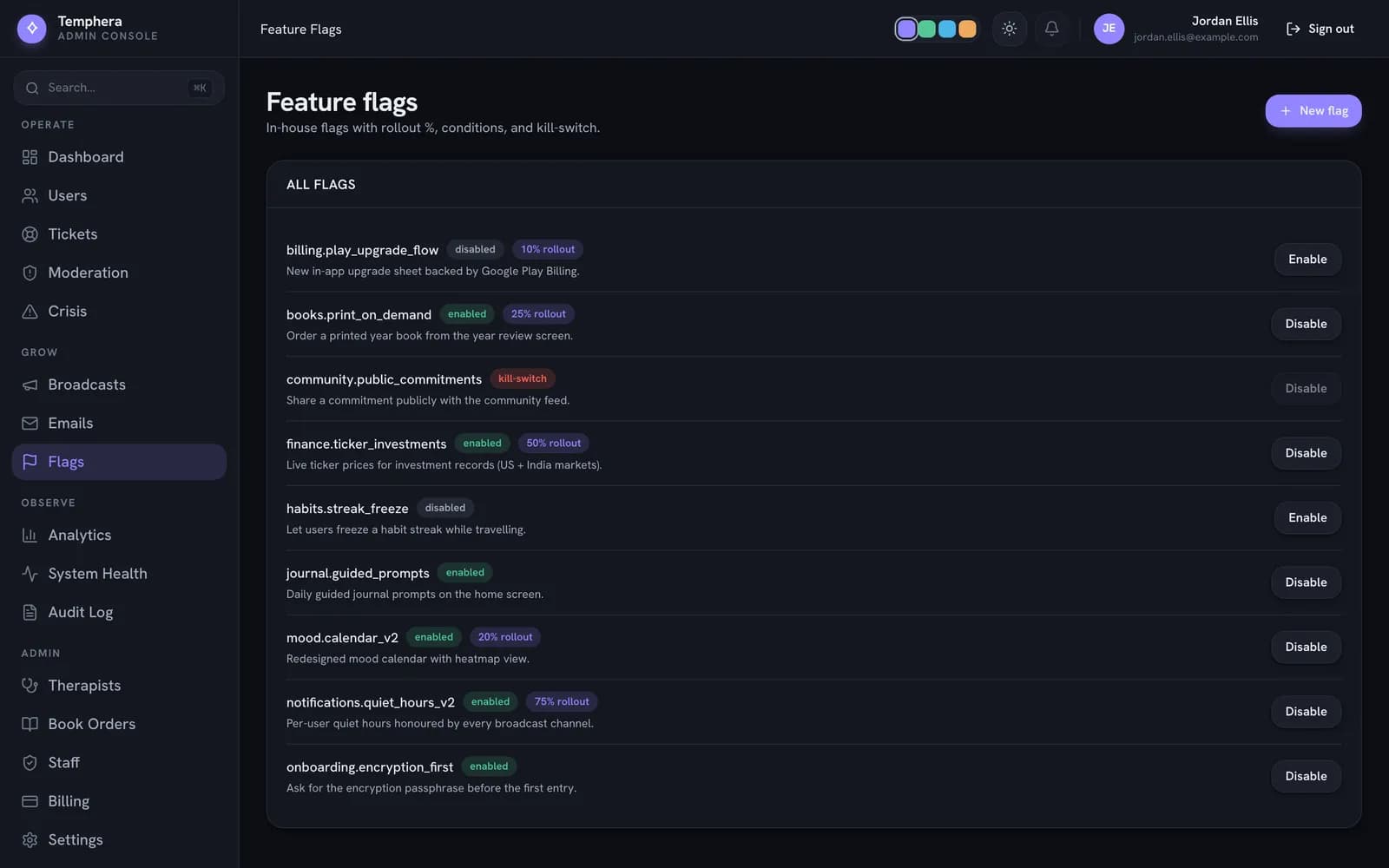
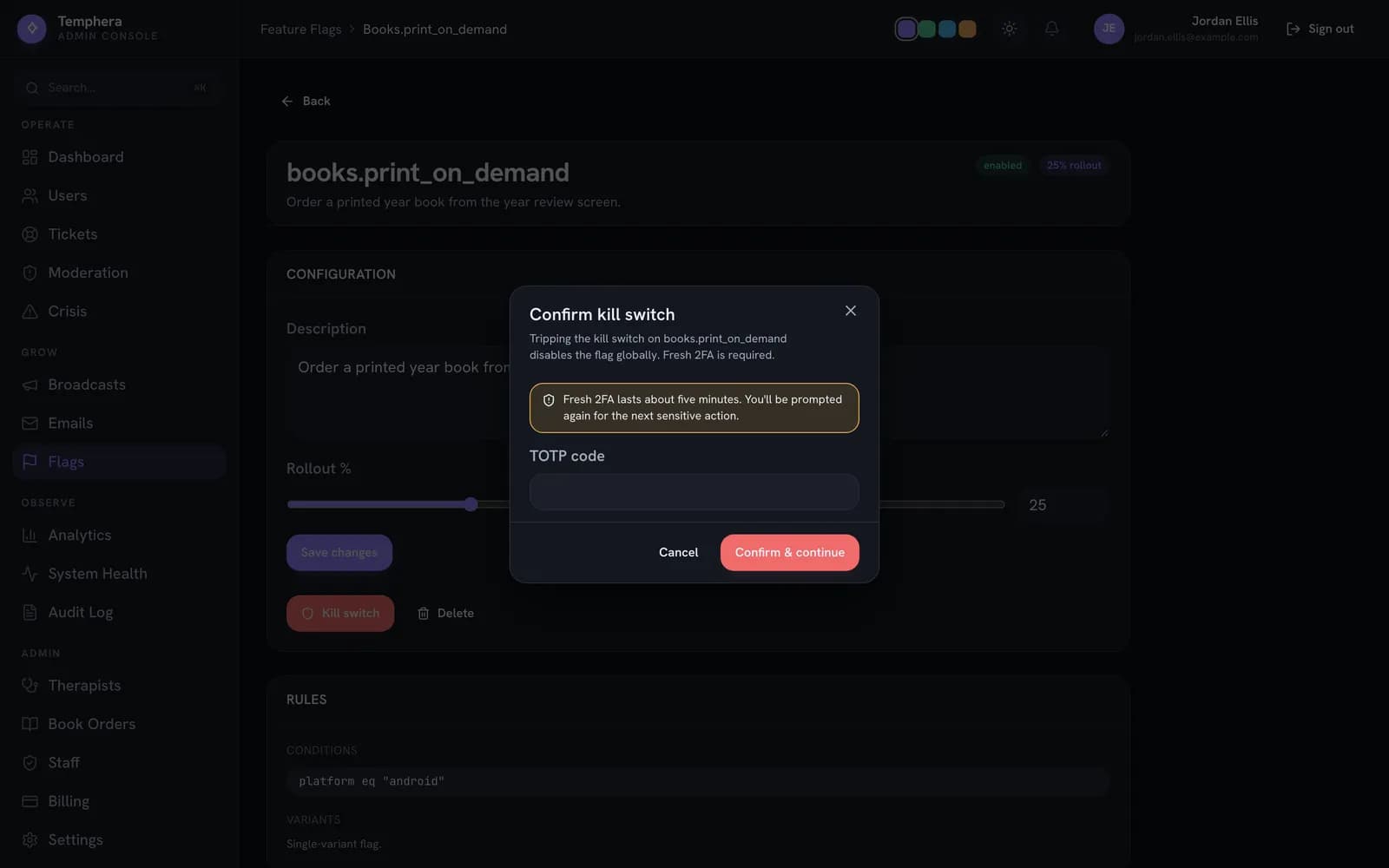
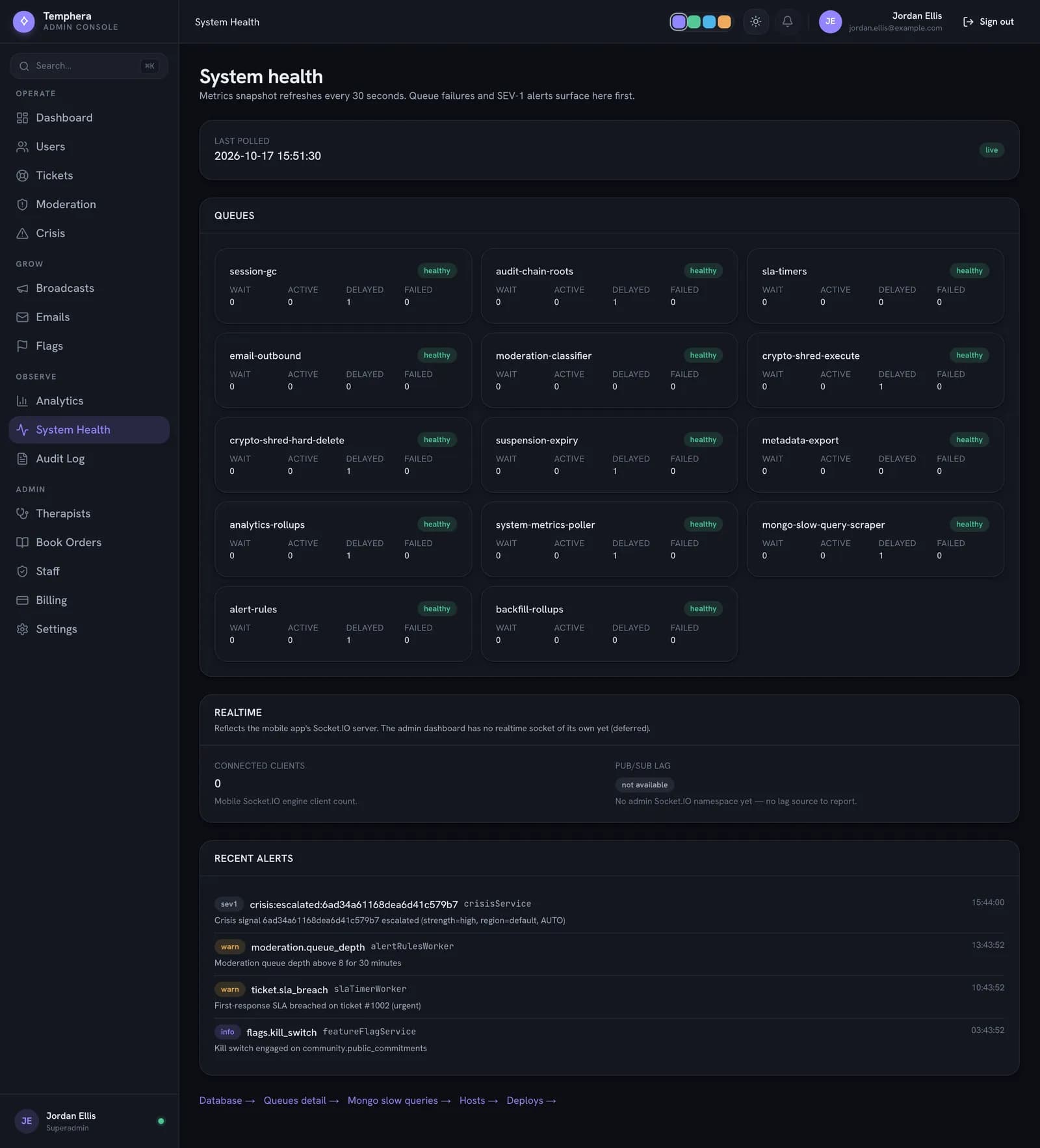
Some problems only appear with real users and real data. The products we build carry controls that let a team release gradually, switch a broken feature off in seconds and see trouble before users report it. QA tests these controls too.

Temphera system health page with a card for each background queue
Queue depth and failures for every background worker, refreshed every 30 seconds.
Temphera admin console feature-flag list with enabled and disabled flags, rollout percentages and a kill-switch badge
Temphera: in-house feature flags with rollout percentages, so a new feature reaches 10% of users before everyone.
Temphera kill switch confirmation dialog on a feature flag
Tripping a kill switch turns a feature off for everyone and asks for a fresh two-factor code first.

Demo data from a local run of Temphera's admin console. Read the Temphera case study

Checks on the release build itself

Some things can only be checked on the finished build, not in the code. When we took Trainr's Android app to production with live payments, these were part of the release:

  • Key shape check

    Every key's format was checked before the build. One check caught a payment secret key pasted into a field that ships inside the app, where anyone could have read it.

  • Native libraries

    The bundle was limited to the two processor architectures real phones use, and the limit was checked on the built file, not just in the config.

  • Release logging

    540 console calls were stripped from the release build, while errors and warnings still reach error monitoring.

  • Readable crashes

    Source maps were uploaded with each release, so a crash report points at a real line of code instead of minified noise.

Read the Trainr case study

Where QA sits

Between Build and launch, and again with every release

QA is a stage of its own in Ship, but it touches both sides. It reads what Build produced, and it feeds the store launch, hosting and monthly maintenance that follow.

  1. From Build

    A feature-complete build, the roles and the admin access. If we built it, the tests we wrote during the build come with it.

  2. QA & testing

    Plan, walkthrough, API checks, defect register, retests, regression suite and the release verdict.

  3. Into Ship

    A release you can submit with confidence, then the same checks run on every monthly update.

Questions about QA and app testing

Can you test an app that another company built?

Yes. We need a test build or staging link, test accounts for each role and, ideally, read access to the code. Without the code we still test everything a user and an API caller can reach; with it, every finding also points to where the developer should look first.

Do you test on real phones or only on emulators?

Both. Emulators are fast for walking every screen and capturing it. Real phones are where permissions, notifications, the camera, background behaviour and slow networks show their true behaviour, so every journey that matters is confirmed on a real device before we call it a pass.

Will testing touch our live users or real payments?

No. We test against a separate copy, a staging environment: a fresh database with demo data, payment providers in test mode, outgoing email sent to a sink, and live keys left out. If you want a final check on production, we agree exactly which read-only checks are run, and when, before anything happens.

What do you need from us to start a QA engagement?

A build or a staging link, a test account for each role, a short list of what the product is supposed to do and who uses it, and a person who can answer questions within a day. The product itself does most of the explaining.

Do you write automated tests, or only test by hand?

Both. We test new features and anything visual by hand, and write automated tests for stable, expensive rules: money, permissions and the API contracts the apps rely on. For Node backends that means Jest and Supertest; for web journeys, Playwright. The tests are committed to your repository and run on every change.

How do you decide how serious a bug is?

By who it hits and how often. Anything that touches money, personal data or account access goes to the top. After that, a problem every new user meets outranks one a single admin meets once a month. Each finding states its severity and the reason for it, so you can disagree with the ranking and know exactly why we chose it.

How long does a full QA pass take?

It depends on the number of roles and journeys more than on the number of screens. A small app with one or two roles usually takes a few days for the first full pass; a marketplace with customers, vendors, drivers and an admin console takes a couple of weeks. The test plan states the estimate before testing starts, and retests after fixes are much quicker than the first pass.

Can QA be part of a monthly maintenance plan?

Yes. On a maintenance plan, each release gets a QA pass on the journeys it touches, plus the automated suite. A sensible path is one full QA engagement first, then this lighter, regular rhythm once the regression tests exist.

Send us a build. We'll tell you what breaks.

A test build or staging link, the roles in the product and what worries you most. We reply with a test plan and how long the first pass will take.