
Build · Business software
Custom business software and ERP development, built around how your team already works
CountryDevs designs and builds custom business software: ERPs, quotation-to-production systems, job and project trackers, and the phone apps your field staff use with them. We start by mapping how work really moves through your company, role by role, then specify every screen, let your team click through a prototype of their own working day, and build the system in slices that each work end to end.
It is for companies whose work no longer fits in spreadsheets, chat groups and a generic ERP that the team works around instead of with: fabricators and manufacturers, contractors, training institutes, pharmacies, and freight and customs firms.
Updated
Has your business outgrown its spreadsheets?
Custom software is a real investment, and not every business needs it. Tick what is true for you today. The more of these you recognise, the more of your team's time is going into keeping the tools in step rather than doing the work.
Each of these signs has a cost that rarely shows up in a report. Retyping the same numbers takes hours a week and creates the mismatches that then take more hours to chase. A job whose status lives in one person's head stops when that person is on leave. Copied quotations carry last month's rates. And a margin that the wrong people can see is a commercial risk long before it is a software problem. A good system removes the retyping and the guesswork, and shows each person exactly what they need. If you tick only one or two, a tidy spreadsheet or an existing tool may well be the cheaper fix, and we will tell you that plainly.
0 of 8 sound familiar
0–2 ticked
You may not need custom software yet
A well-set-up spreadsheet, a standard accounting package or an off-the-shelf tool may carry you further. Tell us what hurts and we will say honestly if a build is worth it.
3–5 ticked
One workflow is ready for a system
Pick the loop that costs you most, often quote to order or purchase to stock, and build that first. A small, complete system beats a big plan that never ships, and what you learn from the first loop makes the second one cheaper.
6–8 ticked
The business has outgrown its tools
Start with a mapping and specification phase across all roles, then build in slices. This is the situation every system on this page started from: several teams, one job passing between them, and no single place that showed where it stood.
How we build custom business software, from the first walk-through to working slices
Most failed ERP projects fail before the first line of code, when the system is designed around a feature list instead of how the business really runs. Our method spends its effort early, where changing your mind is cheap, and then builds in small pieces you can use. Each step ends with something you can check.
Walk the work, not the org chart
We sit with the people who do the work and follow one real job from the first enquiry to the final bill: who touches it, what they type, what they print, what they wait for and where it stalls. For a fire-protection contractor that meant tracing a project through design and costing, the client's purchase order, buying, deliveries to stores and site, installation and a joint measurement before billing. The output is an operational flow and a storyboard you can check line by line.
The usual mistake: Skipping this and starting from a feature list. The list says "inventory module"; the walk-through finds that stock is received at the gate, held in stores and measured again on site, three different numbers a system must keep apart.
You see: An operational flow of your business, on one page
Name every role and what it may see
Each person gets a role, and each role gets a precise list of what it can see, change and approve. This is where commercial rules live: management sees margin, procurement and stores never do; sales releases a work order only after the engineer, the in-charge and the managing director have each approved the quotation. Writing this down early is what stops a system from leaking numbers later.
The usual mistake: Leaving permissions to the end, when the screens already show everything to everyone and hiding a number means rebuilding the screen.
You see: A roles and permissions table you sign off
Model the data the way the business thinks
The data model decides whether a system fits or fights you. A fabricated product is not a price-list item, so we modelled one client's products as spec sheets made of reusable parts, with cost falling out of the parts. A project line that is bought from two vendors, arrives short and measures longer on site needs quantities derived from recorded events, never typed in. Money is stored in whole paise, so totals never drift.
The usual mistake: Treating every product as a priced SKU and stock as one average rate. It looks simple, and it gets costing, buying and margins wrong for any business that makes things or buys the same part at different prices.
You see: A data model explained in your words, not ours
Specify every screen with a stable ID
Before anything is drawn, every screen is written down: layout, fields, states and who can open it, each with an ID such as FN-03 for the third finance screen. The same ID follows the screen into design, code and tests, so a question about "the stores receipt screen" has one answer. For an aviation academy that was 135 screens across 17 roles, specified before a single board was designed.
The usual mistake: Designing screens before they are specified. The boards look finished, and nobody notices the missing empty state, the error message or the screen the auditor needs until the code is written.
You see: A screen-by-screen specification
Let each team click through its own day
We turn the specification into a clickable prototype with one entry per role, running in a browser on sample data. The stores keeper clicks through a goods receipt; the managing director approves a quotation. People find what is missing far faster by doing their job than by reading a document. One client asked for four additions after its walk-through, and all four went in before any of that workflow was built for real.
The usual mistake: Showing the prototype only to the owner. The person who receives goods at the gate knows things the managing director does not, and they are the ones who will use the screen every day.
You see: A prototype for every role, before code
Build in slices that each work end to end
The real system is built one role-complete slice at a time, data before the screens that read it: sign-in and team, then masters, then the first full workflow. Each slice ships with its own tests, API checks and scripted browser click-throughs, and is shown to you working before the next begins. You never wait months to see whether the system is right.
The usual mistake: Building every module halfway at once. Ten half-finished modules are worth nothing to a team; one finished workflow is worth using on Monday.
You see: Working software every few weeks
The first five steps are where most of the thinking happens, and they are also the cheapest to change. A misunderstanding found on a whiteboard costs a conversation; found in a prototype it costs an afternoon; found in production it costs weeks and the team's trust in the system. That is why we would rather spend an extra week walking the work than an extra month rebuilding a module nobody uses.
Who sees what: designing roles and permissions into business software
In a business system the hardest rules are about people, not features. Who may see the margin? Who can release an order? Who approves a rate above the last one paid? We write these rules down before any screen is designed, and the server enforces them on every request. Below is an illustrative example, built from the kind of rules our contracting and fabrication clients set. Pick a role to see its row.
Procurement: Buys what is needed against the lines, never sees what the client is charged. Compares vendor rates against the rates paid before, so a jump is visible.
| Role | Enquiries | Quotation lines | Margin and offer rates | Purchase orders | Stock and receipts | Invoices | Approvals |
|---|---|---|---|---|---|---|---|
| Sales | Sees and edits | Sees and edits | Hidden | Hidden | Sees part | Sees part | Sees part |
| Engineer | Sees part | Sees and edits | Hidden | Hidden | Sees part | Hidden | Sees part |
| Procurement | Hidden | Sees part | Hidden | Sees and edits | Sees part | Hidden | Hidden |
| Stores | Hidden | Hidden | Hidden | Sees part | Sees and edits | Hidden | Hidden |
| Finance | Hidden | Sees part | Hidden | Sees and edits | Sees part | Sees and edits | Sees part |
| Management | Sees and edits | Sees and edits | Sees and edits | Sees and edits | Sees and edits | Sees and edits | Sees and edits |
Permissions come with an audit trail. Every approval, price change, stock movement and release records who did it and when, so a disputed number can be traced to the person and the moment it changed. Approvals can be layered, such as an engineer, then an in-charge, then the managing director, and a document only moves on once each step is signed off.
- Sees and edits
- Sees part, such as quantities without prices
- Hidden
Should you buy an ERP, extend one or build custom software?
We would rather tell you not to build than build the wrong thing. Two questions settle most cases, and the honest answer is often a mix: keep what already works, such as your accounting package, and build only the part that makes your business different. For the longer version of the trade-off, read no-code versus custom development.
Does a standard product already run a business like yours, the way you work?
Can it be set up to fit with configuration alone?
Buy it
Use the standard product. We will tell you so, and can help set it up or connect it to what you already have.
Buy and extend
Keep the standard core, such as accounting, and build the missing part around it. One customs broker's plan kept Tally for the ledger and exported vouchers to it rather than rebuilding accounts.
Build it
When your workflow is the business, as with fabricated products or project-based contracting, a custom system modelled on how you work pays back. Start with the costliest loop and build in slices.
Buying, over time
Licences usually grow with every user you add, and the workarounds your team invents become hidden labour. Check both before you sign.
Extending, over time
The connection between the standard product and your custom part needs looking after whenever either side updates. Keep that connection small and logged.
Building, over time
No per-user licence, but hosting, updates and improvements are yours to plan for. A system built in clean slices with tests is far cheaper to keep than one built in a rush.
Connecting your business software to GST, Tally, email and the tools you already use
A business system is only useful if it fits into the rest of the company. We connect it to the outside world through adapters: each outside service sits behind its own small interface that logs every request, retries failures and shows a status your team can read, so a government portal being slow never leaves an invoice silently stuck.
We also avoid rebuilding what already works. Your accountant can keep Tally; the system exports vouchers to it. Printed documents use your letterhead as A4 templates. Phones get only the screens field staff need. For the rules behind e-invoicing, see our guide to GST e-invoicing for software.
Indian business rules are built in rather than bolted on: financial-year document numbering, GST on service charges but not on costs paid on a client's behalf, and TDS deducted from receipts. Where one company runs two legal entities or several branches, every record carries its company and branch from the first day, so reports can be split or combined without a rebuild.
Documents get the same care. Every quotation, purchase order, delivery note and invoice that leaves the office is generated from the record itself, on your letterhead, with its own number series, so the PDF a customer receives always matches what the system holds. Firetrix's plan specified ten A4 documents and seven system emails this way, each with a stable ID like the screens.
- GST e-invoices and e-way billsthrough a GST Suvidha Provider
- Tallyvoucher export instead of a second ledger
- Emailquotations, POs and alerts sent by the system
- WhatsApp and SMSreminders and status updates
- Printed documentsA4 templates rendered to PDF
- Barcodes and label printersscan to shelf, scan to issue
- Phone appsfor drivers, site staff and field teams
- Paymentsgateways and payment records
Business systems we have mapped, designed and built
Business software takes time to reach full use, so we label every project with its honest stage. A prototype is a prototype; discovery is discovery. What they share is the method above, and each case study shows the boards, prototypes or screens behind it. Prototypes and discovery are not lesser work: they are where the expensive mistakes are found, and for several of these clients they were the deliverable, the thing the owners used to decide what to build and in what order.
- Live
Medtrakr
Pharmacy operations for UK pharmacies: repeat prescriptions, deliveries with proof-of-delivery photos, Scan to Shelf with the label printer, and apps for drivers, pharmacy staff and patients.
What it shows: Split the product by who uses it: one system for the counter, one app for the road, one for the patient, all on the same records.
- In build
QKE
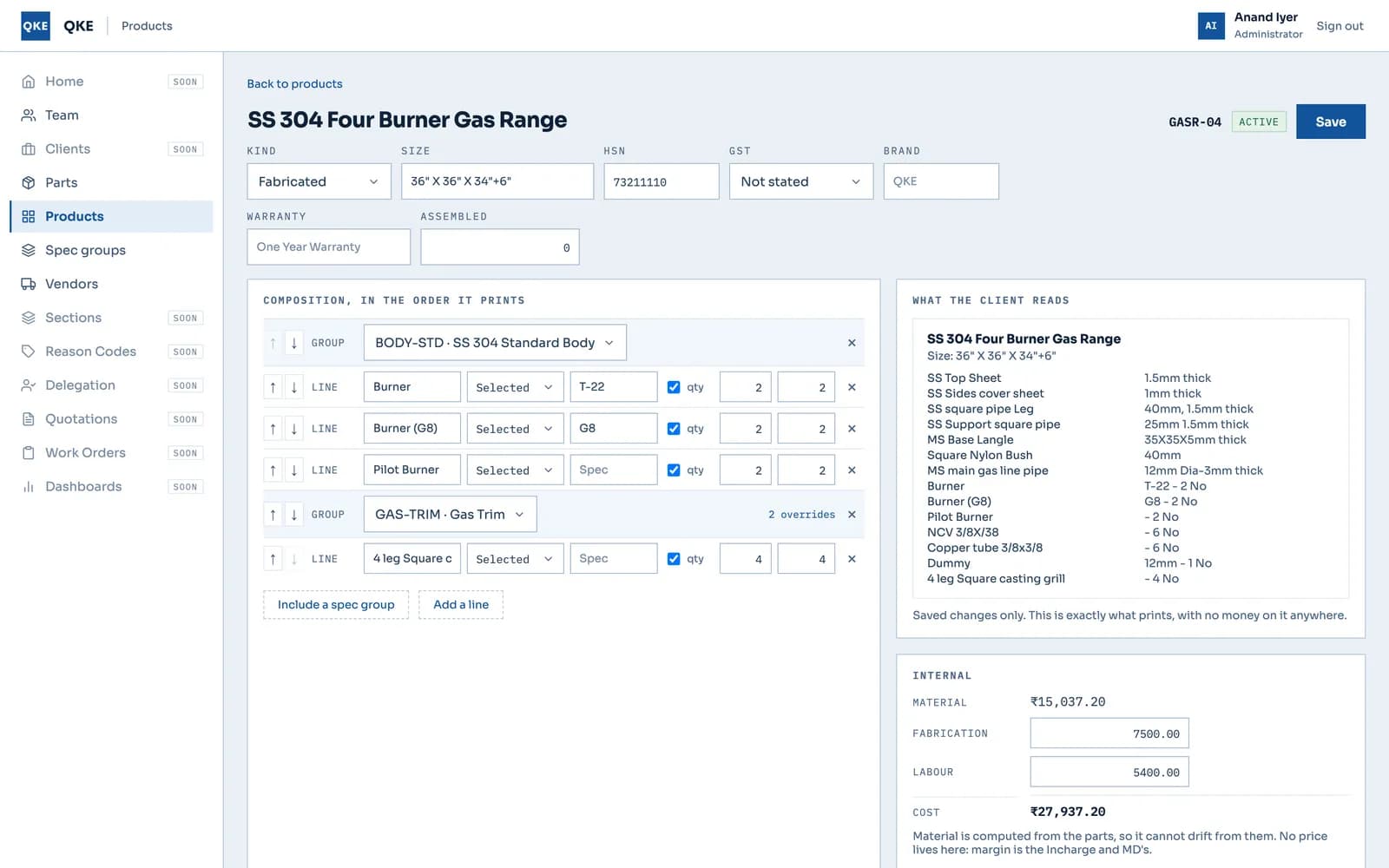
Quotation-to-production for a commercial-kitchen fabricator, nine roles. Foundations and masters are built and tested in the real app; the full workflow runs as a prototype with 389 passing checks.
What it shows: Model the product from the client's own documents. The spec-sheet model was tested against 243 lines of one real quotation and 77 of another before the build relied on it.
- Prototype
Firetrix
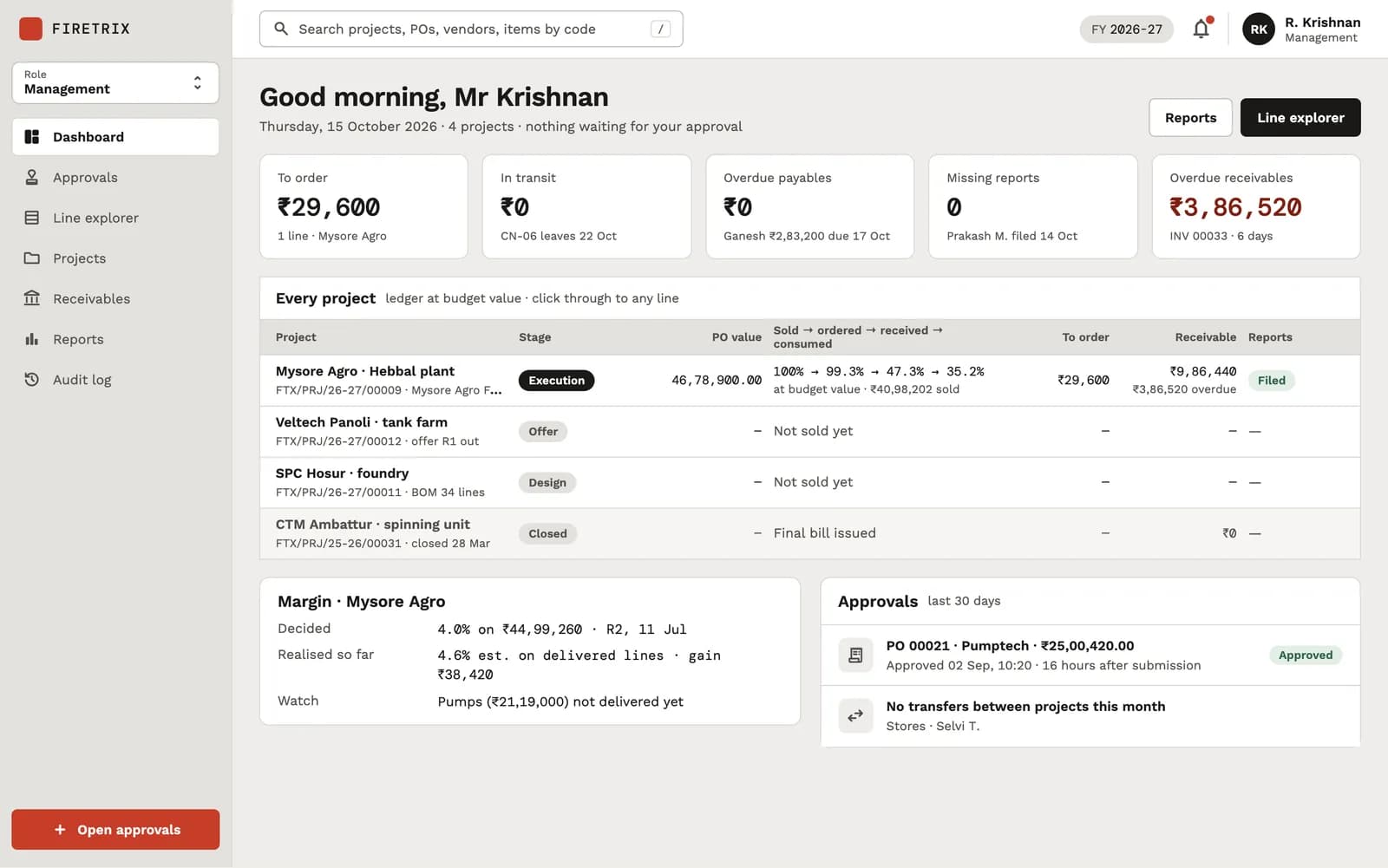
Enquiry to final bill for a fire-protection contractor: a 32-document plan, 12 design boards and nine clickable prototypes, one per role. No application code yet.
What it shows: Make the project line the subject and derive its quantities from events: bought, received, issued, measured, billed. Nobody types a balance.
- Prototype
Vyoma for BrandCrew
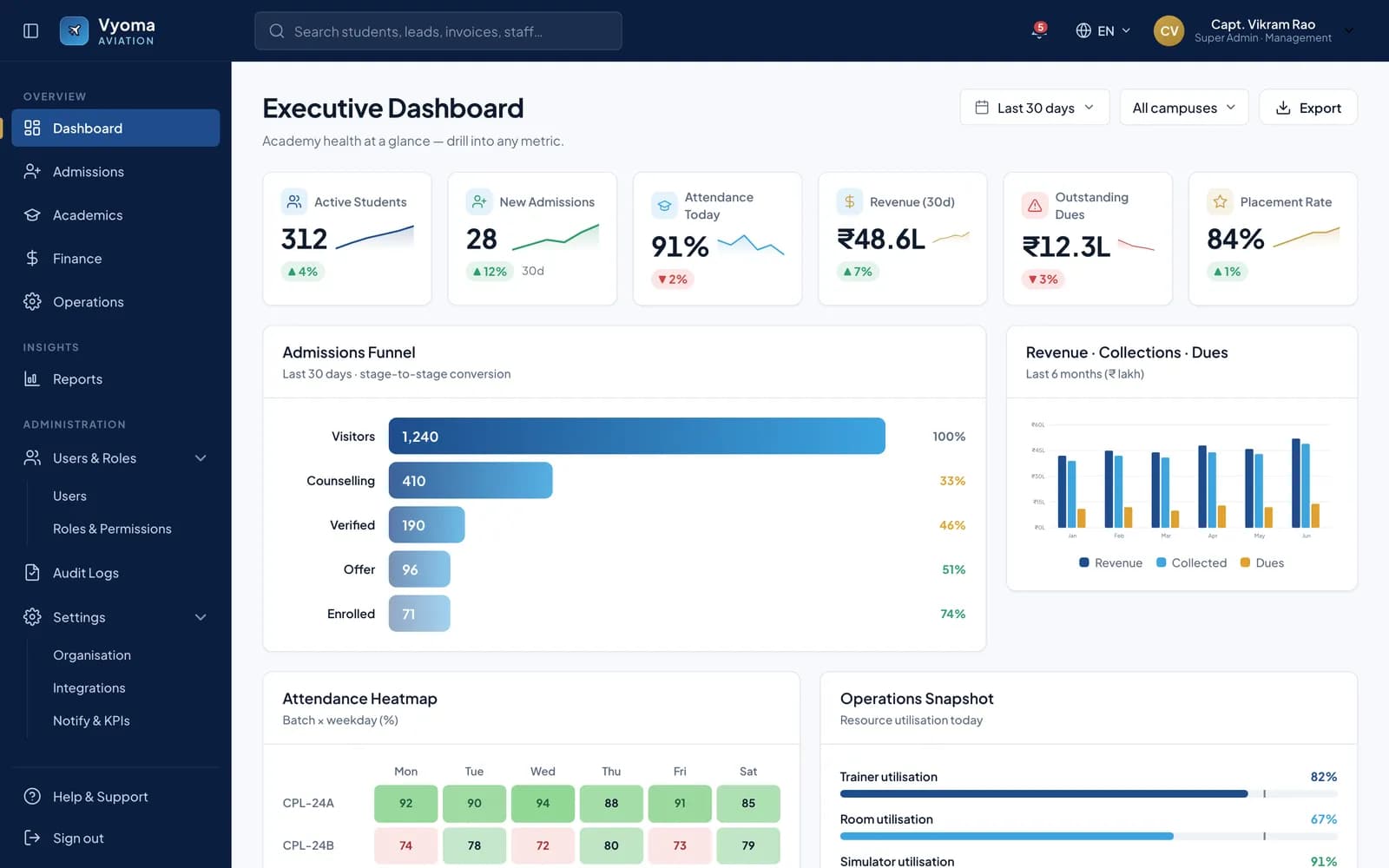
One platform for an aviation academy: 135 screens across 17 roles, specified and turned into a clickable prototype on mock data for the founders to judge.
What it shows: Make many roles concrete before pricing the build: each counsellor, trainer and parent clicks through their own panel.
- Discovery
Customs broker ERP
Discovery for replacing a legacy ERP of 400+ screens with one job engine, milestone templates and adapters for e-invoicing and Tally. The client is not named; no code is written.
What it shows: Replace sprawl with one engine: six regulatory flows become milestone templates on one job type, and ten questions are answered before a firm quote.

Rolling out new business software without stopping the business
A new system should never arrive as a big bang on a Monday morning. Each slice goes live in phases that overlap, so the business keeps running while one team proves the new way of working. This is the typical shape of one slice going live; the real weeks depend on your team and your data. The rule that matters most: the old way of working is only switched off for a workflow once the new one has matched it, day for day, on real numbers your team trusts.
Pilot with one team
One team uses the first slice for real work while everyone else carries on as before. We pick a team that is willing and busy enough to find real problems. Their feedback shapes the next slice.
Weeks 1–3
Move the master data
Items, vendors, customers and opening stock are cleaned and imported, with a count you check against your records. Duplicates and dead entries are flagged for you to decide on, not silently merged.
Weeks 2–4
Run old and new side by side
For a short, agreed window both systems run, so any difference is caught before the old one is switched off. Totals are compared at the end of each day, and every mismatch is traced to its cause.
Weeks 4–6
Train each role
Short sessions per role on their own screens, plus a written guide, rather than one long demo for everyone. People learn faster on their own work than on sample data.
Weeks 5–6
Switch over and support
The old tool is retired for that workflow, and we stay close for the first weeks of full use, fixing what real volume reveals before the next slice begins.
Weeks 7–8
Going live is where Build hands over to Ship. Once a slice is in daily use, the work becomes keeping it healthy and moving it forward: dependency and security updates, backups that are checked, small changes as the business learns, and the next slice planned from what the first one taught us. Business software is never finished, because the business is never finished; it should get better every month, not older.
Questions about custom business software and ERP development
How long does it take to build custom ERP software?
Mapping and specification for a mid-sized business usually takes a few weeks, the clickable prototype a few more, and the build then runs in slices of a few weeks each, so the first part of the system is in real use within months rather than at the end of a year-long project. The total depends on how many roles and workflows you need. You get a dated plan after the mapping phase, when the scope is known.
Is custom business software better than an off-the-shelf ERP?
Not always. If a standard product runs businesses like yours and fits with configuration, buy it; it will be cheaper. Custom software pays back when your workflow is what makes you different, such as fabricated products built from parts or project-based contracting with partial deliveries, and the standard product forces your team into workarounds. Often the best answer is a mix: keep standard accounting and build the operational part around it.
Can custom software work with Tally and GST e-invoicing?
Yes. Rather than rebuild an accounting ledger, we usually export vouchers to Tally so your accountant keeps working where they already do. GST e-invoices and e-way bills go through a GST Suvidha Provider behind an adapter that logs every request, retries failures and shows the status to the user. Our guide to GST e-invoicing for software covers the rules in more detail.
How do you stop staff seeing data they should not see?
Permissions are designed before screens. Every role gets a written list of what it can see, change and approve, the server enforces it on every request, and the screens only show what the server returns. In practice that means rules like procurement and stores never seeing margin or offer rates, and a work order released only after the right approvals.
What happens to our existing spreadsheets and data?
We clean and import the master data you rely on, such as items, vendors, customers and opening stock, and give you a count to check against your own records. Old transactions stay where they are unless you need them in the new system. A short period of running old and new side by side catches any difference before the old tool is switched off for that workflow.
Can our field staff use the system on a phone with poor signal?
Yes, and we plan for it. Site engineers, drivers and stores staff get phone-first screens or an app with only what they need: post progress with photos, confirm a delivery, scan a shelf or an item. Where signal is weak, the screens are kept light and actions are designed so a retry never creates a duplicate. Medtrakr's driver app, for example, captures a proof-of-delivery photo stamped with the time and location, so the office sees the delivery as it happens.
Can custom business software grow with the company, such as new branches or a second legal entity?
Yes, if it is designed for it from the first day. When a business runs more than one company or branch, we put the company and branch on every record, so data stays separated, reports can be split or combined, and opening a new branch is configuration rather than a rebuild. Roles, numbering series and document templates are set per company for the same reason. Retrofitting this later is one of the most expensive changes a system can need.
Do we have to specify everything before you start building?
No, but we do specify the part we are about to build. The mapping phase covers the whole business at a high level so nothing important is missed, and the detailed screen specification and prototype are done slice by slice. That keeps you from paying for a thousand-page document while still never building a screen nobody has agreed. It also means later slices benefit from what the team learned using the earlier ones, which a specification written all at once can never do.
Show us how the work moves today
You do not need a specification to start. Send us what your team already uses and a sentence on what hurts, and we will reply with questions and a suggested first slice.
Send us your workflowWhat happens next: we read what you send, ask the questions it raises, and suggest which loop of the business to map first. If a standard product would serve you better, we say so in that first reply. If not, the next step is a walk-through with the people who do the work.
Prefer a fixed first step? Our Discovery Sprint maps the workflow and ends with a plan and prototype.
The spreadsheets
The ones people actually open every day, even if they are messy.
The paperwork
Quotation, purchase order, delivery note and invoice formats.
Who does what
The roles involved and where jobs usually get stuck.