Training programs
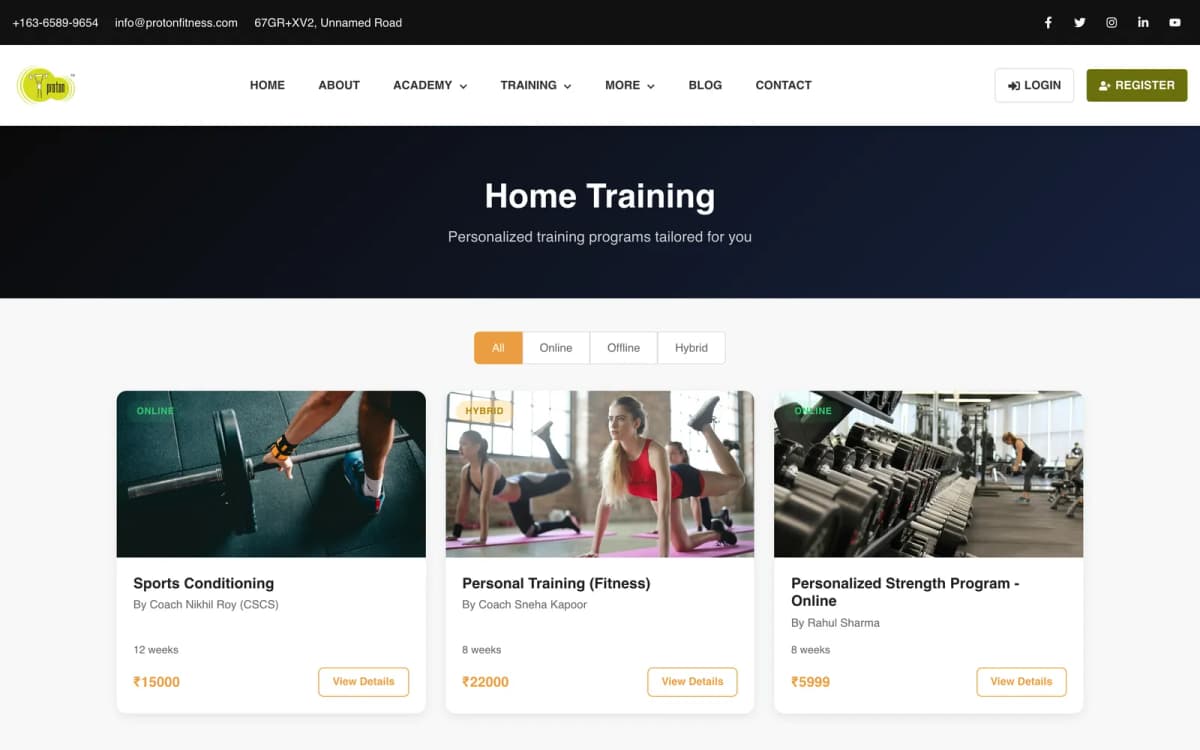
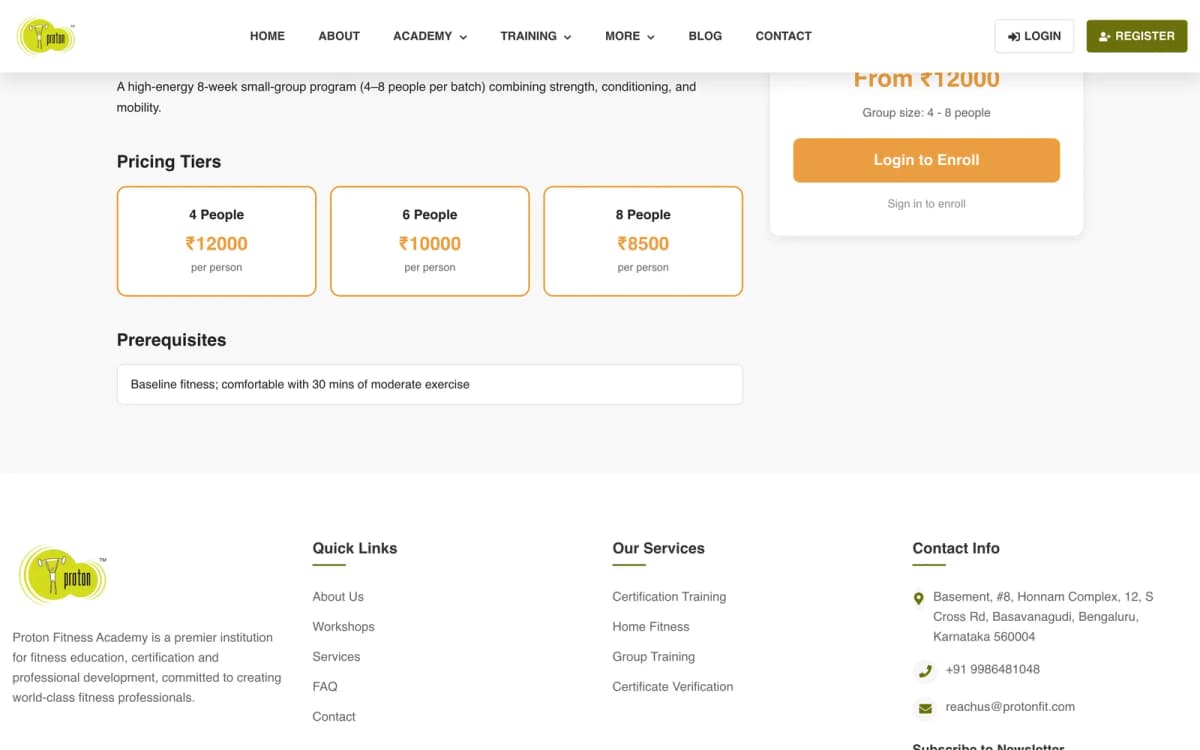
Group training, home training and workshops each have a public listing and detail page, a schedule and their own enrolment.
Proton Fitness Academy runs trainer-certification courses and training programs. We built protonfit.com and the platform behind it: course batches with sessions and attendance, student and trainer portals, certificates, Razorpay checkout and a home-page CMS.
Updated
Overview
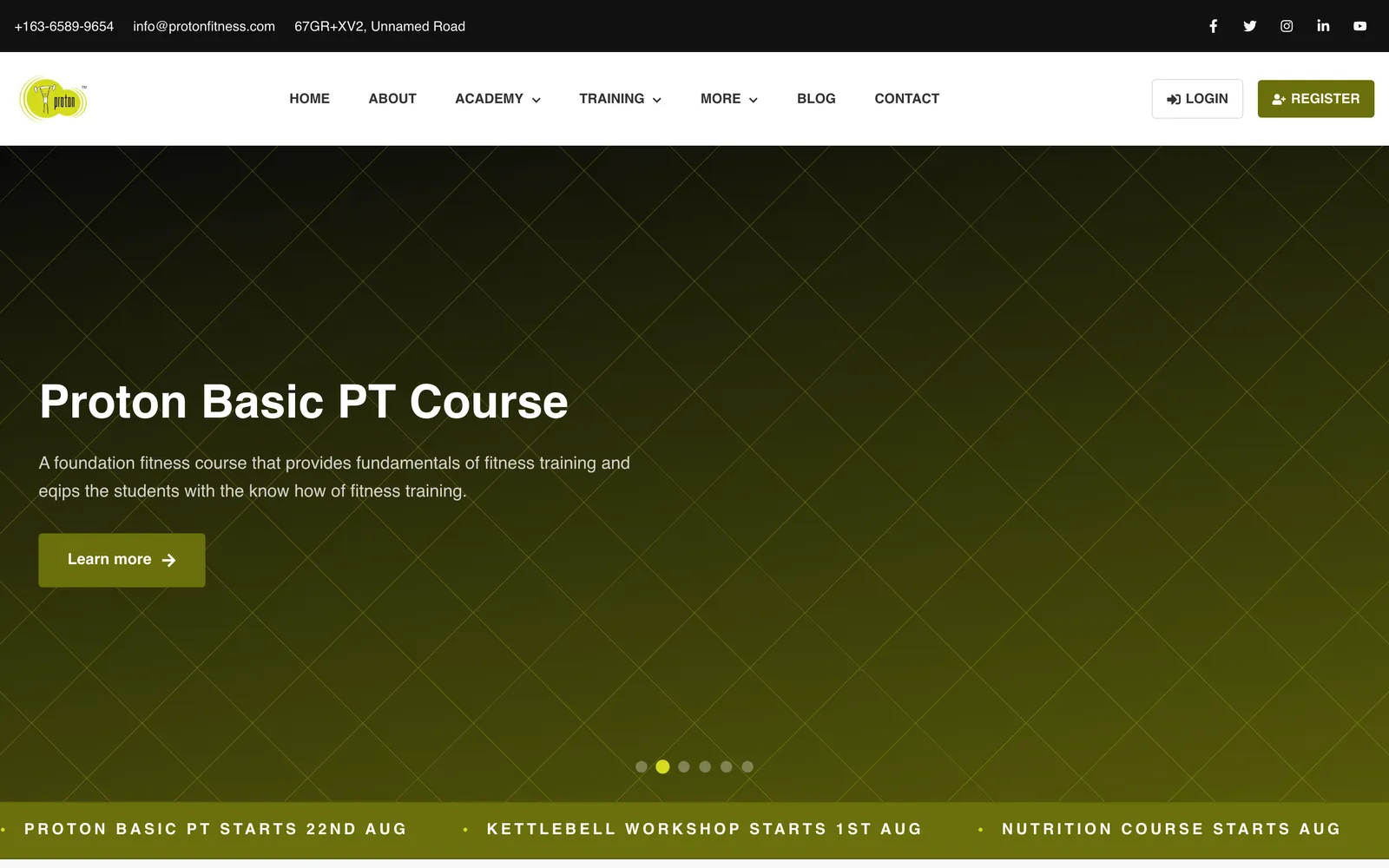
Proton Fitness Academy trains fitness professionals. Its personal-trainer, nutrition and advanced certification courses run for weeks or months as dated batches, and it also sells group training, one-to-one home training, single-day and multi-day workshops and self-paced online courses. CountryDevs built its website and the platform behind it from May 2025: a Next.js client and a Node.js, Express and MongoDB API. The site is live at protonfit.com.
The platform has four kinds of user. Visitors browse the catalogue and enrol, paying through Razorpay or through a payment an admin records by hand. Students get a portal with their enrolments, the next class, a calendar of every session they can subscribe to from their own calendar app, attendance for each batch, an online-course player that remembers where they stopped, their certificates and their notifications. Trainers see the programs assigned to them and a teaching calendar. Admins and the superadmin run the catalogue, batches, enrolments, payments, refunds, certificates, users, inquiries, the blog and the home page.
The sections below walk through each part as it works in the code: how a batch turns into a timetable, who may enrol and when, how attendance and certificates are recorded, how money moves, and what each portal shows. In June 2026 we also found the live site serving no page titles or link previews and retrofitted its SEO without rewriting its pages. A daily AI blog is built and tested on a local database and is not yet switched on at protonfit.com.
The story in three steps
01 · Where it started
Proton sells two different things. Training programs (group classes, home training and workshops) are booked and attended. Academy courses run for months as dated batches, with a weekly timetable, a trainer, a capacity, attendance at every session and a certificate at the end. Students, trainers and admins each need their own view of the same schedule, and a trainer cannot be in two places at once.
The academy also needed to be found and shared. When we audited the live site in June 2026, a link to protonfit.com shared on WhatsApp previewed with "protonfit.com" as both its title and its description, and the browser tab showed the framework's default icon. And the team wanted to change the home page's banners, copy and featured courses without asking a developer each time.
02 · What we built
In April 2026 we restructured the backend from four flat program types into two verticals, Academy and Training. An academy course holds batches; each batch has dates, days of the week and time slots, and the server generates every session from that pattern. Attendance is recorded per session, and schedule conflicts are checked per trainer.
Prices and checks stay on the server. A Razorpay order is priced from the course record, never from the browser; the payment signature is checked with HMAC-SHA256; and capacity and the enrolment window are checked again before a registration is created. Certificates are created as pending at enrolment and issued by an admin with attendance and grade. The home page became a CMS over a fixed set of sections, so the academy edits content without breaking the layout. For SEO we made the root layout a server component and added metadata route by route.
03 · Where it stands
protonfit.com is live (checked 17 October 2026) with its training programs, academy course pages and their batches, a blog and a certificate verification page. Since the SEO retrofit in June 2026, public pages carry their own titles, descriptions and canonical URLs, link previews show a branded image, and the site serves robots.txt, a sitemap and Organization structured data with the academy's real contact details. The student, trainer and admin portals ship with the site.
The AI blog is the part still in progress. Its scheduler, planning wizard and cover-image pipeline are built and were verified against a local database, including a second run on the same day doing nothing. It goes live once a production AI API key and server fonts for the cover text are in place.
Chapter 1
Proton sells two different things, and the data model keeps them apart on purpose.
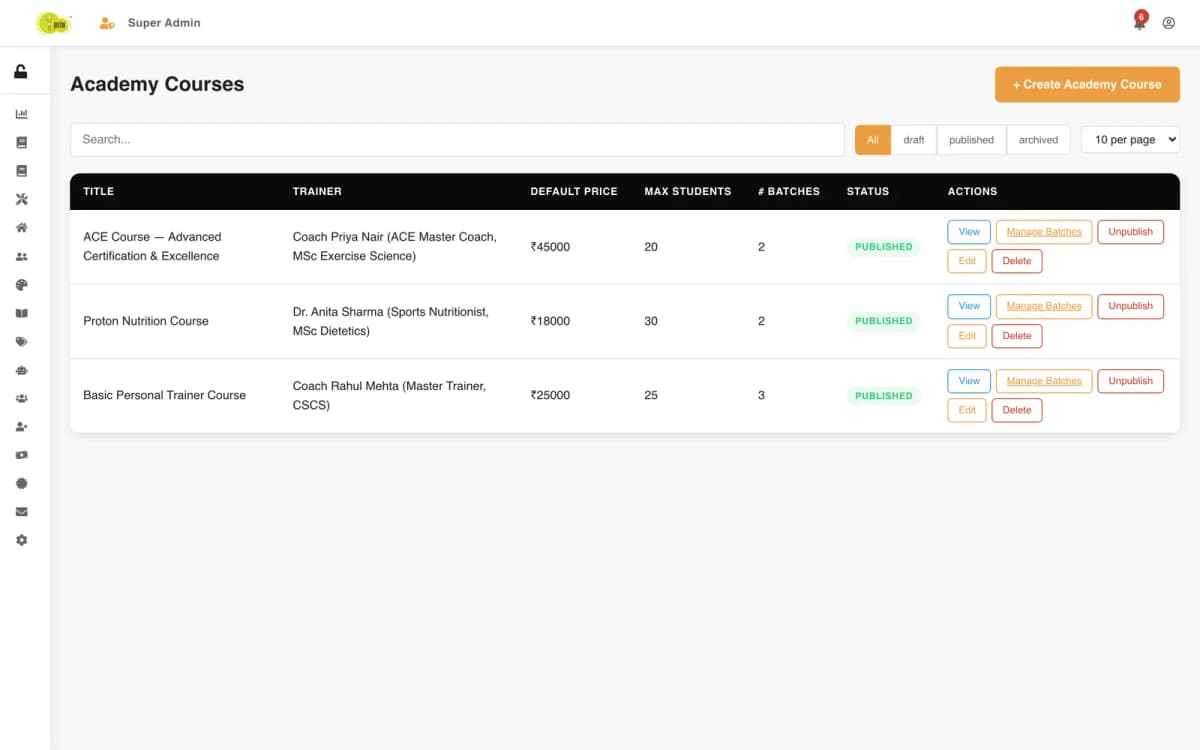
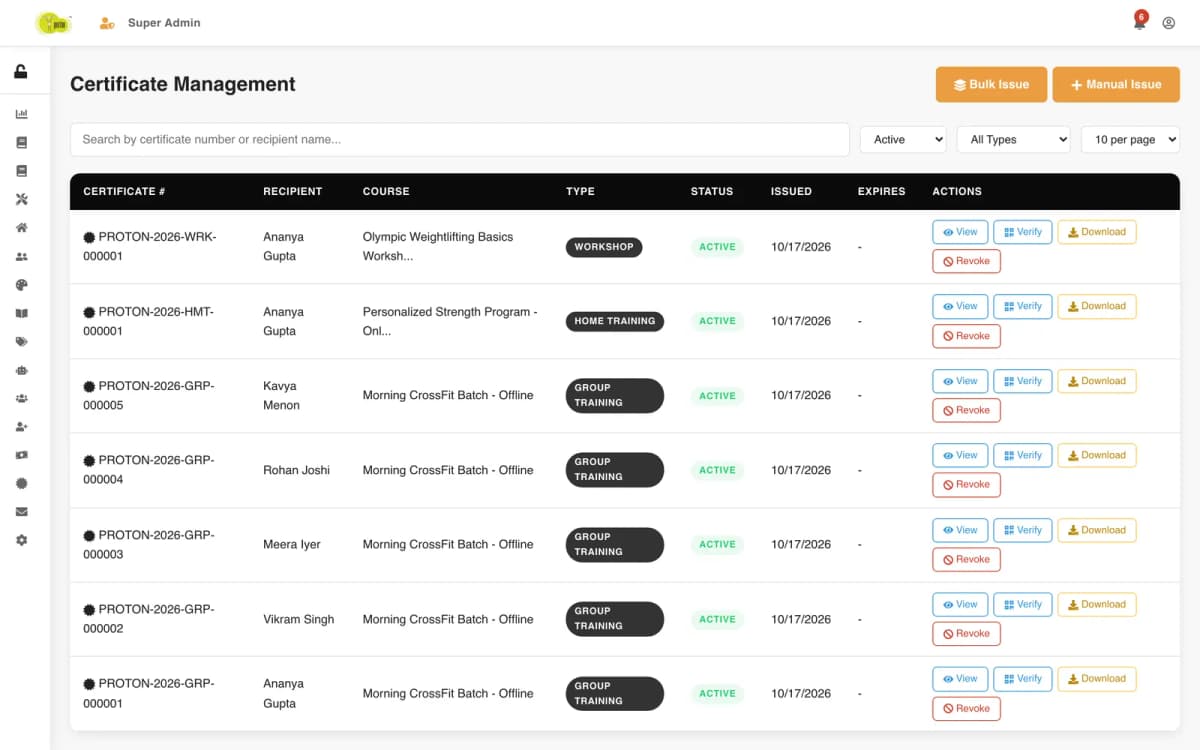
An academy course is a template, not a class. It holds the title, the topics covered, the banner, a default trainer, a default price, a default class size, a default weekly pattern and the number of grace days after the start. What students actually join is a batch of that course: "Weekend Batch — September", "Starting Batch", "Next Batch". Each batch copies the course defaults when it is created and can override any of them, so one course can run a weekend batch and a weekday batch with different trainers and timings side by side. The superadmin console lists every course with its trainer, default size and the number of batches running from it.
Online courses are self-paced. Each is a list of sections, each section a list of lessons with a video and a duration, and the course works out its own lesson count and total running time from that structure. There is no batch and no schedule: a student buys it and works through it at their own pace.
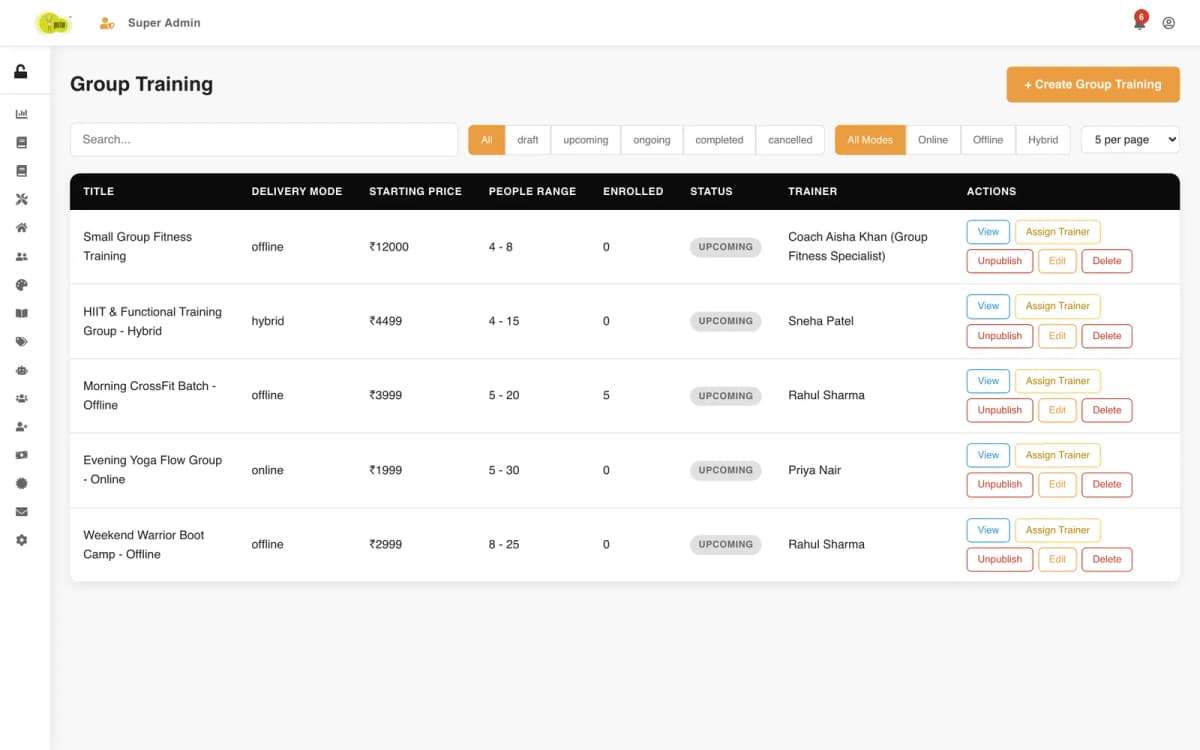
Training is three program types, each with its own listing, detail page and admin screen:
In April 2026 we restructured the backend from four flat program types into these two verticals. Everything that is genuinely different — dated batches, generated sessions, attendance, grace windows — lives only on the academy side, so the training programs stay simple. Everything that is genuinely shared — enrolment, payment, certificates, notifications, the student's schedule — works across all of them through one courseType and courseId pair on every registration, payment and certificate. A student's "My courses" page can then split one list into academy, online and workshops without three separate data paths behind it.
Chapter 2
An academy batch is described once, as a pattern, and the server turns that pattern into every individual class.
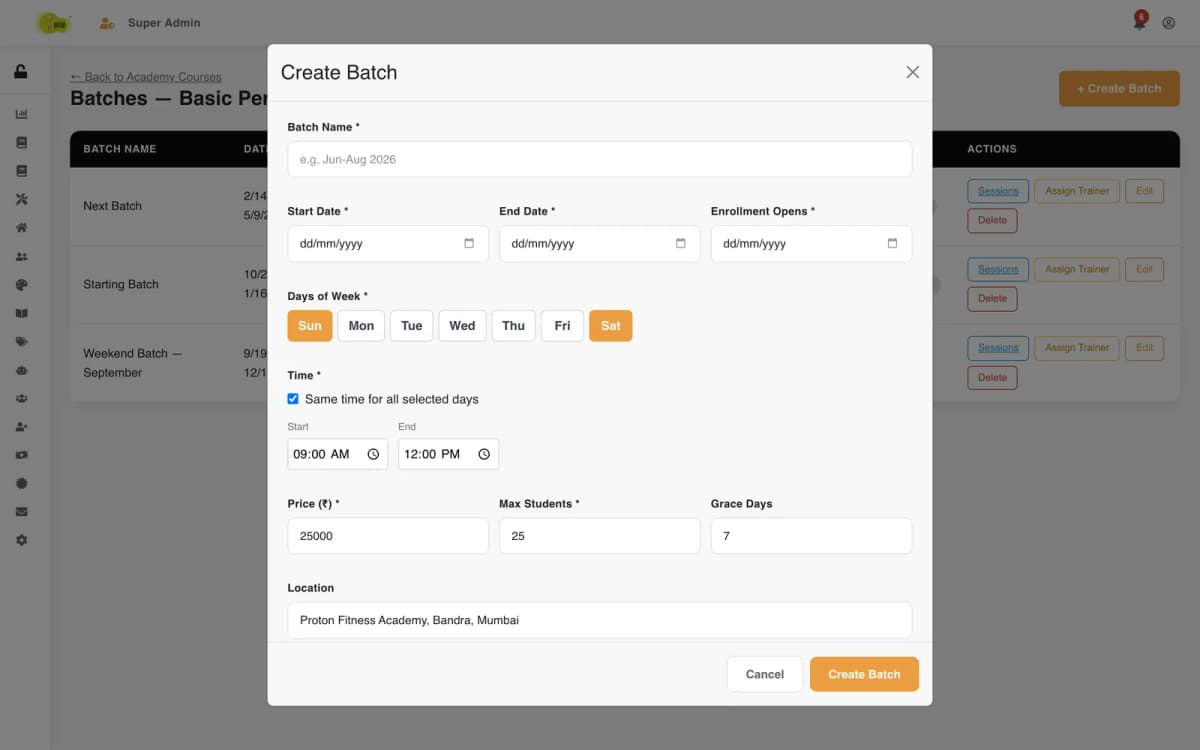
Creating a batch asks for a start date and an end date, the date its enrolment opens, the days of the week it meets, and the time. The time can be one slot for every selected day ("Saturday and Sunday, 09:00 to 12:00") or a different slot per day ("Tuesday evening, Saturday morning"). The form also takes the class size, the location and the number of grace days.
On save, the server expands the pattern into concrete sessions. It walks every date from the start to the end, keeps the dates that fall on a selected weekday, attaches that day's time slot, and inserts one numbered session per class: session 1, session 2 and so on, each with its date, start and end time, an empty attendance list and the status "scheduled". The batch records how many sessions it generated. A weekend batch from mid-September to mid-December comes out at 25 sessions without anyone typing a date.
The same pattern also becomes a calendar entry for the batch with its weekly slots and its trainer. That entry is what conflict checks and schedules read.
Each batch has an opening date for enrolment and a closing date the server derives on every save: the start date plus the grace days. A student can still join a batch in its first week if the academy allows seven grace days, and not after that. The batch moves through draft, enrolling, upcoming, ongoing, completed or cancelled, and only published, active batches inside their window appear as bookable on the public course page.
Editing the schedule fields of a batch updates its calendar entry, regenerates its sessions and sends every actively enrolled student a "Batch Updated" notification, so nobody turns up to a class that moved. Changing only the trainer updates the calendar's trainer without touching the sessions. A batch with active enrolments cannot be deleted: the server refuses until those students have been dealt with, and deleting an empty batch removes its calendar entry and sessions with it.
Before a batch is saved, the console can ask the server whether its weekly slots overlap another batch's calendar on the same day. The answer names the day, the clashing times and the other course, so the academy sees "Saturday 09:00–12:00 clashes with Proton Nutrition Course" rather than a generic error. Workshops, group training and home training run the same kind of check against the trainer's existing schedule when they are created or edited, because a trainer cannot be in two studios at once.
Chapter 3
Every enrolment, whether it comes from a student's checkout or from an admin entering it by hand, passes through one eligibility check on the server. The browser is never trusted to decide.
For a batch the server checks, in order:
Each failure returns a reason a person can act on: "Enrollment opens on Sat Sep 12", "Enrollment is closed — grace period ended", "Batch is full".
Workshops, group training, home training and online courses are checked for being published and active, and for capacity where a program sets one, counted from pending and active registrations.
A registration is created in one of two ways, and both go through the same check:
A successful registration records the program, the payment and an attendance pattern ("single-event" for a workshop, "multi-session" for everything else). For an online course it also creates the student's progress record. For workshops, group training, home training and academy batches it creates a pending certificate straight away, so the certificate exists from day one and only needs issuing at the end. The student gets an "Enrollment Confirmed" notification, and the admins are told when a payment arrives.
Chapter 4
For a course that runs for months, a certificate means little without attendance behind it, so attendance is recorded per session rather than per batch.
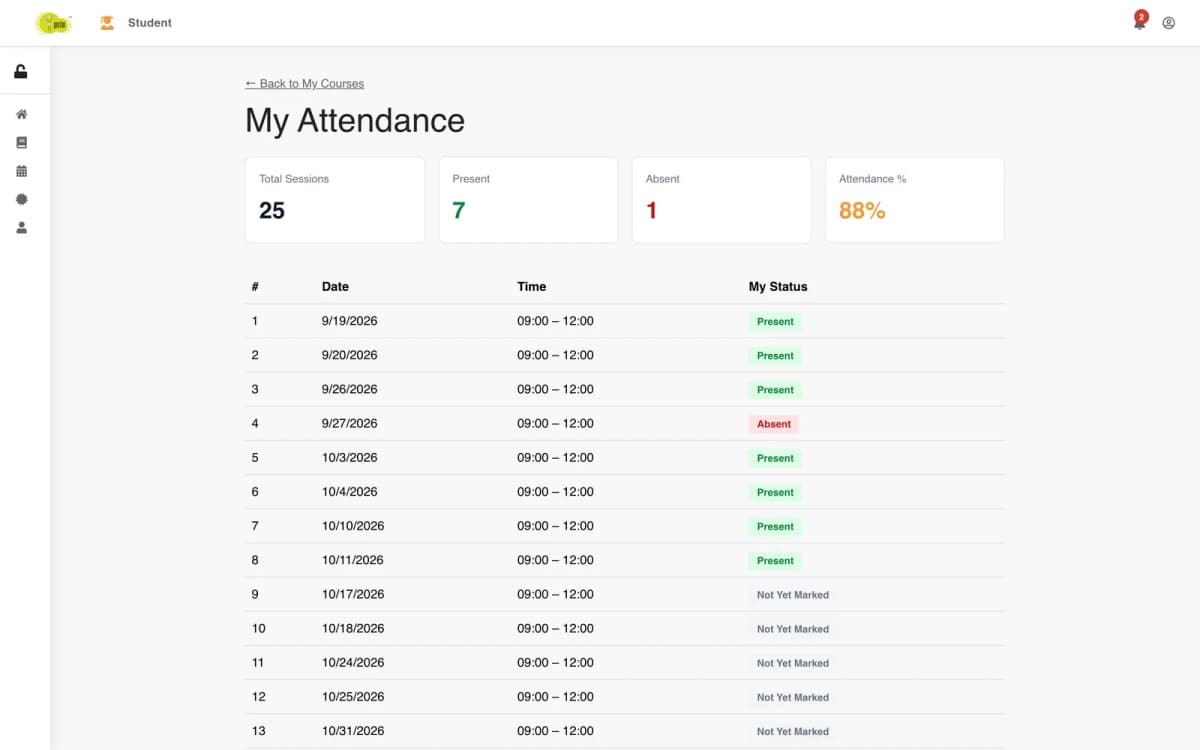
Each generated session holds a list of attendance records: the student, present or absent, who marked it and when, and an optional note. Marking a student who already has a record updates it instead of adding a second one, so correcting a mistake does not double-count. Attendance can be marked one student at a time or for the whole class in one request, and the server ignores any value other than present or absent.
The first time anyone is marked for a session, the session's status changes from "scheduled" to held. A session can also be cancelled with a reason by an admin, and cancelled sessions are left out of the student's counts.
The student's attendance page for a batch lists every session with its date, time and their own status: present, absent, or not yet marked. Above the list it shows four numbers: total sessions, present, absent and an attendance percentage. The percentage is worked out only from sessions that have actually been marked, so a student is not shown as failing attendance because a trainer has not filled in last Saturday yet; future sessions and cancelled ones do not count against them either.
The session and attendance pages are built for the batch's assigned trainer and for admins. A trainer's access is checked against the batch itself: being a trainer is not enough, they must be assigned to that batch. Admins can see every batch.
When a certificate is issued at the end of a batch, the admin can record the attendance percentage, the sessions attended out of the total, a score and a grade on it. Those numbers are stored on the certificate itself, so the record says not only that the trainer passed but how much of the course they attended.

Chapter 5
Proton takes money in two ways, and both end in the same payment record with its own invoice number.
When a student enrols online, the server creates a Razorpay order. The amount comes from the program record on the server, never from the browser: the batch or course price, or for group training the price of its first tier. The payment record is created at this point as pending, with the order ID and an invoice number.
When Razorpay returns, the server checks the payment signature with HMAC-SHA256 against the order and payment IDs. A bad signature marks the payment failed and stops there. A good one marks it paid with the time, then runs the eligibility check again before creating the registration. If the class filled up in the meantime, the student is told the payment was captured and enrolment blocked, and the record is left for an admin to refund.
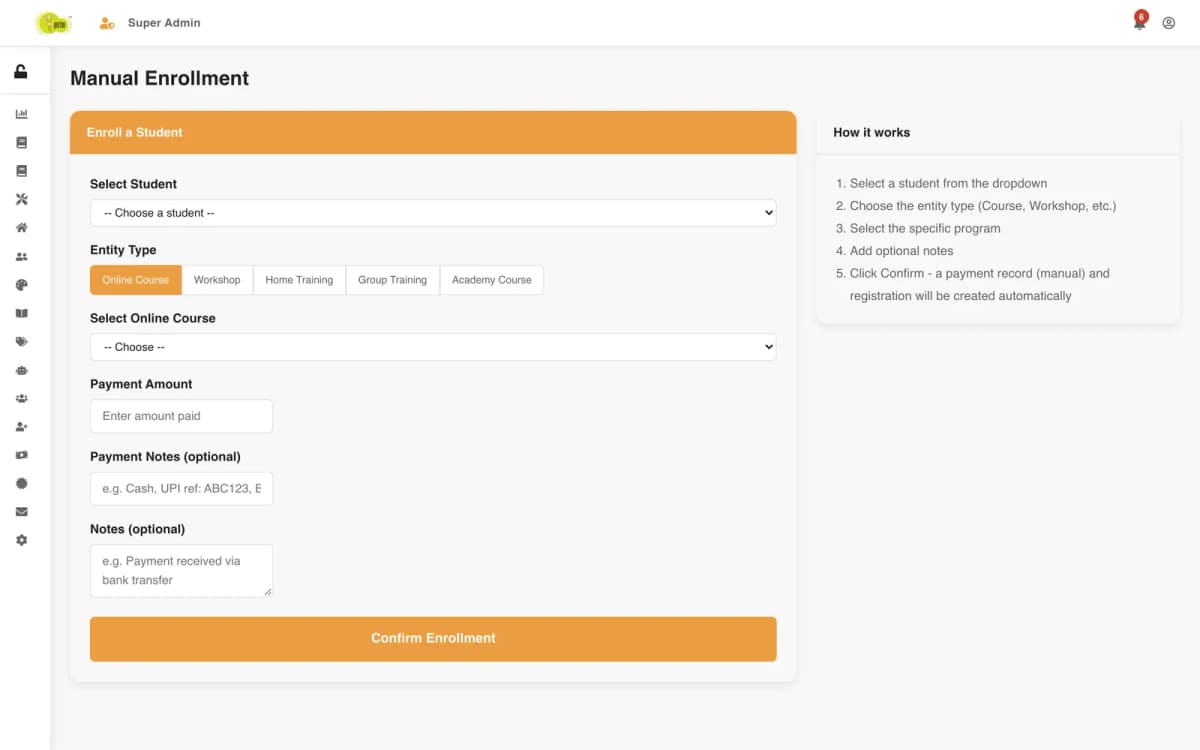
Some students pay at the academy, by bank transfer or by UPI. The manual enrolment screen lets an admin pick the student, the program type and the program, and record the amount and a payment note ("UPI ref ABC123"). The server creates a payment with the method "manual" and a fresh invoice number, then the registration, through the same eligibility checks as checkout.
Every payment gets an invoice number in the form INV-2026-000021, numbered within the year. The payments screen lists them all with the student, the program type, the amount, the status (pending, paid, failed or refunded), the method (Razorpay or manual) and the date, with filters for each.
A refund can only be made on a paid payment and never for more than was paid. For a Razorpay payment the server asks Razorpay to refund that payment and stores the refund ID; for a manual one it records the refund. Either way the payment keeps the amount, the reason and who processed it. Students can also request a refund on a registration, which lands with the admins rather than moving money on its own.
Chapter 6
Proton's certificates are what students are really paying for, so they are designed to be issued deliberately, with the evidence on them.
When a student enrols in a workshop, group training, home training or an academy batch, a certificate is created immediately with the status pending: the student's name and email, the program and a "Certificate of Completion" title. Online courses do not get one, because they have no trainer sign-off. Creating the pending certificate is best-effort: if it fails for any reason, the enrolment still goes through.
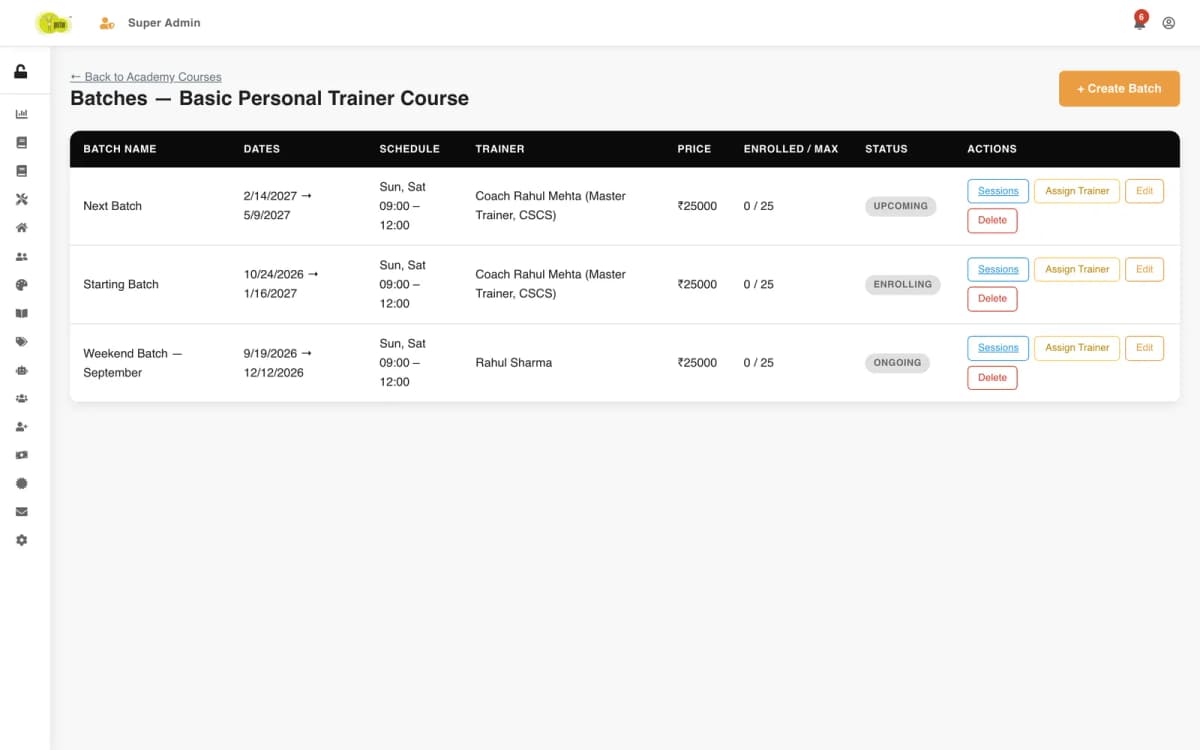
Each certificate gets a number like PROTON-2026-GRP-000001: the academy's prefix, the year, a code for the program type (workshop, group training, home training and so on) and a running number within that year and type. The number is the one thing a student needs to share.
At the end of the program an admin issues the pending certificate. Issuing makes it active, stamps the issue date and who issued it, and can record the trainer who signs it with their designation and the achievement: attendance percentage, sessions attended out of the total, score and grade. It also stores a signature built from the certificate number, the student, the program and the issue date, a hash of the certificate's details for tamper checks, and a verification link for its QR code. A certificate that is already active cannot be issued twice, and a revoked one cannot be re-issued.
The certificate screen lists every certificate with its number, recipient, program, type, status and dates, with filters for active, pending, expired and revoked, and actions to issue one at a time or in bulk.
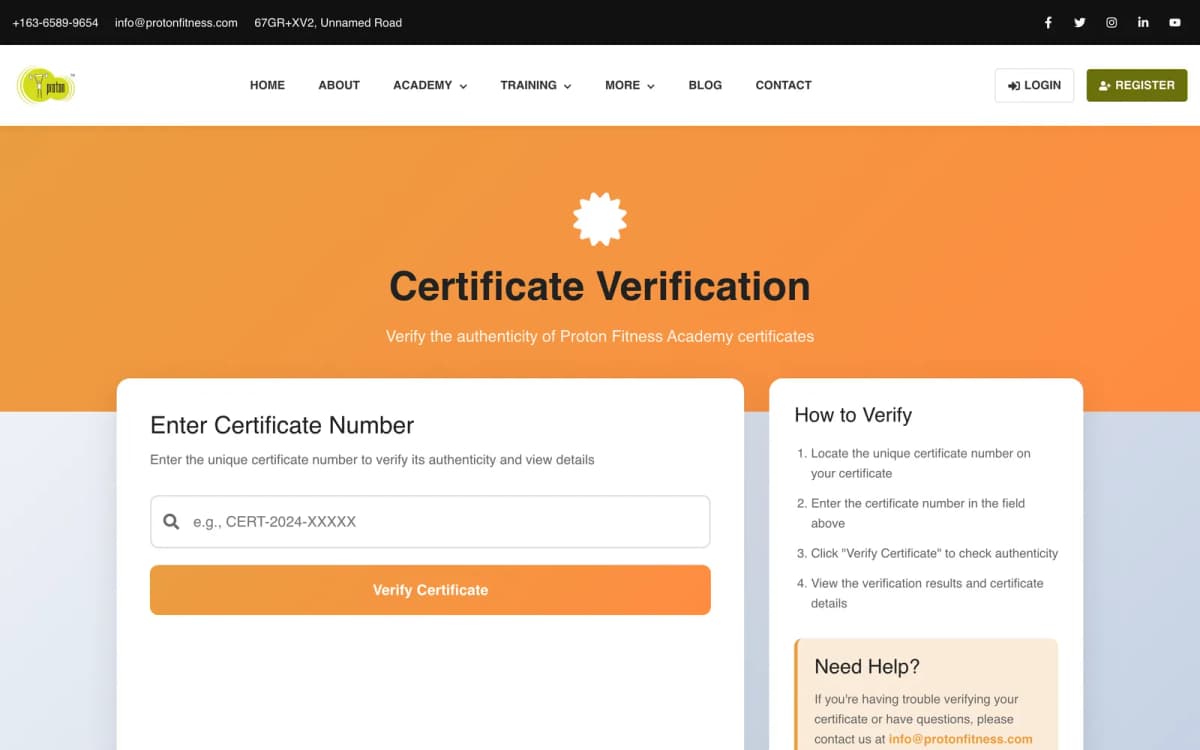
protonfit.com has a public certificate verification page where anyone can enter a certificate number. The lookup behind it needs no login and is designed to answer with the certificate's details or a status: not found, expired (past its expiry date) or revoked.
An admin can revoke a certificate with a reason. The record keeps who revoked it and when, the status changes to revoked, and the student is notified that their certificate for that program has been revoked. The console can also list certificates that are about to expire within a chosen number of days.
Chapter 7
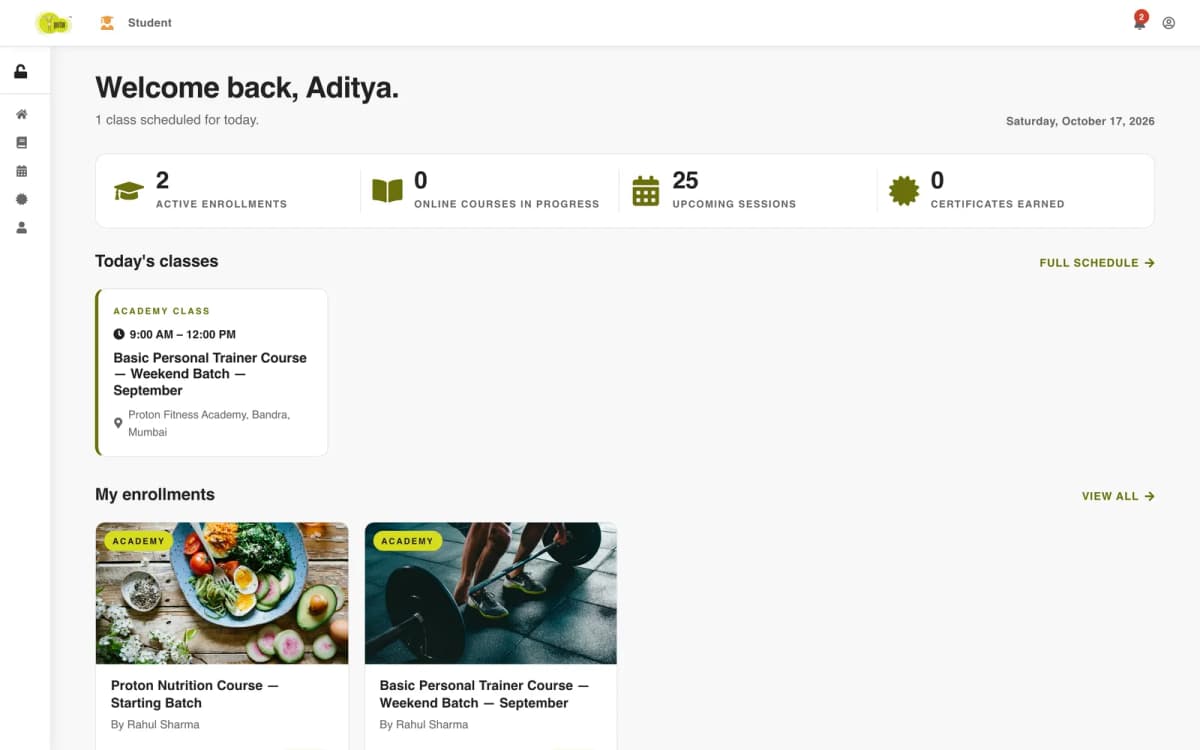
A student logs in to one place that knows everything they have bought.
The dashboard greets the student by name, tells them when their next session is, and shows four numbers: active enrolments, online courses in progress, upcoming sessions and certificates earned. Below that are their current enrolments as cards with the trainer and start date, shortcuts to the schedule, certificates and catalogue, and links back into the academy courses, workshops, training programs and the blog.
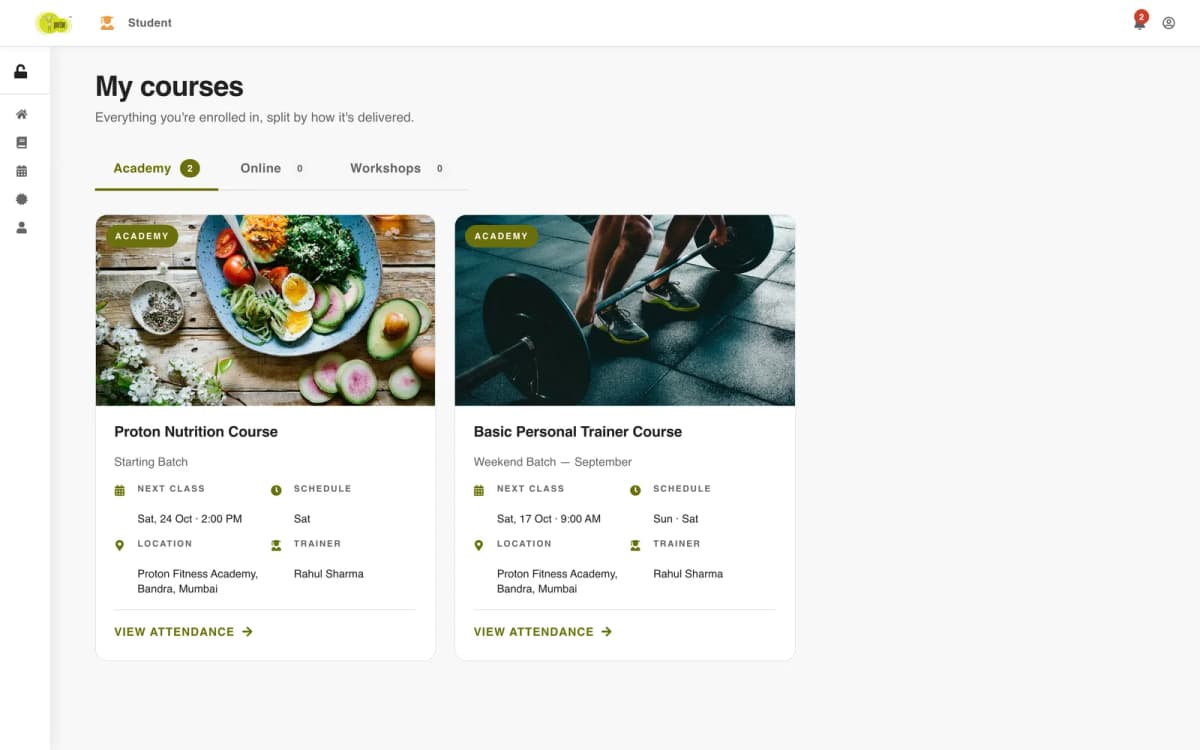
"My courses" splits every enrolment by how it is delivered: academy, online and workshops. Each academy card shows the next class, the weekly schedule, the location and the trainer, with a link to the attendance page for that batch.
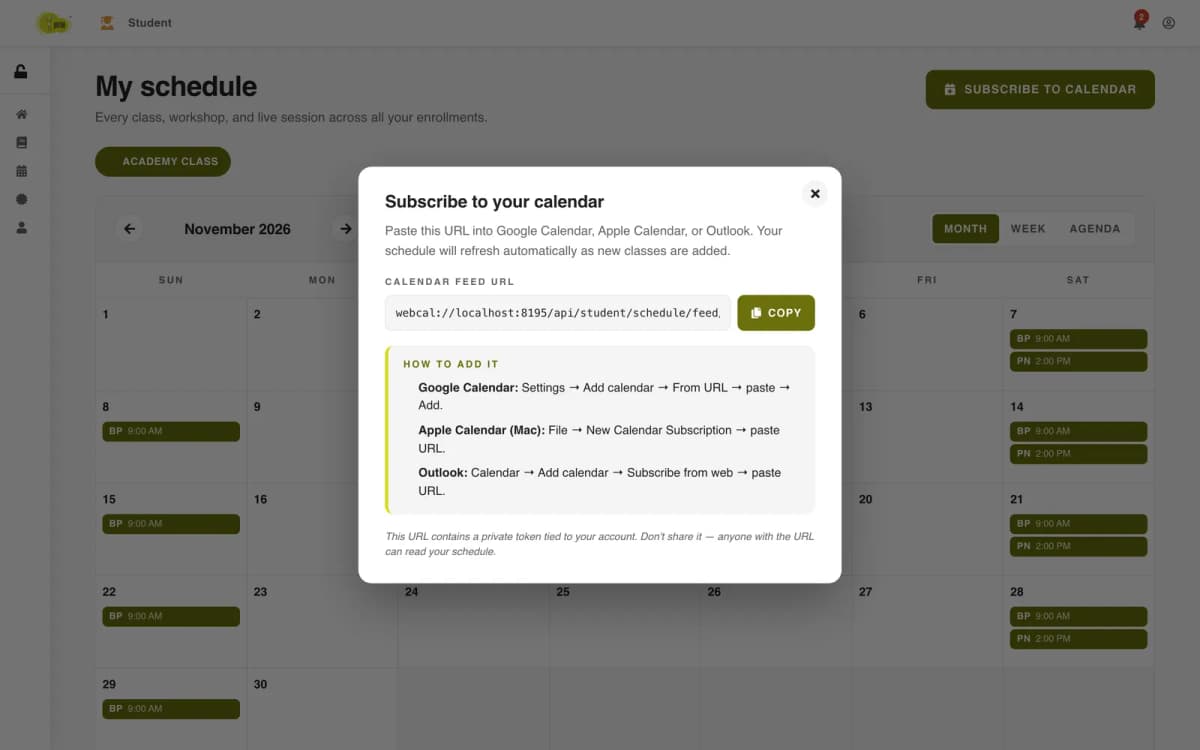
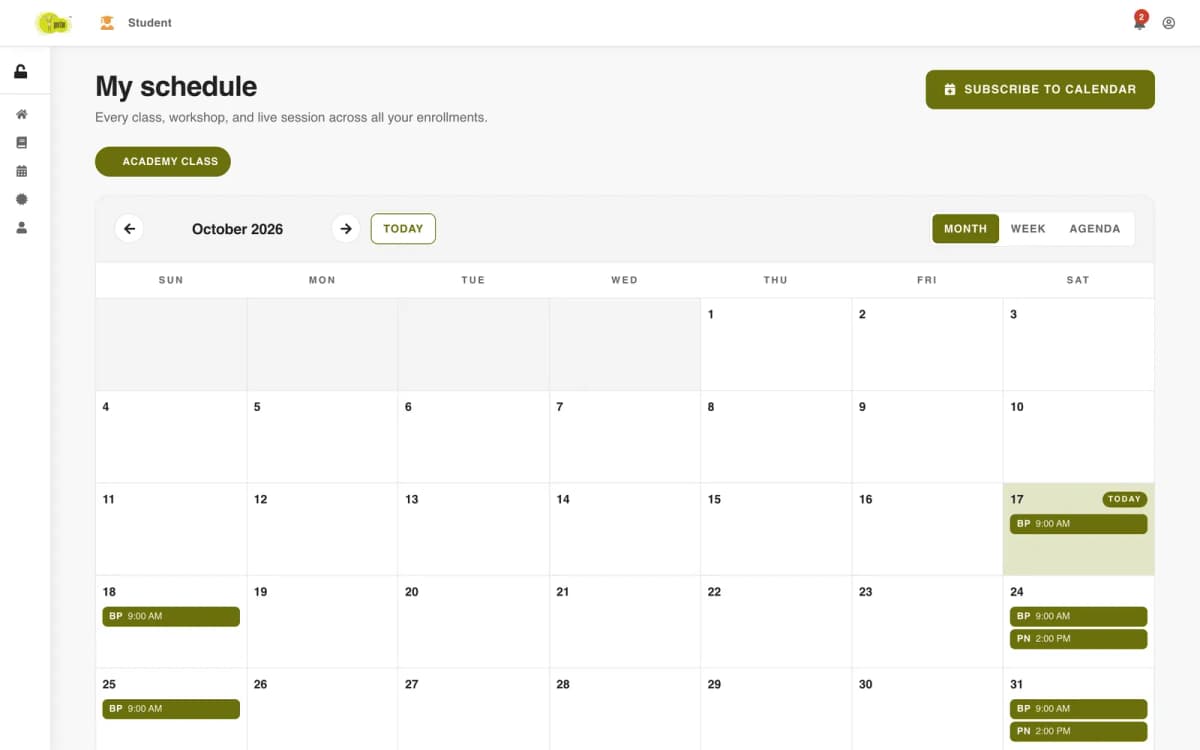
"My schedule" shows every class, workshop and live session across all enrolments in one calendar, with month, week and agenda views and a colour per program type. Two ways get it out of the website:
.ics file and dropped into a calendar.The feed link carries a random token tied to the student's account, and that token is the only key: calendar apps cannot log in, so the server looks the student up by the token and builds the calendar from their current enrolments. The link is offered as webcal:// so calendar apps treat it as a subscription rather than a one-off download, and the server accepts it with or without the .ics extension because some calendar apps insist on it. The dialog warns the student not to share it.
The profile keeps personal details, an emergency contact and the student's fitness goals, which trainers and support use to reach them. Email is read-only and the account type shows whether they sign in with a password. A bell in the header shows unread notifications — enrolment confirmations, batch changes, course completions — with "mark all read".
Chapter 8
Self-paced courses need a different experience from a timetable: the student needs to know where they stopped and how far they have come.
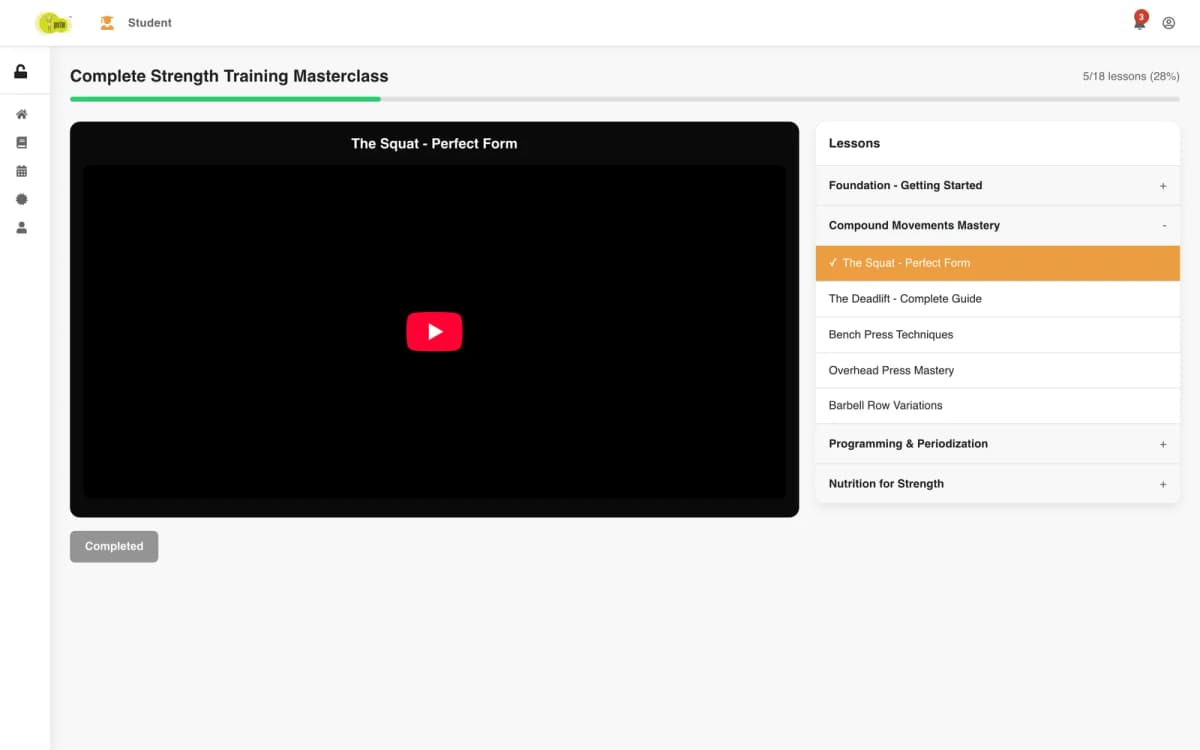
An online course is a list of sections, each a list of lessons with a video and a duration. The course works out its total lesson count and running time from that structure, which is what the public course page shows: "18 Lessons · 4h 49m". Admins manage these courses in their own list with lesson counts, enrolment and the assigned trainer.
When a student buys an online course, the same payment step that creates the registration also creates a progress record for that student and that course. The registration points to it, so the portal can open the player straight onto it.
As the student finishes a lesson, the player marks it complete with the section and lesson number and the time watched. The server ignores a lesson that is already complete, so replaying a video does not inflate progress. It then recalculates:
When progress reaches 100 percent, the student gets a "Congratulations! You completed …" notification with the course title. On the dashboard, "online courses in progress" counts the ones still under 100 percent.
The player only opens for a student with an active registration for that course. Anyone else sees "Not enrolled" with a link to the catalogue, so lessons are not reachable by sharing a URL.
Chapter 9
Trainers work across programs, so their portal is organised around what they teach and when, not around one course.
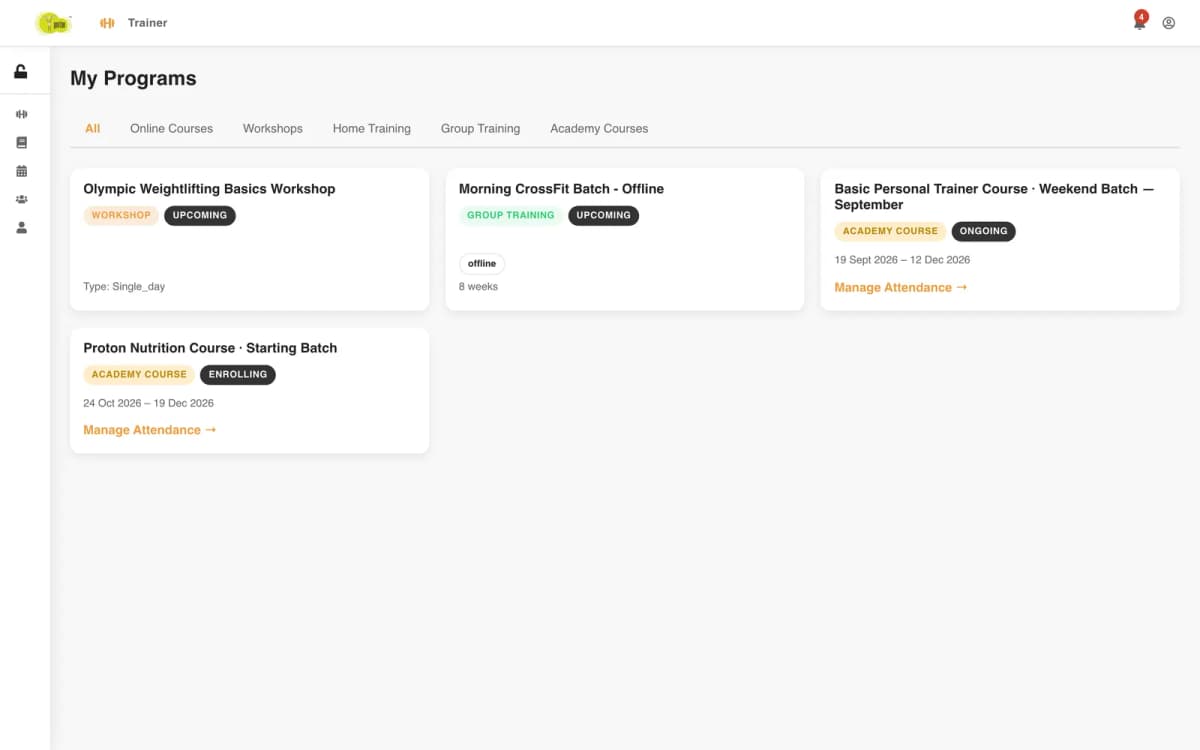
"My programs" lists everything the trainer is assigned to, across all five types, with a tab for each: online courses, workshops, home training, group training and academy courses. Each card shows its status and dates, and academy batches carry a link to manage attendance for that batch.
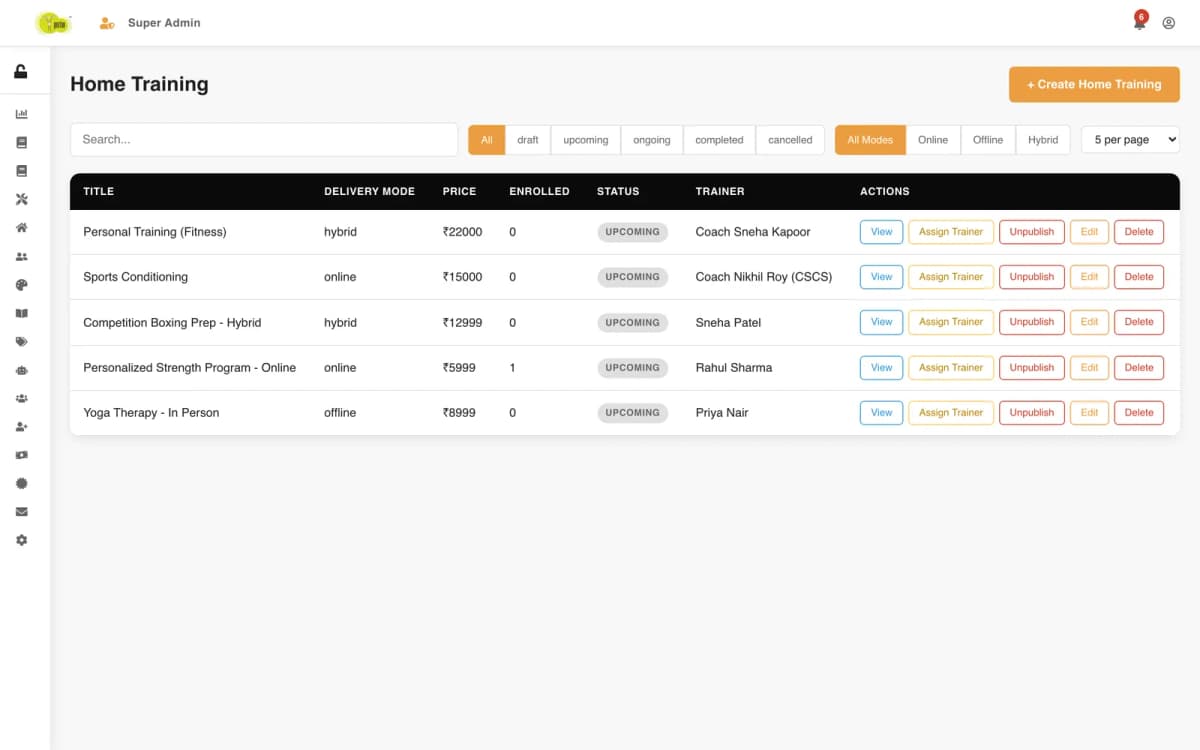
Assignments come from the console: admins assign a trainer to a specific workshop, program or batch, and a batch can also carry additional trainers beside the lead. That assignment is what decides whether a trainer may open a batch's session pages.
The teaching schedule is a month calendar of every class the trainer runs, coloured by type (workshop, home training, group training, live session), with a list view beside it. It is built from the same calendar entries the conflict checks use, so the calendar a trainer sees is the one that stops them being double-booked.
The trainer's profile holds their email, phone, bio, experience, certifications and specialties, which is the information students see about who is teaching them.
Trainer screens carry no revenue, payment or refund data. Trainers see their programs, their students and their schedule; everything to do with money and certificates stays with admins and the superadmin.
Chapter 10
Behind the portals is one console, shown in two versions: a full one for the superadmin and a narrower one for admins.
Every account is a student, a trainer, an admin or the superadmin. The role guards on the API load the user's record on each request and check its role there, rather than trusting what the browser says, and they answer 403 when the role is not allowed. Money-moving and site-wide actions sit behind the superadmin; day-to-day running sits with admins and the superadmin together.
New accounts are activated through an emailed link, which can be re-sent, and passwords are reset through an emailed link too. The superadmin can ban an account with a reason; a banned user who tries to log in is told their account is banned and why, instead of seeing a generic error. User management filters by role, activation and ban status, and opens each student's enrolments.
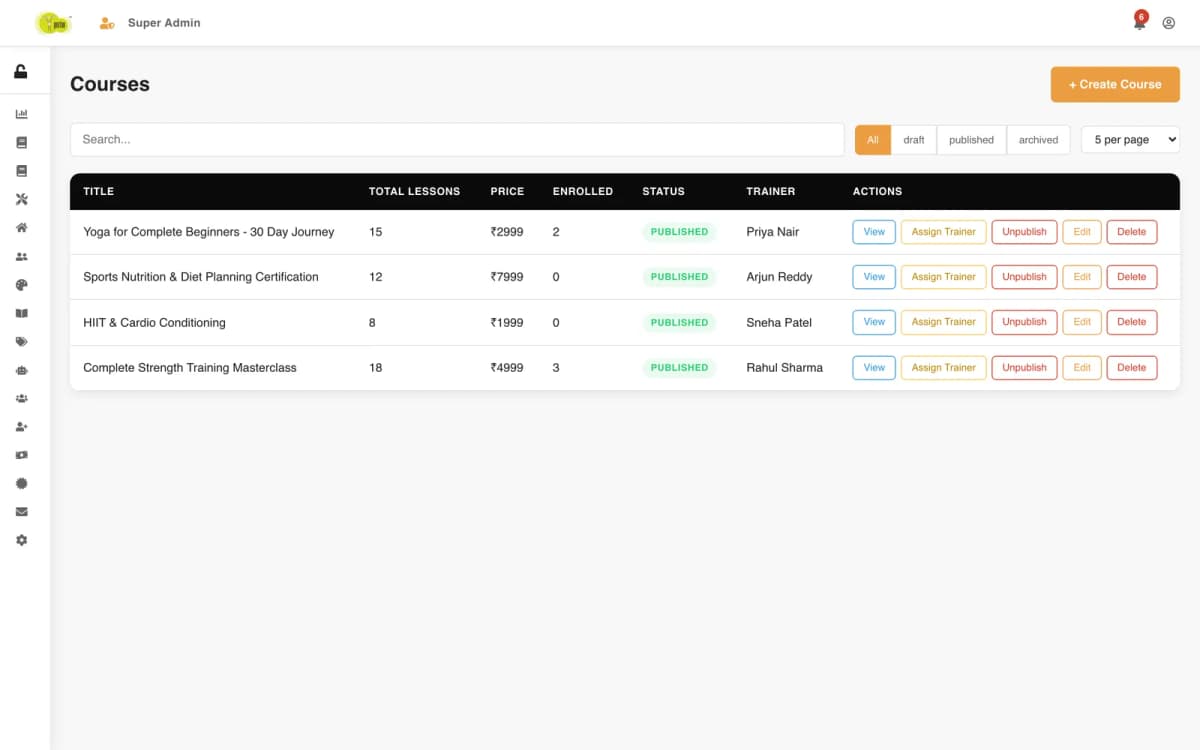
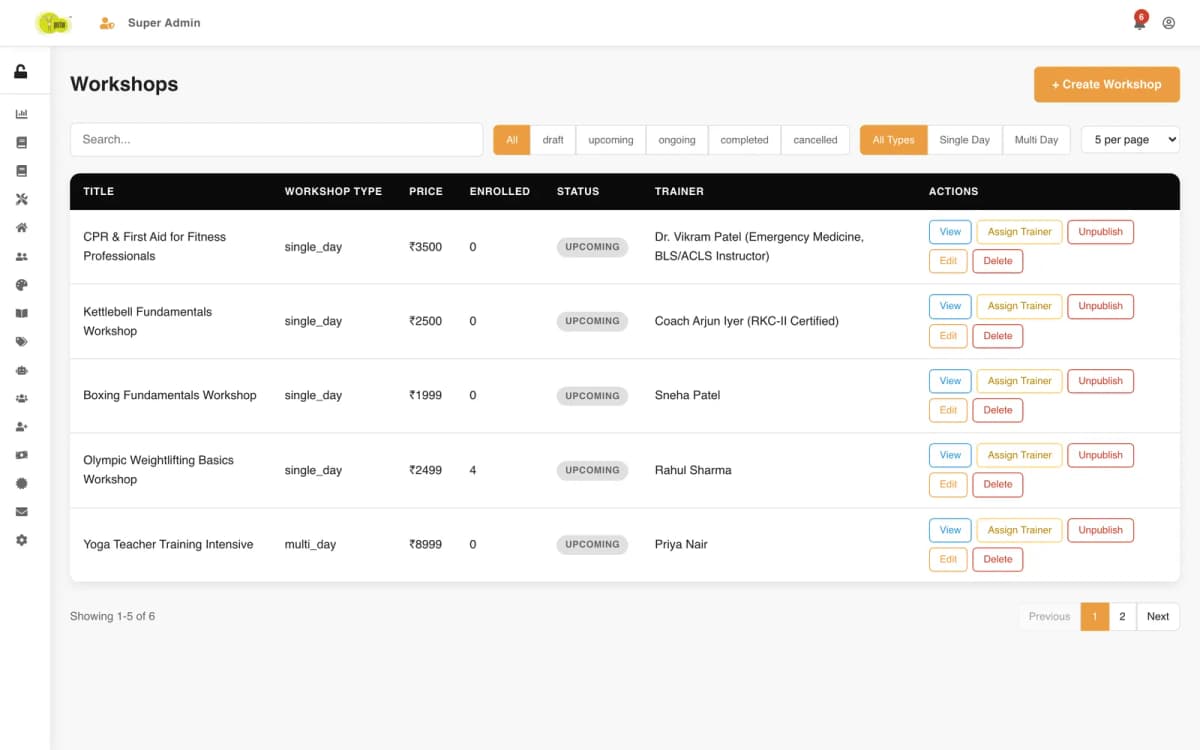
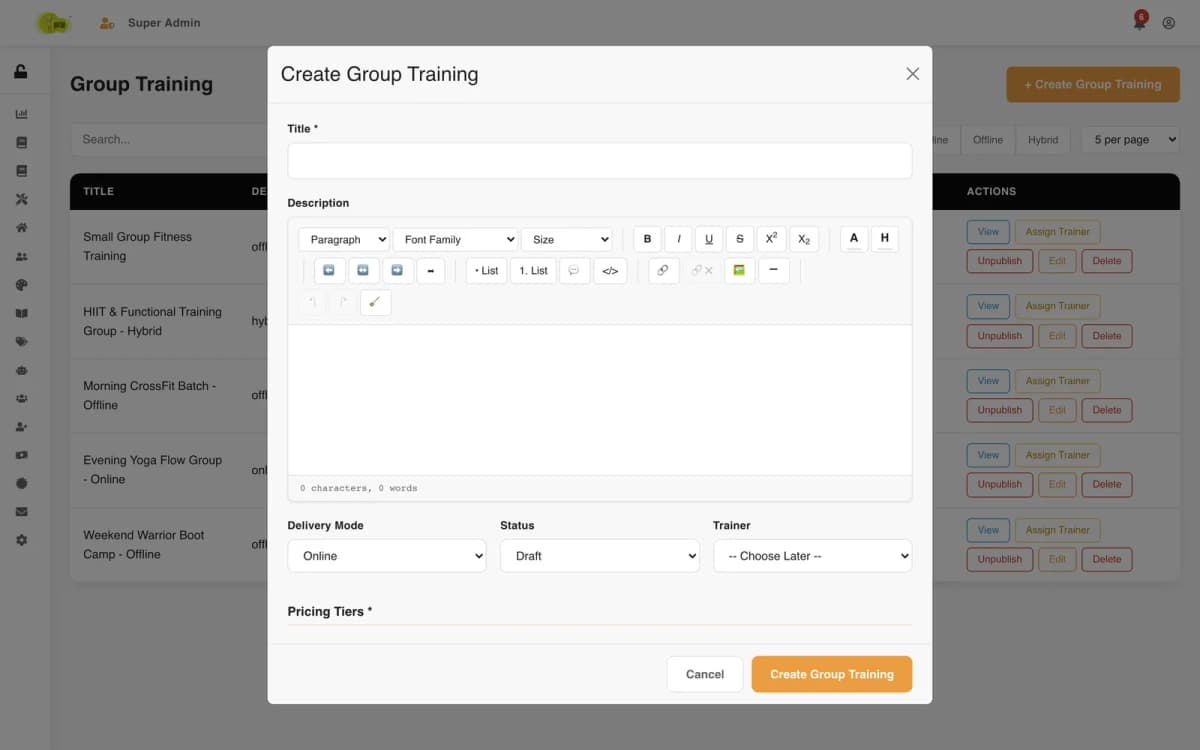
Each program type has its own list with search, status and delivery-mode filters and pagination: academy courses and their batches, online courses, workshops, group training and home training, each with create, edit, publish and "assign trainer" actions. Group training has its pricing tiers by group size in the same form as its description, mode, status and trainer.
The manual enrolment screen covers students who paid outside the website: choose the student, the program type and the program, add the amount and a payment note, and confirm. A short "How it works" panel beside the form tells the admin what will happen: a manual payment record and the registration are created together.
Messages from the contact form arrive as inquiries with the sender, subject and type. Each moves through pending, responded, on-going, completed or rejected, so the team can see what still needs a reply. Settings hold the academy's contact details (WhatsApp number and message, support email and phone), business details and social links, which the public site reads instead of hard-coding them.
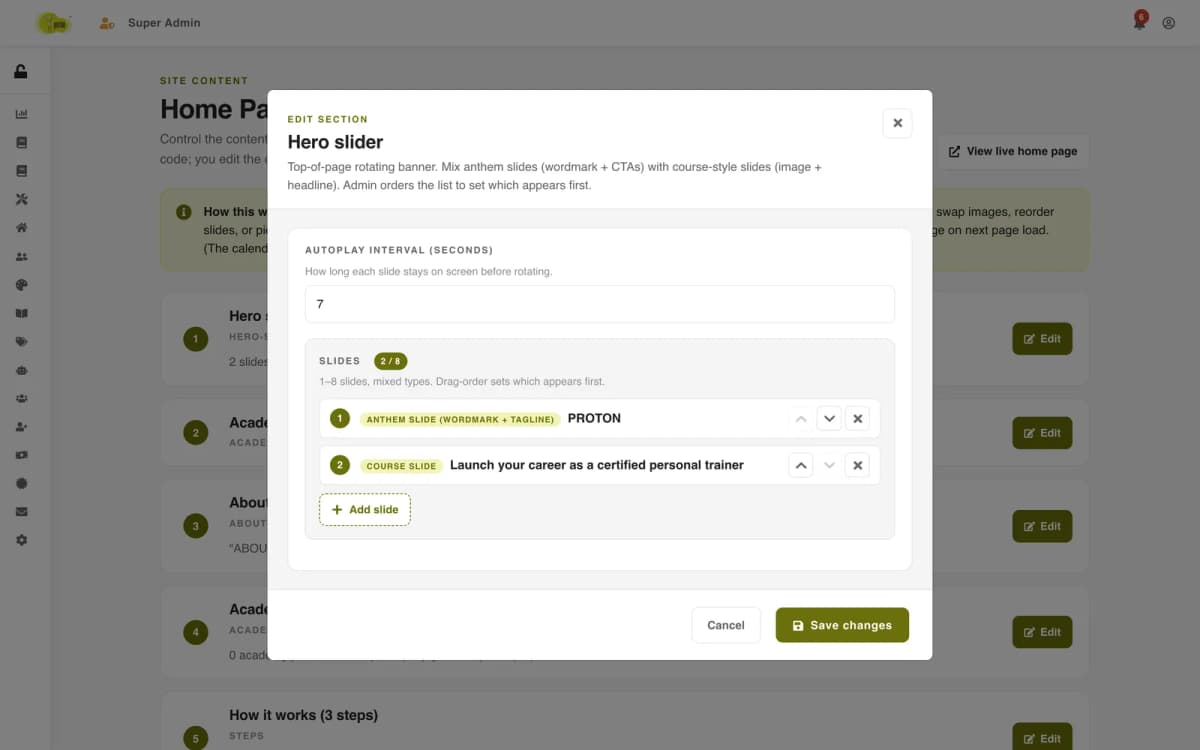
The blog has categories the academy manages itself (nutrition, wellness, career, training) and posts with status, author, featured flag and schedule. The home page is a CMS over a fixed set of eight sections — hero slider, academy highlights, about, academy courses, steps, why choose us, testimonials and featured blog — where the team edits the copy, images, lists and course picks inside each section while the order and layout stay fixed in code.
Chapter 11
The platform tells people about the things that change their plans, inside the portal they already use.
Notifications are written by the server at the moment something happens, not by a nightly job:
Each one carries a type, a category (information, success, warning or error), a title, a message, an optional link and a reference to the record it is about, so the portal can take the reader straight to the batch or certificate concerned.
The service can notify one user, a list of users (every student in a batch), everyone with a role, or all admins at once. Sending to a batch's students is done after the change is saved and outside the request's success path: if a notification fails to write, the batch update itself still succeeds.
A bell in the header of every portal shows the unread count. Opening it lists the latest notifications with their time; each can be marked read, deleted, or all marked read at once. The list is paginated and can be filtered to unread only, so a student who was away for a month is not handed a wall of old alerts.
Chapter 12
A WhatsApp message started it: a link to protonfit.com previewed as a bare card, with "protonfit.com" for both its title and its description.
The site's root layout began with "use client". Next.js ignores metadata exported from a client component, so the whole site had been shipping with no <title>, no meta description and no Open Graph or Twitter tags. All 22 public page files were client components too, so none of them could export its own. There was no favicon beyond the framework's default, no app icons, no share image, no robots.txt and no sitemap.
The audit also found that the phone number and address in the footer looked like template values, and that contact details lived in three copies that disagreed. We did not put business structured data on top of that. The academy supplied its real details, and phone, email, address and social links now come from admin settings that feed the footer, the contact page and the structured data from one place.
The production build came out at 64 pages, and the live site now serves titles, previews, robots.txt and a sitemap.
Chapter 13
Proton's API runs in Node cluster mode: a master process and a worker for every CPU core. A scheduled job placed naively would run in each of them and publish the same post several times a day. The academy asked for a blog that writes and publishes itself once a day.
The scheduler starts only in the cluster's master process. That holds for one server but not for two, so each day's run must also win an atomic MongoDB update: set lastRunOn to today's UTC date only where it is not already today. Whichever process gets there first publishes; every other process finds nothing to update and stops. The day's posting hour is picked at random within Indian daytime, and that choice is claimed the same atomic way, so every process agrees on it.
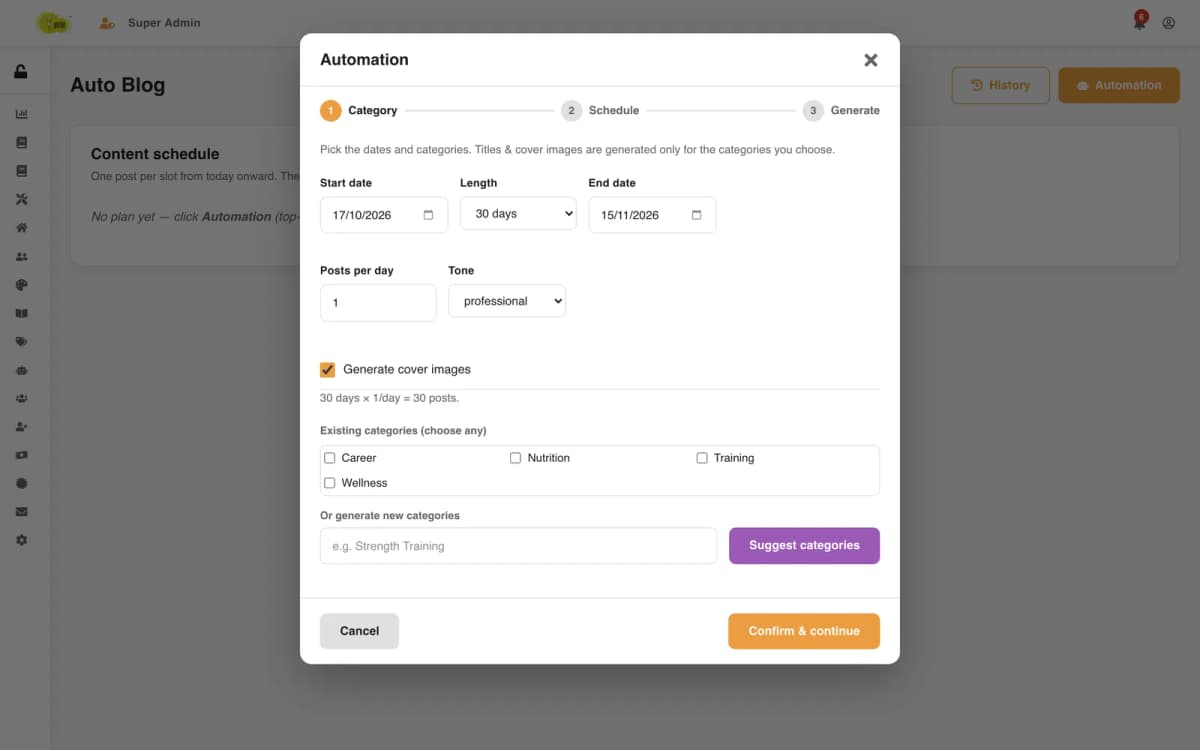
A three-step wizard in the admin console plans the content:
An hourly tick publishes the draft dated for today. A second hourly job writes drafts for any topic still waiting, for example after the admin closed the wizard early. Each topic is claimed atomically, from scheduled to generating, so the catch-up job and a wizard run never write the same post twice. In testing, one of six drafts stayed unwritten because a backend restart had interrupted it; the catch-up job generated it without anyone pressing a button.
On a local database a tick published a post with its cover in S3, and a second tick on the same day did nothing. The feature is not deployed yet: it needs a production AI API key and fonts on the server for the cover text.
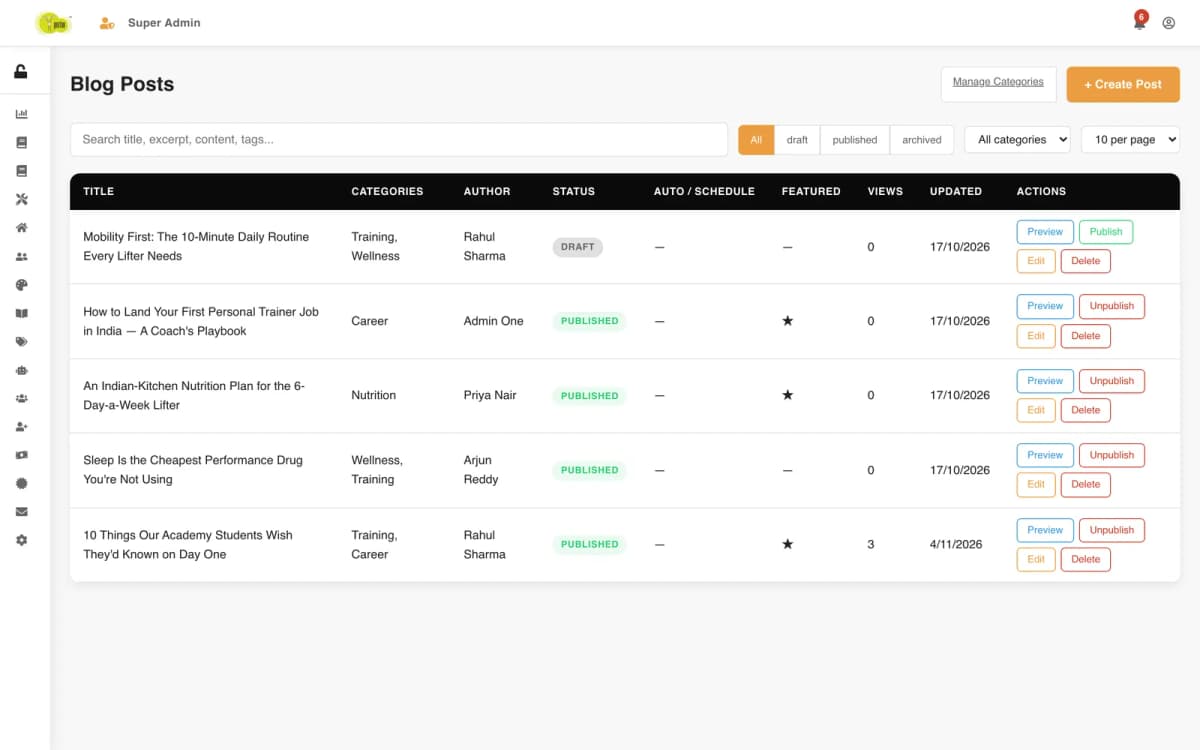
Group training, home training and workshops each have a public listing and detail page, a schedule and their own enrolment.
A course runs as batches with dates, days, time slots, a trainer, a price and a capacity. The server generates the sessions from that pattern, and each batch shows as upcoming, enrolling or ongoing.
Attendance is recorded for every session. A student sees sessions held, present and absent counts and an attendance percentage for each batch.
Today's classes with time and studio, all enrolments, an online-course player with lesson progress, and one calendar of every session that can be subscribed to as a calendar feed.
Trainers see every workshop, training program and academy batch assigned to them, and a teaching calendar colour-coded by program type.
Enrolment creates a pending certificate; an admin issues it with attendance and grade, one at a time or in bulk. Each gets a number such as PROTON-2026-GRP-000001 and a SHA-256 signature and can be revoked, and the site has a public verification page.
Orders are priced on the server and payment signatures checked with HMAC-SHA256. Admins can also record a manual payment and process refunds from the console, and every payment gets an invoice number.
Eight fixed home-page sections, from the hero slider (one to eight slides) to the featured blog, are edited in place with character limits, while the layout stays fixed.
Per-page titles and descriptions, server-built metadata for blog and course pages, icons and a share image generated from the logo, plus robots.txt, a sitemap and structured data.
A three-step wizard plans categories, a dated title schedule and cover images; an AI model drafts the posts, and a scheduler publishes one each day.
Sections and lessons with video, a progress record per student, completion percentage, resume where you stopped and a completion notification.
Every student gets a private subscription link that keeps all their classes in Google Calendar, Apple Calendar or Outlook, plus a single-class .ics download.
Every payment gets a yearly invoice number; refunds are limited to paid payments and the amount paid, and go back through Razorpay where the payment came from.
Enrolment confirmations, batch changes, course completions and certificate revocations, with unread counts and mark-all-read.
Real screens · 29
Each academy course has batches with start and end dates, days of the week, time slots, a trainer, a price and a capacity. The server generates every session from that pattern, attendance is recorded per session, and students see sessions held, present, absent and their attendance percentage.
The scheduler starts only in the cluster's master process, and each day's run must also win an atomic MongoDB update on the date of the last run, so only one process can publish per UTC day. The blog is built and tested on a local database and is not yet switched on at protonfit.com.
The root layout was a client component, and Next.js ignores metadata exported from client components, so the site served no title, description or Open Graph tags. We made the layout a server component, moved the interactive shell into its own client component and added per-page metadata, icons, a sitemap and robots.txt.
Enrolling in a workshop, training program or academy batch creates a pending certificate. An admin issues it with attendance and grade, and it carries a number in the form PROTON-2026-GRP-000001 and a SHA-256 signature; it can be revoked later.
Every enrolment, online or entered by an admin, runs one server-side check that counts the batch's active and completed registrations at that moment and compares them with its class size. Checkout runs it again after the payment is verified, because the batch can fill up while a student is paying.
When an admin issues it, a certificate can carry the attendance percentage, the sessions attended out of the total, a score, a grade and the trainer who signs it with their designation. Its number shows the year and the program type, and the record keeps who issued it and when.
The schedule page gives each student a private subscription link. Added to Google Calendar, Apple Calendar or Outlook, it lists every class across their enrolments and updates when a batch changes. Single classes can also be downloaded as an .ics file.
 Featured
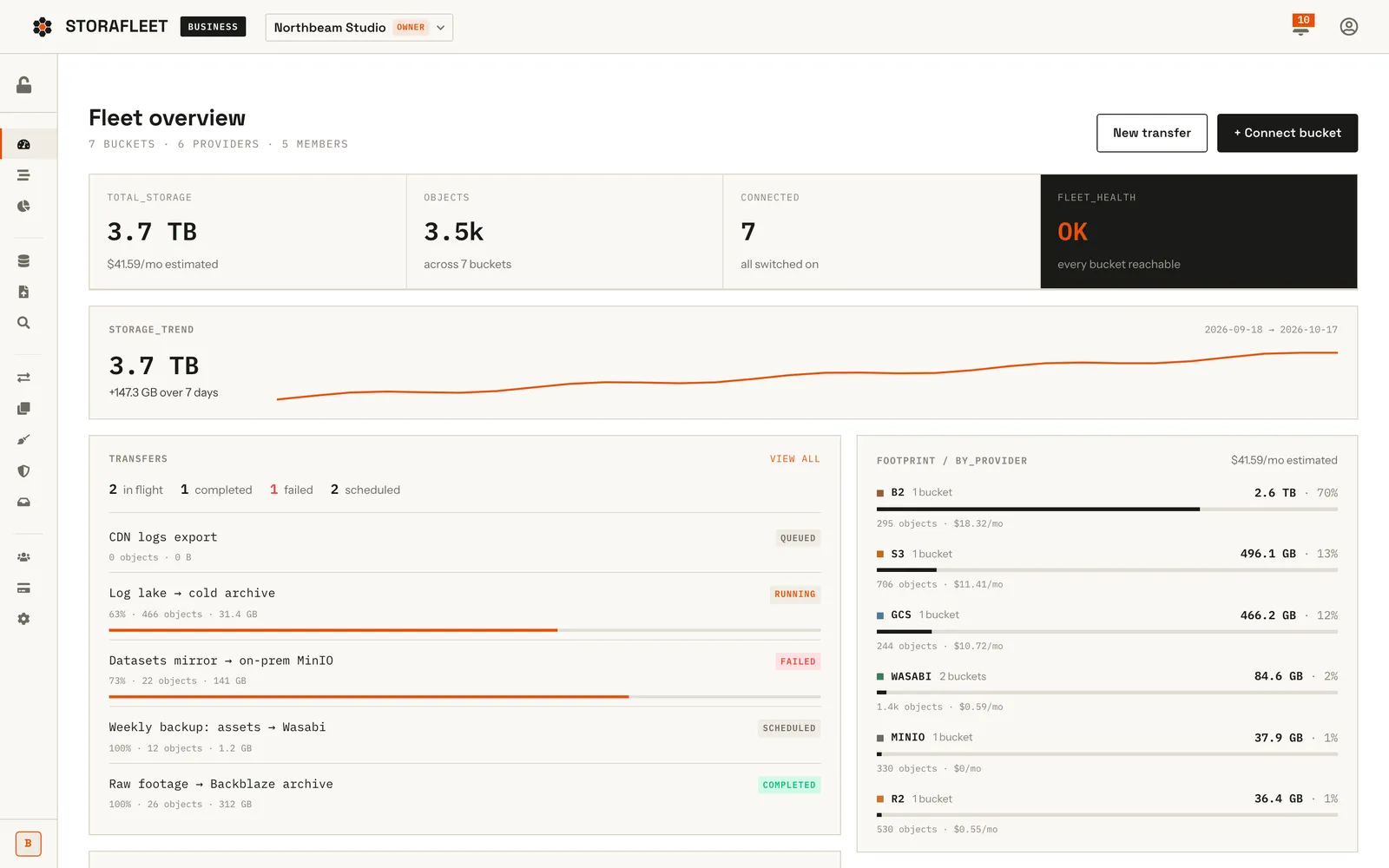
Storafleet is CountryDevs' own SaaS control plane for object storage. Teams connect buckets they already own on 50+ providers, including AWS S3, Cloudflare R2, Backblaze B2, Wasabi and MinIO, then browse, migrate, search, secure and cost-check them from one console.
 Featured
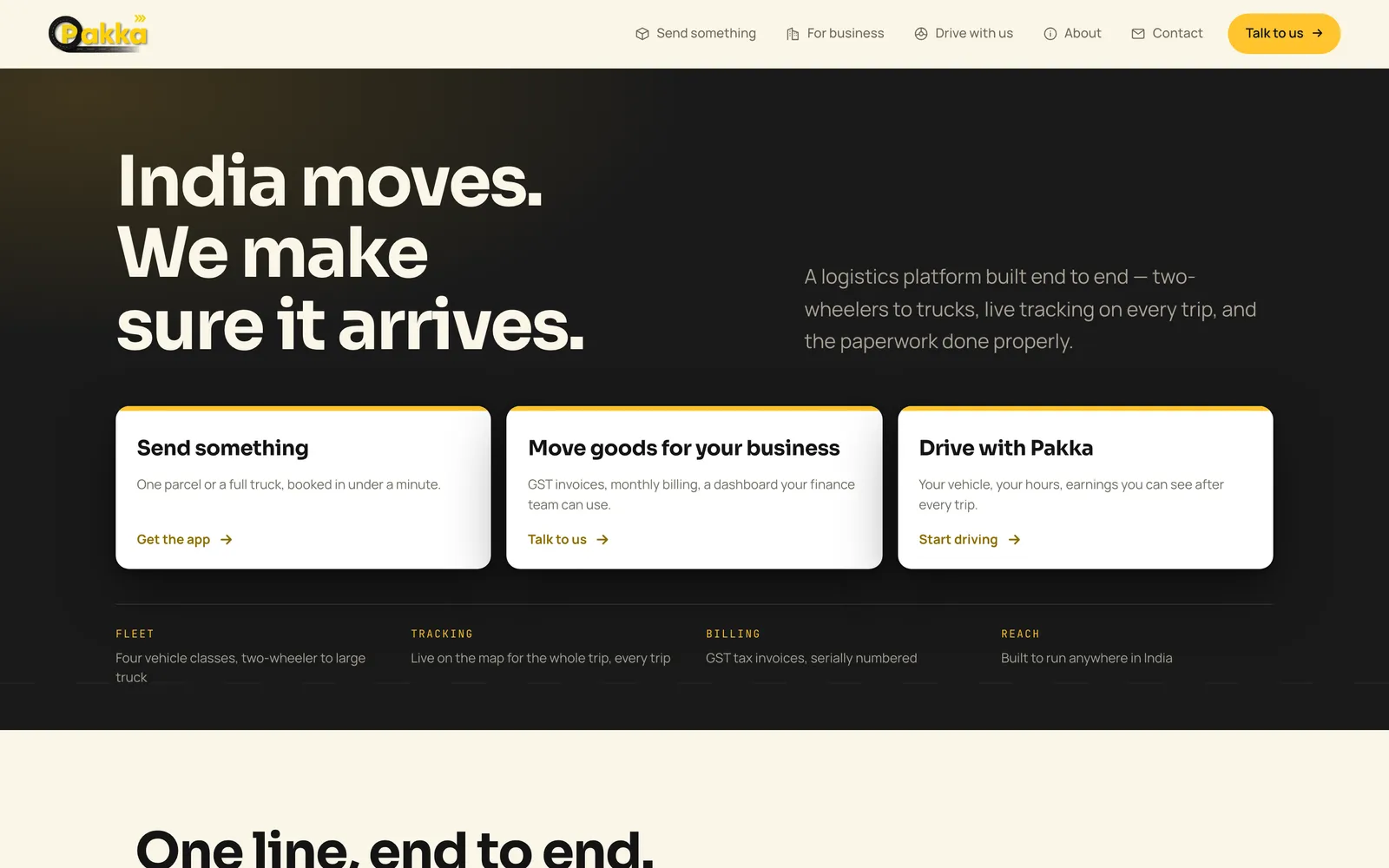
Pakka Logistics is an on-demand goods delivery platform for India. We built all of it: Android apps for customers and drivers, a business portal, an operations console and the website. The web platform is live and both Android apps are on Google Play; the two iPhone apps are in App Store review.
 Featured
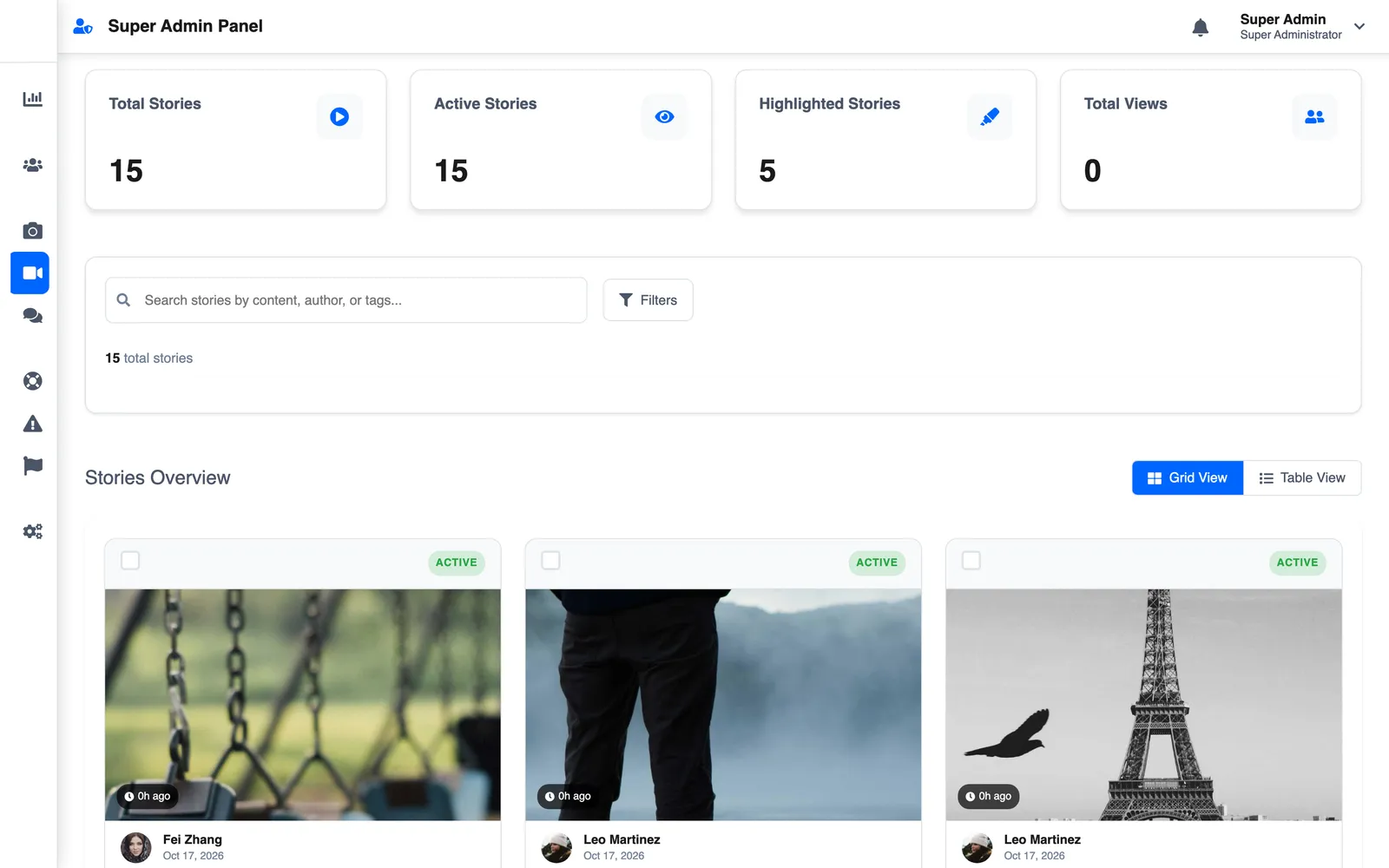
LetSlic, listed on Google Play as Slic, is a social app for photo posts, 24-hour stories and real-time chat with group moderation. We built it for Slic Solutions Private Limited: the React Native app, two Node.js APIs, the superadmin console and the website, plus Premium and ads.
Tell us what you're trying to ship and which project here is closest to it. We'll reply with the questions that shape the plan, then start with a two-week Discovery Sprint, so you see the screens and the plan before any code is written.
Not ready for a full build? Start with a Discovery Sprint, or get a code audit of an app someone else built. See how a project runs with us.
More on what we build from Bangalore for Indian businesses: App Development Company in Bangalore.