All projects
Saas
Built — not yet launched

AlwaysLoud — AI Content Marketing Platform for SaaS

AlwaysLoud is CountryDevs' own content-marketing autopilot for SaaS companies. It reads a company's site and app, then writes blog posts, case studies, social posts, newsletters and narrated feature videos, and holds any sentence about the business the company never published. Built, not launched.

For AlwaysLoudSep–Oct 2026
  • Web app (workspace)
  • Operator (superadmin) console
  • Node.js API with a Playwright browser and an ffmpeg render worker
  • Receiver kit that runs inside customers' apps
  • MCP server for AI coding assistants
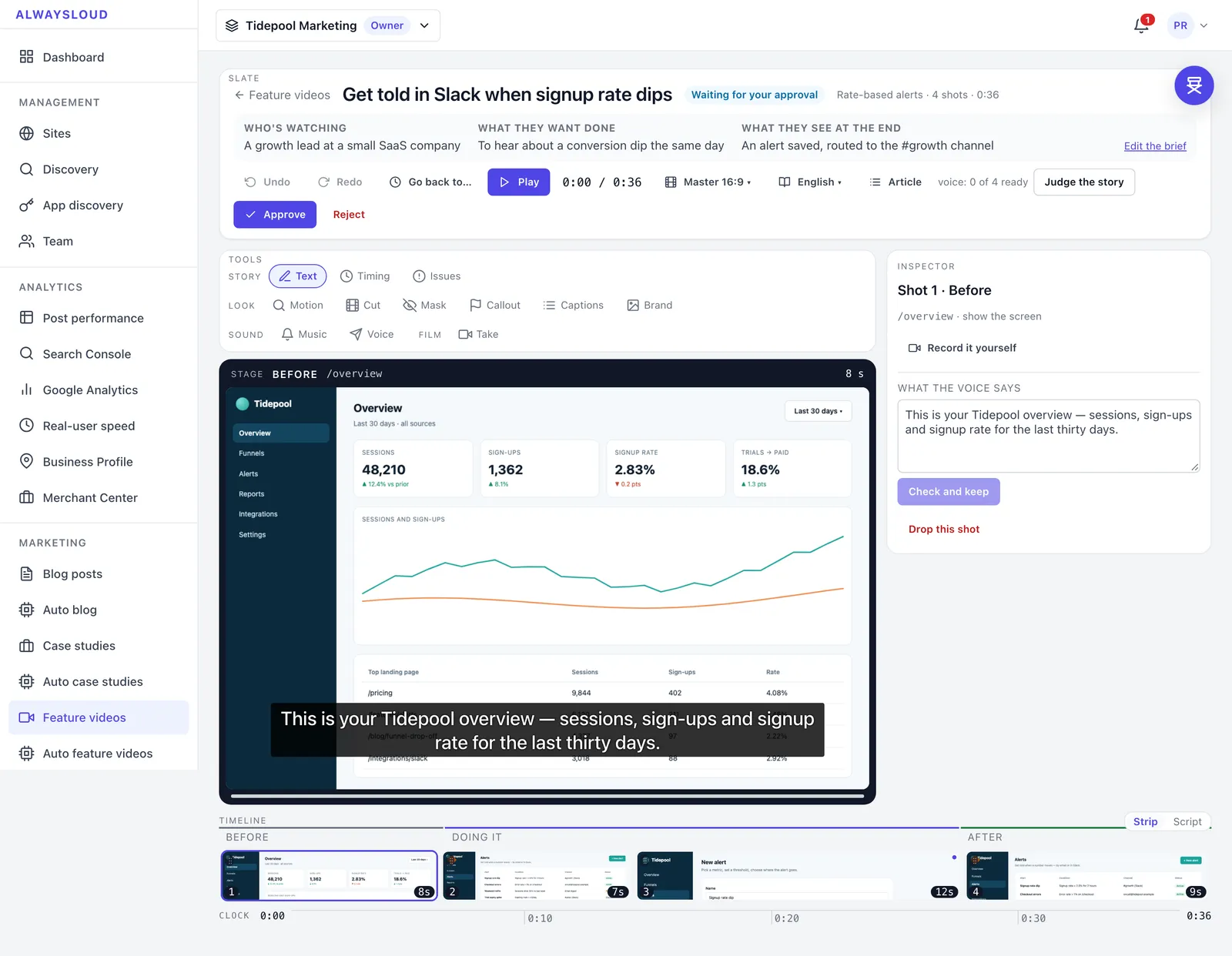
Video storyboard studio with stage, inspector and shot timeline

Overview

AlwaysLoud is a content-marketing autopilot that CountryDevs designed and built as its own product. A SaaS company connects its website and, if it wants videos, a demo login to its app. AlwaysLoud reads the public pages into a map of what the company actually claims, signs into the app to find its real screens, and from there writes blog posts, case studies, LinkedIn and X posts, a monthly newsletter, comparison and integration pages, and short narrated videos of single features made from real recordings of the app.

Every piece passes a support gate before it goes anywhere. Code finds each sentence that makes a claim about the customer's business, and a model has to match it to something the customer already published or told us. Sentences that cannot be matched are held for a person. Posts reach the customer's own app through a signed receiver kit, or WordPress and Webflow, and a Site Doctor turns Search Console, Analytics and page-speed data into written fixes.

We built the whole stack: a Next.js 15 workspace and operator console, a Node.js and Express API on MongoDB with Playwright and ffmpeg, a Python narration sidecar and an MCP server. It runs locally and is tested against our own product, Storafleet. It is not deployed and has no customers yet, so this page is about the engineering.

How does AlwaysLoud stop AI content from inventing claims?

AI writers are good at the most dangerous sentence a marketing post can contain: a plausible claim about the customer's own product that the customer never made. "Storafleet supports over 50 providers" breaks no rule about style or numbers. The only test is whether they ever said it, so we built that check in code, with one model call inside.

Find, narrow, judge, decide

  1. Find (code). The post is split into sentences, headings dropped, and a sentence is flagged only if it names the customer, speaks as them ("we", "our") or compares them with someone else. A sentence about how a technology works is not their liability.
  2. Narrow (code). Each flagged sentence gets up to six candidates: the claims Discovery read off the customer's pages that share the most distinctive words with it, plus everything the customer told us directly. Discovery had read 1,475 sentences off Storafleet's pages, far too many to show a model at once.
  3. Judge (one model call per post). For each sentence the model answers two questions: does it claim anything that could be wrong, and if so, which one candidate supports it.
  4. Decide (code). A citation the model was not shown for that sentence is dropped. A sentence the model skipped counts as unsupported. A judge that cannot run marks the post unchecked, never passed.

What the first real run taught us

On a real Storafleet post, the first version held 11 sentences, and most were the writer declining to claim things ("we are not claiming that"). We split the judge's question in two. On the same post the gate then held none of the 15 risky sentences, cited evidence for two, and still caught both planted inventions: an ISO 27001 certification and a 99.99% uptime SLA. A third plant, "over fifty storage providers", passed correctly, because Storafleet says "50+" on four of its own pages.

A held post has no "publish anyway" button. The way out is "that's true, here's the proof", which saves a proof point that later posts can use too.
How do posts get into a customer's app without CMS access?

AlwaysLoud never logs into a customer's CMS. The customer drops a small receiver kit into their own backend, and AlwaysLoud sends each post to it as signed JSON with a publish time. The app stores the post, copies its images into its own storage and publishes it itself when the time comes.

One contract file for both sides

The contract is one plain CommonJS file with no dependencies, shared by our sender and every receiver. It holds the limits, error codes, HTML allowlist and signing scheme, and a server test fails if either side re-declares any of them.

Signing the raw bytes

Each request is signed with HMAC-SHA256 over the method, the path, a timestamp, a nonce and a SHA-256 hash of the exact request body. The kit mounts before the app's JSON parser; if the parser has already run, it answers KIT_MISCONFIGURED rather than verify re-serialised JSON. Timestamps more than five minutes out are refused, and a nonce is stored only after the signature checks out, so unsigned traffic cannot fill the nonce table. During a key rotation, two keys are accepted.

Images judged by their bytes

Images are downloaded only from allowed origins, with no redirects, a 15-second timeout and a 10 MB limit. The type comes from the file's first bytes (PNG, JPEG, WebP, GIF or AVIF), never from the Content-Type header, and SVG is refused because it can carry script.

Safe with several app instances

The kit's publisher runs every minute in every instance of the app. Publishing is a conditional update on the post's status, so two instances that tick at the same moment publish a post once. That case has its own test among the kit's 29.

For apps not on Node.js

A generated guide covers any language, and conformance.mjs, a single file for Node 18+ with nothing to install, sends real signed requests and prints PASS or FAIL with the fix for each rule. One check sends oddly spaced JSON, to catch receivers that verify parsed JSON instead of the raw body.

How are feature videos built from real app screens?

A feature video starts as a storyboard: a short brief (who is watching, what they want done, what they see at the end) and a strip of shots, each a real screen of the customer's app with one sentence of narration. Nothing renders until a person approves it, and approval waits while a story issue is open.

Timing comes from the voice

Narration is generated first. Each shot holds for its sentence plus the chosen pace, never less than the sentence plus one second, so no voice is cut off. The same timings drive the recording, the edit and the captions.

Narration on our own server

The default narrator is Kokoro, an open-weight 82-million-parameter speech model run on CPU through ONNX Runtime in a Python sidecar, with no per-sentence fee. Its ONNX build returns no word timings, so the sidecar estimates each word's share of the audio from its phonemes, accurate to about a tenth of a second on product sentences.

The render

Playwright records the app, and ffmpeg cuts each shot to H.264 once and reuses it in later renders. Shots are joined with the transitions the studio previews; captions are burned in with one libass pass. When licensed tracks are on file (none ship with the server), the music bed sits at a fixed level, is ducked under the voice by a sidechain compressor, and the mix is normalised once to −16 LUFS. Each render writes a master, a clip of up to 20 seconds, a poster and VTT and SRT captions, in 16:9, 9:16 or 1:1.

What real renders found

The first real Hindi and Tamil renders, in October 2026, failed: the server's ffmpeg had no libass or libfreetype, and the test suite used a fake renderer. We moved to a full static build; the render now checks what its ffmpeg can draw and reports what it skipped rather than failing. The same pass replaced a notched caption band in Devanagari with one box behind the whole line. After the fixes, a 42-second English master rendered in 50 seconds.

How does AlwaysLoud explore a customer's app without changing anything?

To film real screens, AlwaysLoud has to find them inside an app it has never seen, signed in as the customer, without changing anything. We modelled access on app-store review: the customer gives us a demo account with made-up data and no two-factor prompt. If the login page shows a captcha or asks for a code, the run stops and says so. It never tries to get past either.

The walk

Playwright opens a 1440×900 browser, signs in (the only form it ever submits) and walks the app breadth-first: up to 60 screens, four levels deep, 12 clicks and 45 seconds per screen. On each screen it records the title, the headings, every control by its accessible name and a screenshot. Links are always followed, because opening a page is reading. Buttons, tabs and menu items are followed only when the fence allows them.

The fence

The fence is a deny-list matched against accessible names: words for deleting, paying, reaching other people, changing access and committing anything (save, submit, import, export). It is cautious on purpose, so "Remove filter" is refused too. A false positive costs a screen; a false negative costs someone's data. Any button inside a form, or of type submit, is refused whatever it is called.

A vision model looks at each screenshot and suggests which controls are sections and which are worth opening. It can only reorder and prune. Advice to press a denied control changes nothing, and a test plants exactly that advice to prove it.

The first real run

On Storafleet's app, the first advised walk covered 19 screens and mapped 15 of 17 workspace sections, refusing 29 clicks along the way. It also pressed three buttons that start work, "Scan for duplicates", "Rescan all buckets" and "Test connection", because none was a deny word or sat inside a form. Nothing was damaged (a scan ran in the demo account), and the deny-list gained a "starts work" group: scan, run, sync, retry, connect and others.

The challenge

SaaS companies need a steady stream of content, and AI writing tools can produce it. The problem is what they produce. The riskiest sentence in an AI-written post is a plausible claim about the company's own product that the company never made, published on its own domain under a real person's name. Style rules and fact-checkers about the wider world do not catch it, because only the company can say whether it is true.

Video has a different cost. A short feature video needs someone to script it, record the screens and do it again whenever the interface changes. And all of this has to land on the company's own site, whatever stack it runs on, without handing a third party the keys to its CMS or its app.

The solution

We built AlwaysLoud around one rule we had already proven in our own AI products: the model phrases, code owns the facts. Discovery keeps a claim from a customer's page only when its quote appears on that page word for word. The writer's drafts go through deterministic lint (banned phrasing, false precision, invented people) and then the support gate, which decides in code and uses the model only to match sentences to evidence.

Videos start as storyboards of real app screens that a person approves before anything renders. Reelberg, a director chat inside the studio, edits a storyboard only through a kit of typed operations, the same ones the inspector's buttons and the MCP server use, so every change can be checked and undone. Posts travel as signed JSON to a small receiver kit inside the customer's own backend, which stores them, copies their images and publishes them at the scheduled time itself.

The impact

AlwaysLoud is built and not launched. alwaysloud.com serves a parking page, the product runs on our machines, and it has no customers, so we quote no user or revenue figures. Live operation of some Google services is waiting on a Google API key and a Google OAuth app, and Google Trends is waiting on Google's alpha access. The social networks and newsletter providers are written against their APIs but have not been run against real accounts.

What the records show is the engineering. Between 16 September and 17 October 2026 each feature was logged in dated trackers with its API suite and browser walk results, and on 17 October the server's Jest suite passed 701 tests. Run on a real Storafleet post, the support gate caught both planted false claims. On its first real run, app discovery mapped 15 of the 17 sections of Storafleet's app. The first real renders in English, Hindi and Tamil found three faults that no test had caught, and all three were fixed the same day.

Features

What we built into AlwaysLoud

Discovery that quotes, never paraphrases

AlwaysLoud reads a site's own pages and keeps a claim only if its quote appears on the page word for word. Claims are grouped into product pillars, ranked by how much of the site carries each one, and confirmed by the customer.

Read-only app discovery

With a demo login, a Playwright browser walks the customer's app screen by screen, taking a screenshot of each, and a deny-list stops it from pressing anything that saves, sends, pays or deletes.

Blog posts and an auto blog

Posts are written from the searches a site already appears for, announced before they go out so they can be cancelled, and published at a random time inside the site's posting window.

Case studies about named clients

Case studies are written one client at a time, only from what that client has published, and the support gate runs a second time against the client's own words.

Social posts and a monthly newsletter

Each published post becomes LinkedIn posts and carousels and X threads, with publishers written for YouTube, Instagram, TikTok and Google Business Profile. The newsletter goes through the customer's Mailchimp or Resend account, and the real send waits for a person to press Send.

Feature videos and the Studio

A storyboard of real app screens becomes a narrated video with captions and an optional music bed, in 16:9, 9:16 or 1:1, and can be translated into 65 languages.

Reelberg and an MCP server

Reelberg is a director chat that edits the storyboard through the same typed operations as the inspector's buttons. An MCP server with nine tools lets an AI coding assistant read and edit a storyboard through the same rules.

Site Doctor

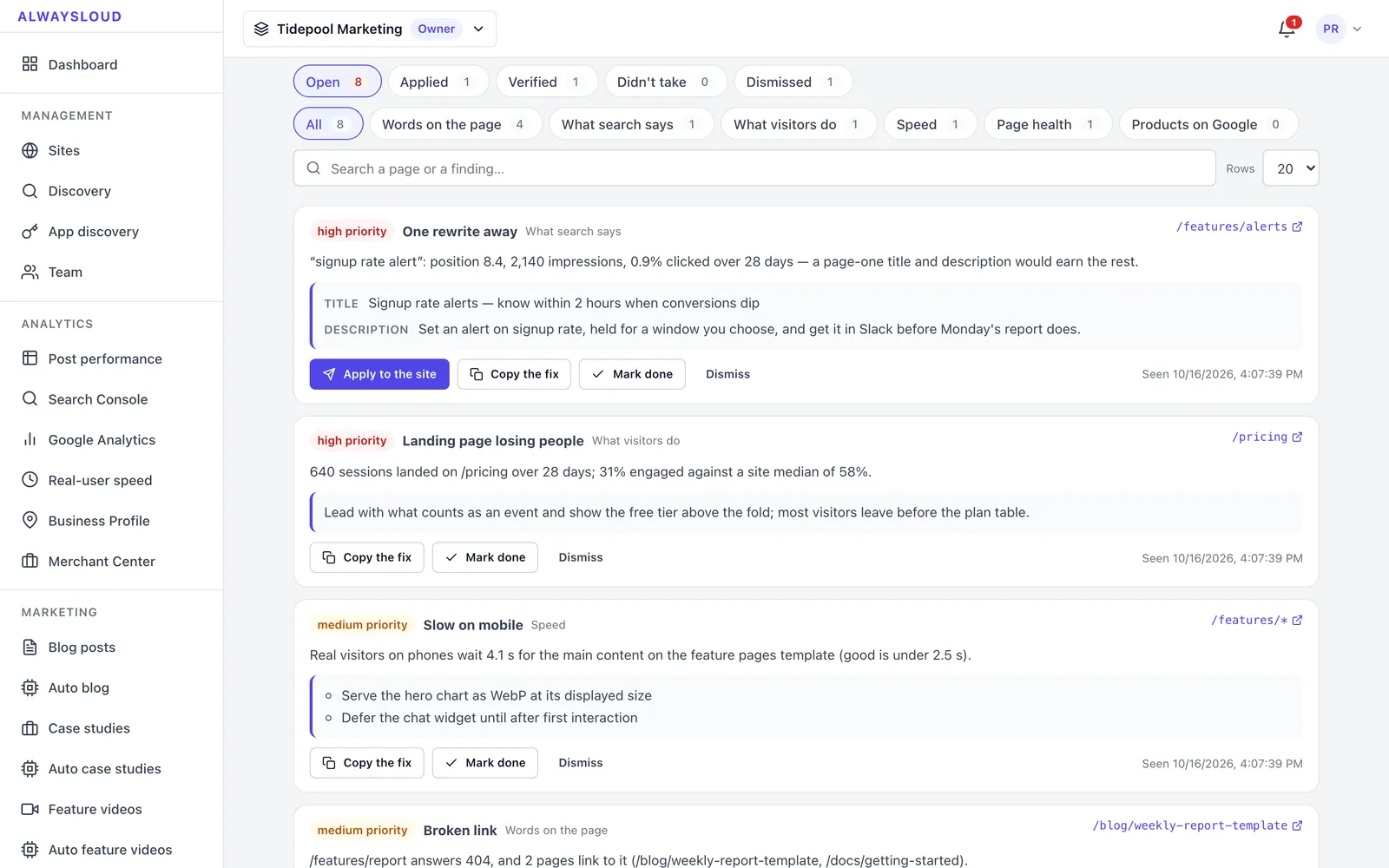
Findings from the site's pages, Search Console, Analytics and real-user speed data, each with evidence, a priority and the fix already written. A fix can be applied through the receiver kit or copied, and later reads show whether it worked.

Weekly director brief

Every Monday each site gets a one-page brief built from its numbers. Every line cites a fact that code computed, and every suggestion links to one action.

Programmatic pages with a duplication check

Alternative-to and integration pages are written only from the customer's own words. Each batch is measured with 6-gram Jaccard similarity, and a page at 0.70 or above against a sibling is held.

By the numbers
701
Server tests passing at the 17 October 2026 build
2/2
Planted false claims caught by the support gate on a real post
15/17
Storafleet app sections mapped on the first real app walk
65
Languages a storyboard can be translated into
Screens

What AlwaysLoud looks like

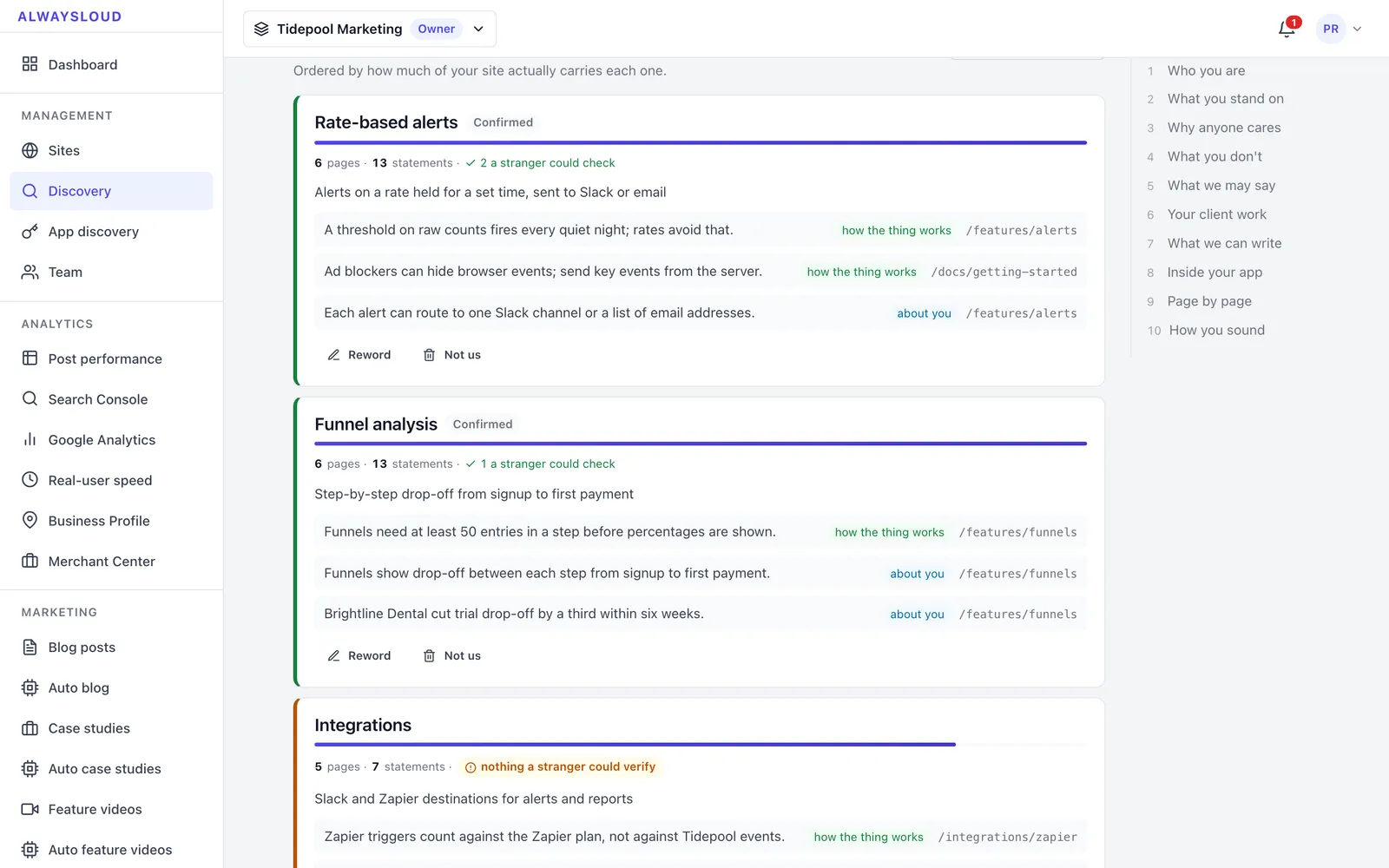
Discovery report listing product pillars with page and claim counts and confirm buttons
Discovery reads the site's own pages and groups what they claim into pillars, ranked by how much of the site carries each one, for the customer to confirm.
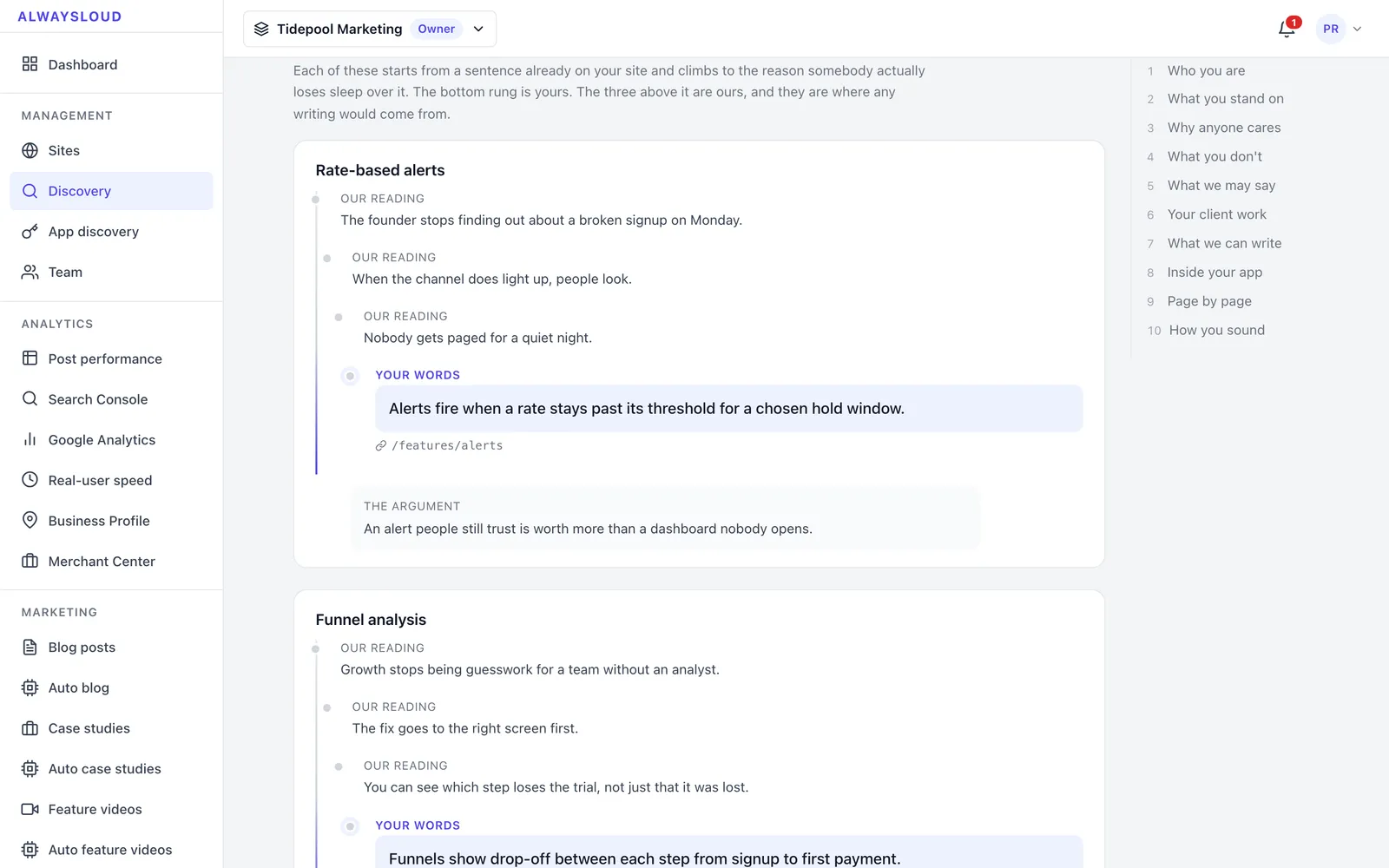
Why anyone cares section showing benefit ladders built from site quotes
The message house climbs from a sentence on the site to the reason a buyer cares, marking which rungs are the customer's words and which are AlwaysLoud's reading.
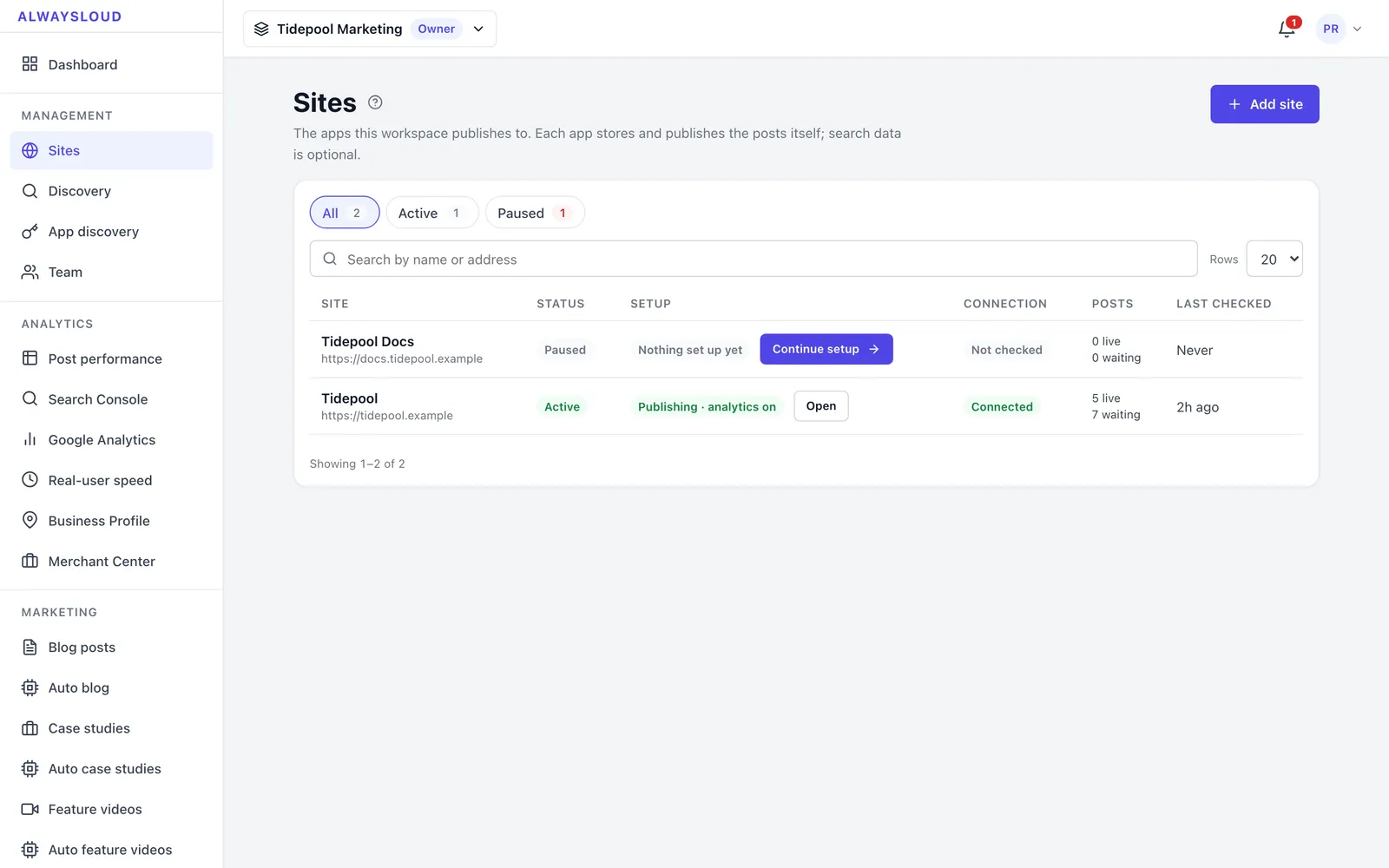
Sites table with status, setup progress, connection and post counts
Each connected site shows whether it is active, how far setup has got, whether the receiver in the customer's app answered, and how many posts are live or waiting.
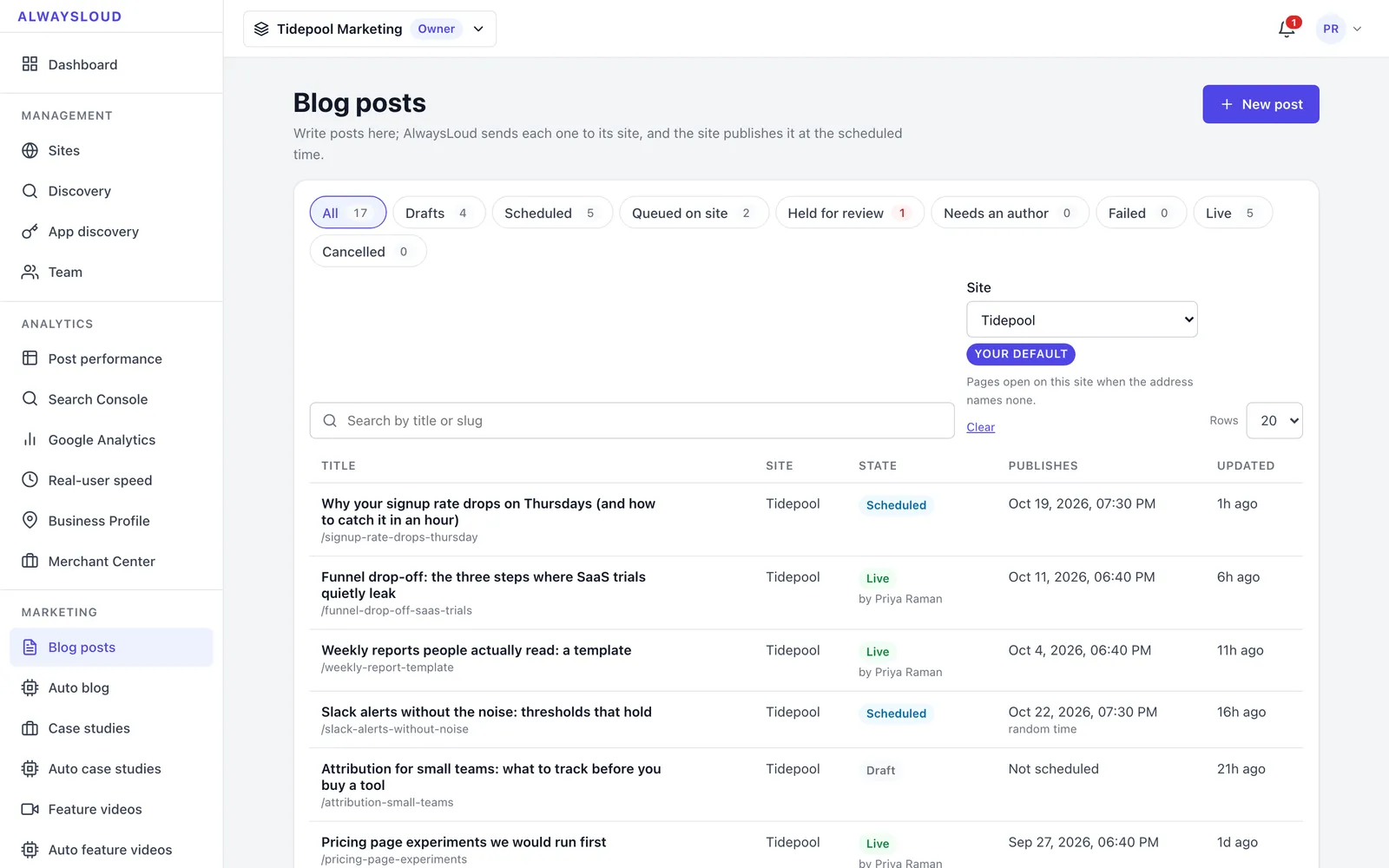
Blog posts list with state filter chips and scheduled and live posts
Every post across states — drafts, scheduled, queued on the customer's site, held for review and live — with its publish time and author.
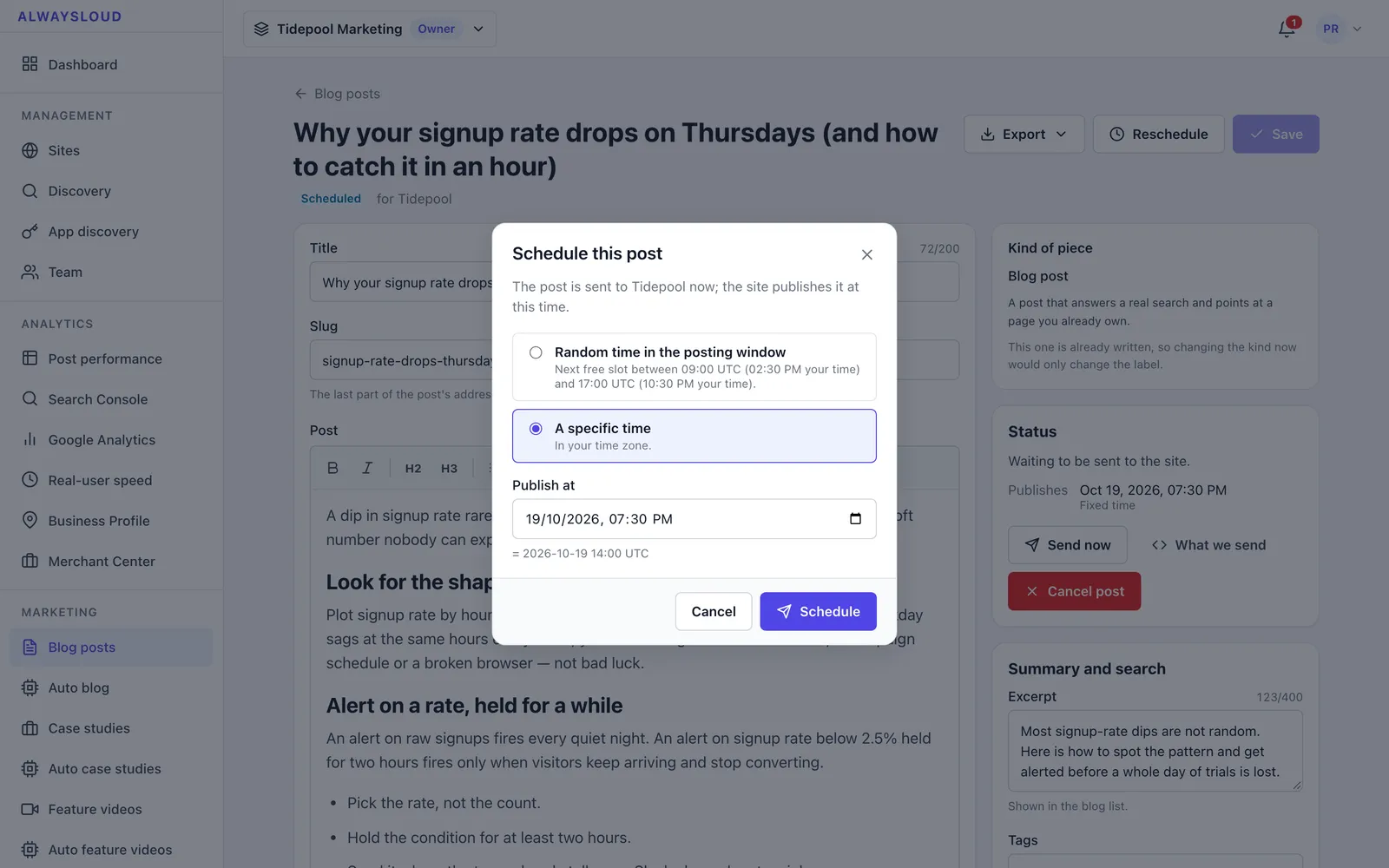
Post editor with a schedule dialog open over it
The post editor with its rich-text body, excerpt and search fields, and the schedule dialog for a fixed time or a random time inside the site's window.
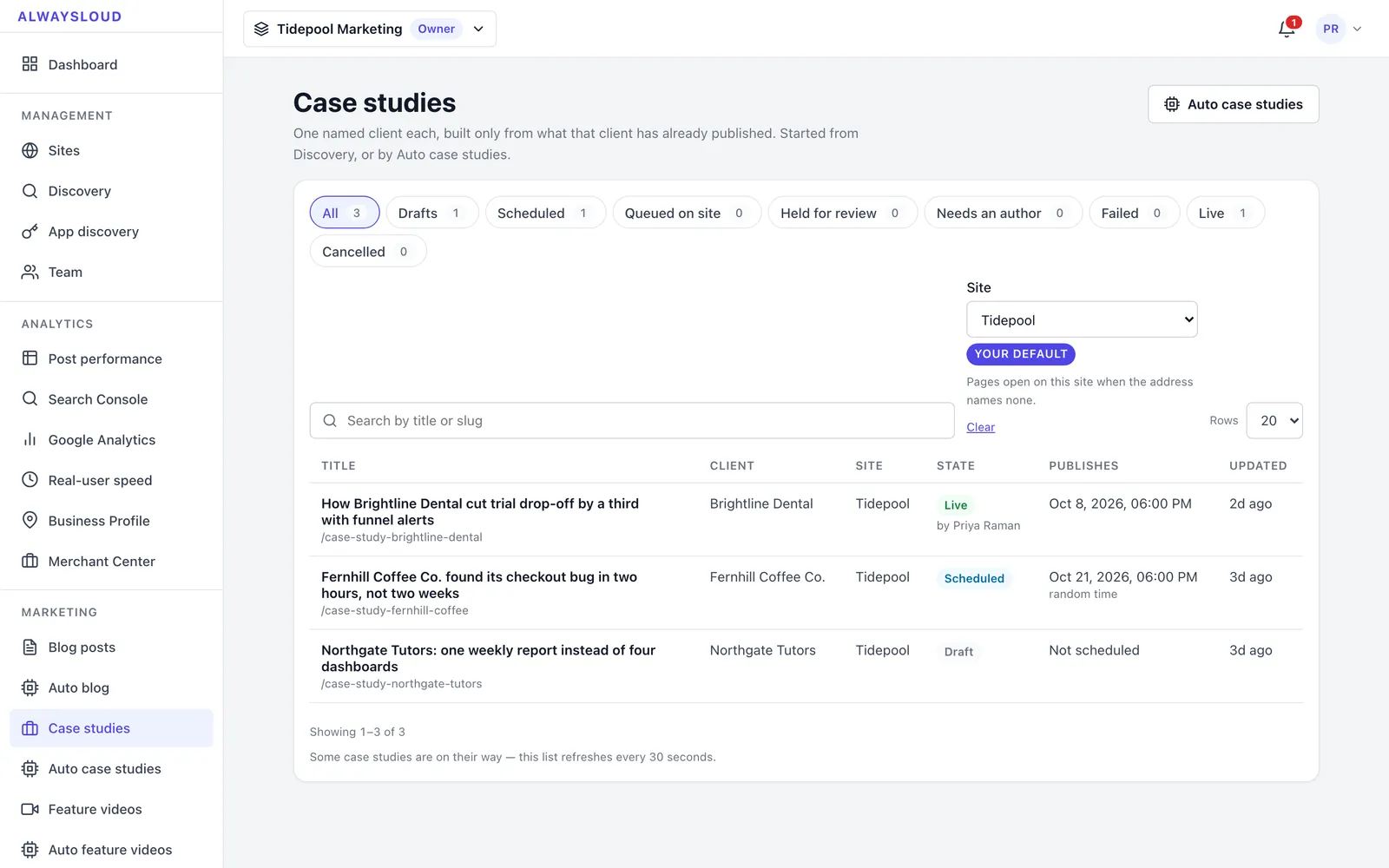
Case studies list with client names, states and publish dates
Case studies are written one named client at a time, only from what that client has already published, and scheduled like any other post.
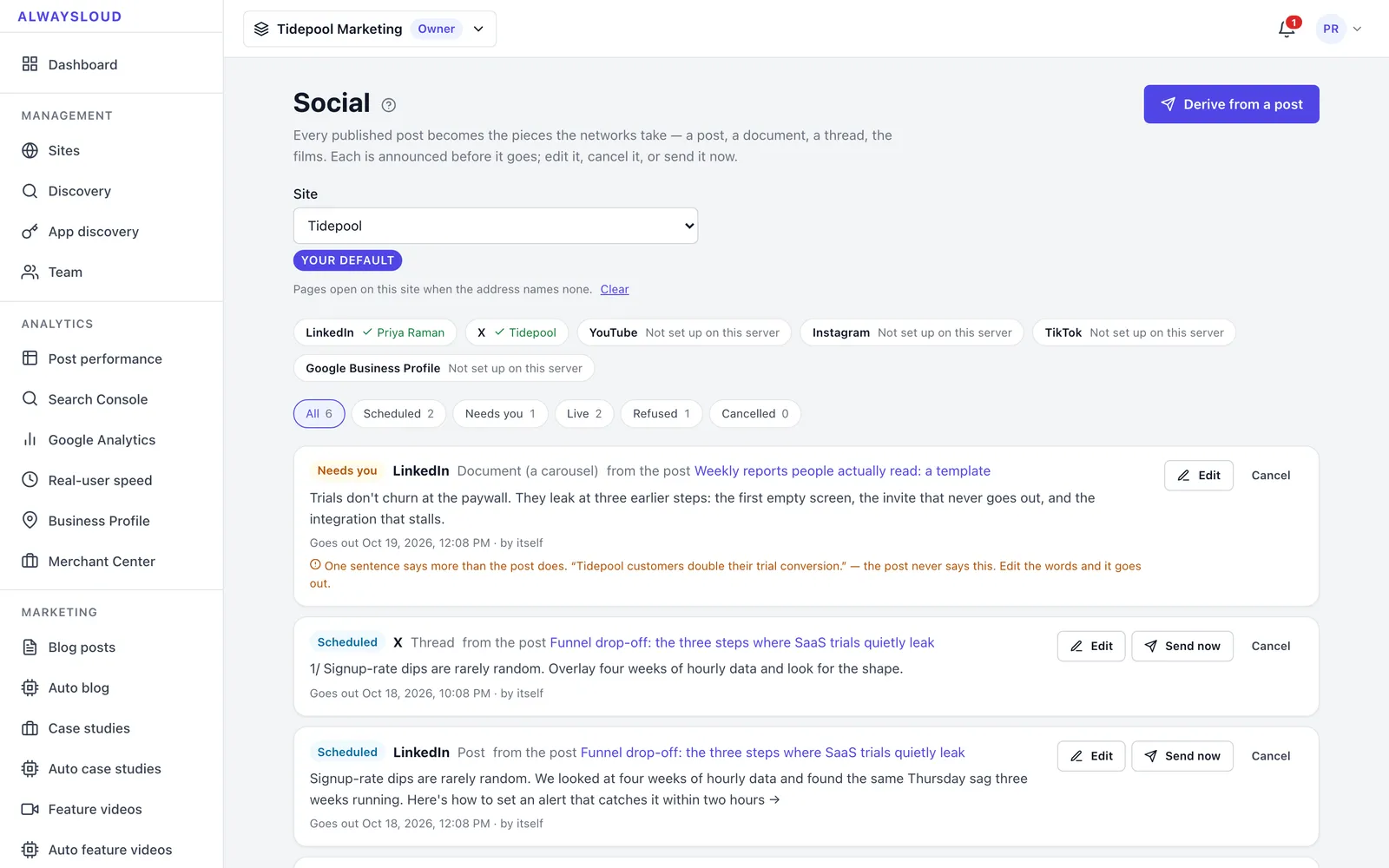
Social page with connected networks and scheduled, held and sent pieces
Published posts are turned into LinkedIn posts, documents and X threads; each piece is scheduled, held when a sentence goes beyond the source post, or marked sent.
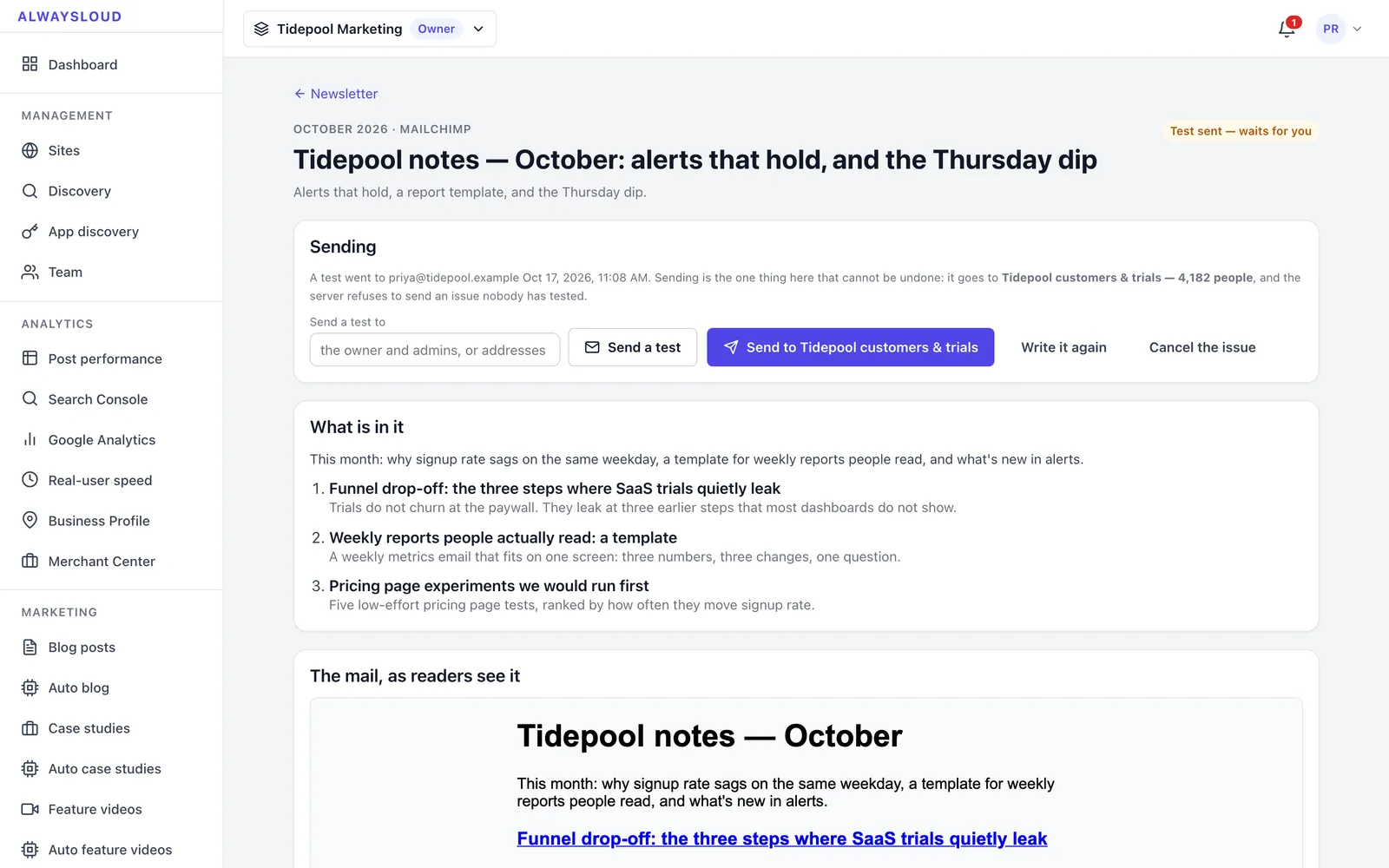
Newsletter issue page with sending controls, contents and email preview
A monthly newsletter issue assembled from the month's posts, test-sent first and only sent to the list when someone presses Send.
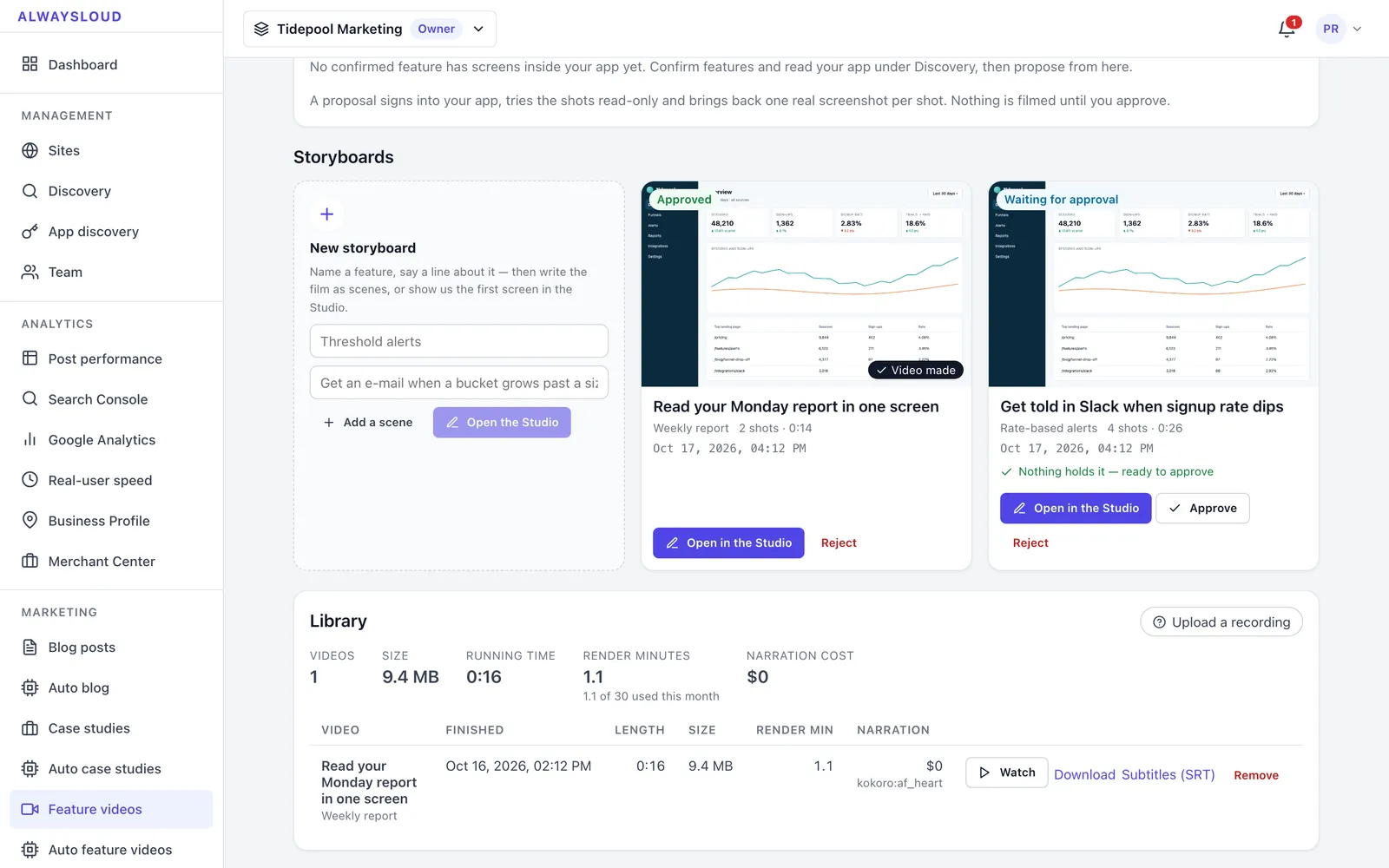
Feature videos page with storyboard cards and the video library
Feature videos start as storyboards of real app screens; one is waiting for approval and an approved one has already been made into a video.
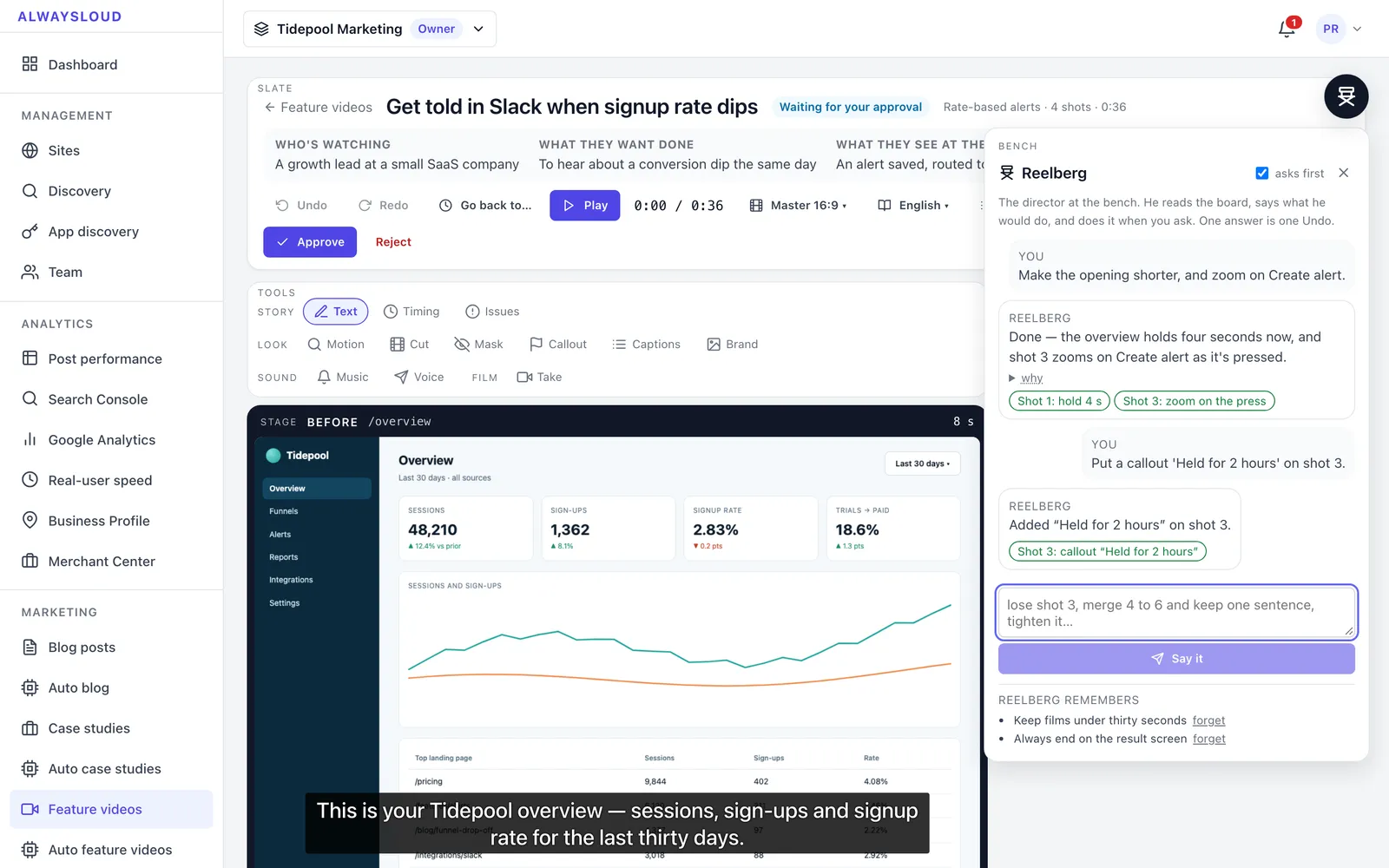
Reelberg chat panel in the studio showing requests and the edits made
Reelberg is a chat inside the studio: each request becomes a list of edits to the storyboard (hold times, zooms, callouts), and each answer can be undone.
Site Doctor findings with priorities, evidence and written fixes
Site Doctor lists what the site could do better — from its pages, Search Console, Analytics and speed checks — each with evidence, a priority and the fix already written.
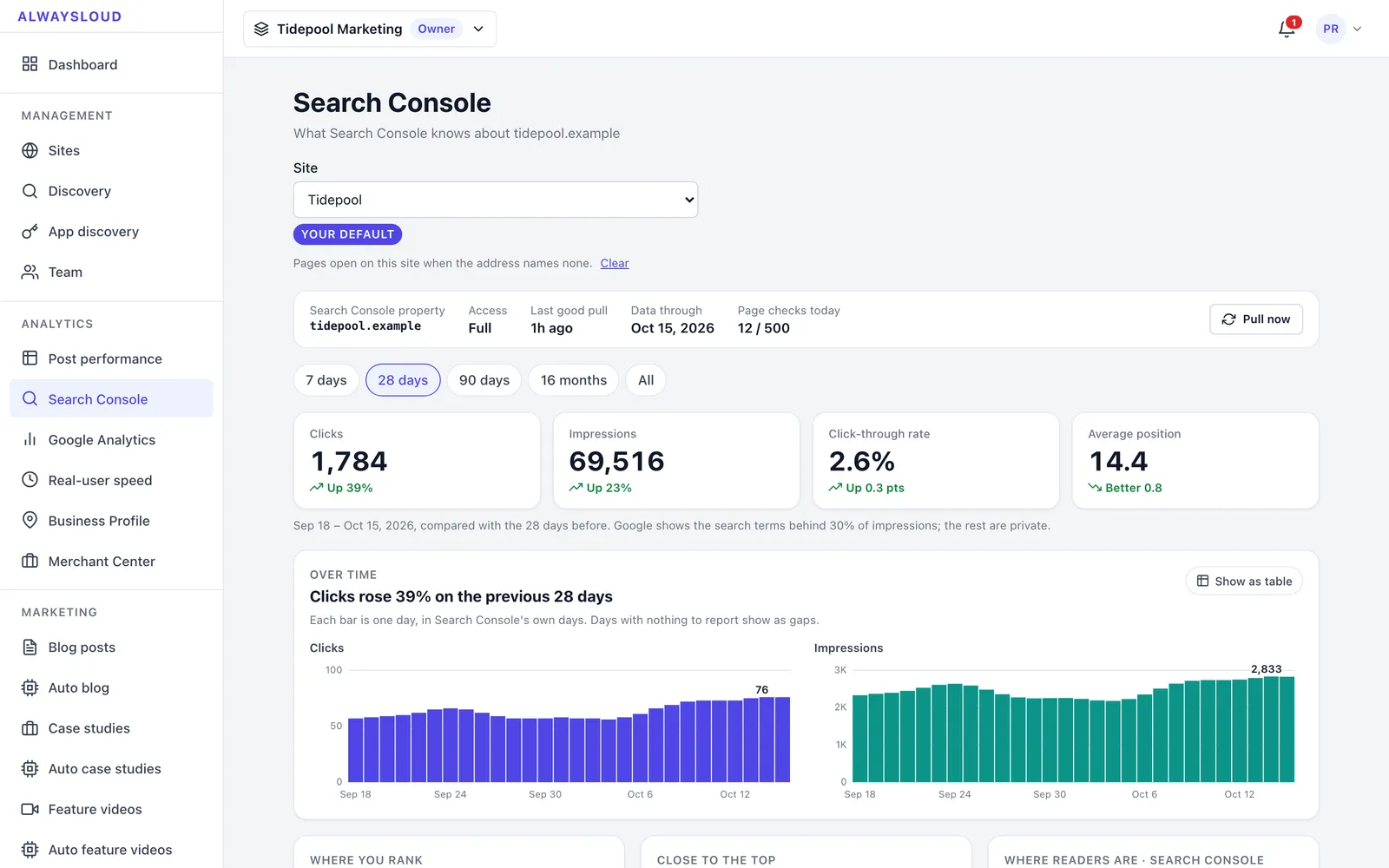
Search Console analytics with KPI tiles and daily clicks and impressions charts
Search Console numbers for the site — clicks, impressions, click-through and position against the previous period — read from stored daily rows.
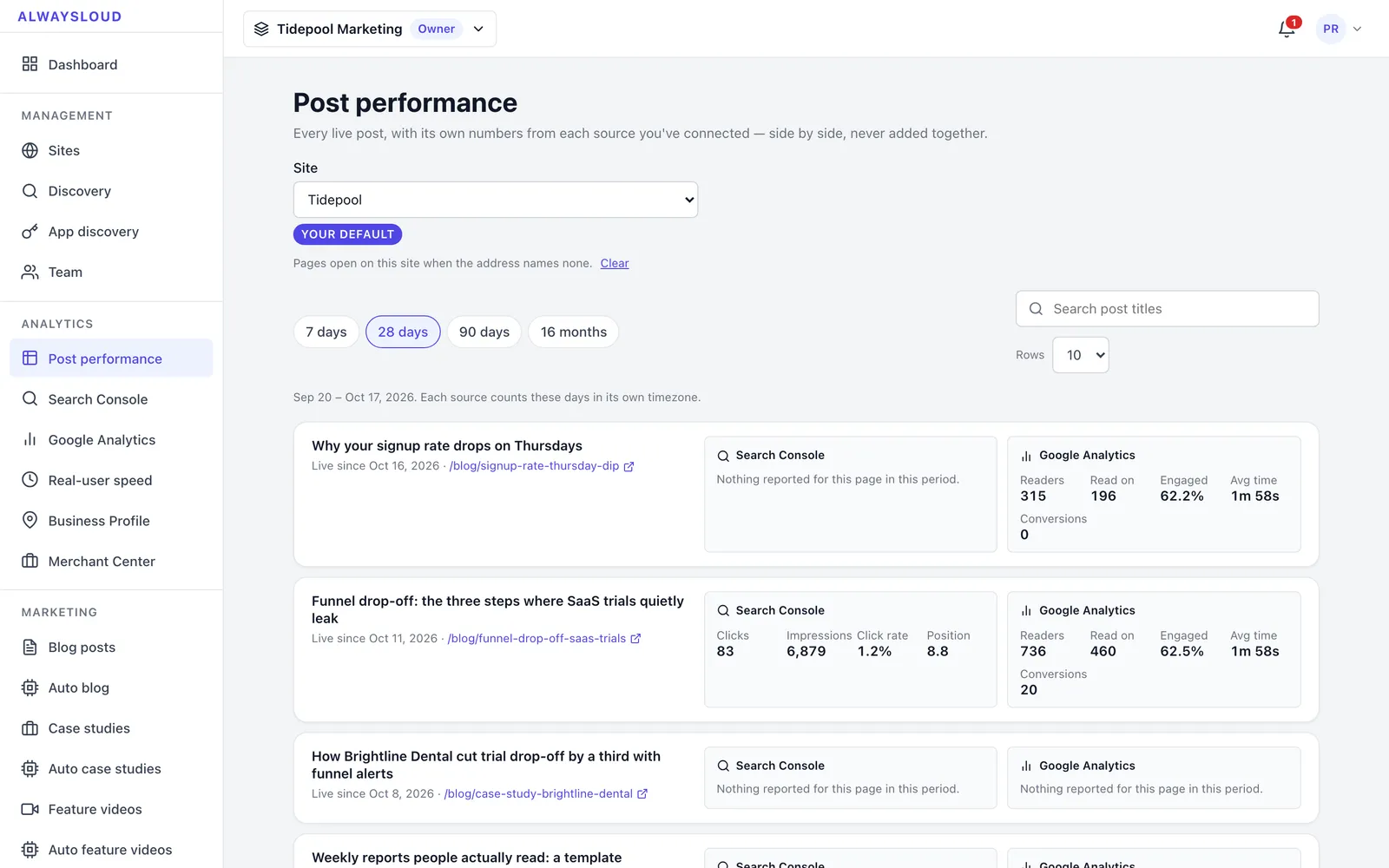
Post performance list showing per-post search and analytics metrics
Each live post with its own Search Console and Google Analytics numbers side by side, so the team can see which posts bring readers.
Project details
Tech stack
Next.js 15ReactRedux ToolkitTiptapNode.jsExpressMongoDBMongooseZodPlaywrightffmpeglibassKokoro TTS (ONNX Runtime)PythonModel Context Protocol SDKHosted AI modelsAWS S3Google Search Console APIGoogle Analytics 4
Timeline & team
Sep–Oct 2026
FAQ

Questions about this project

How does AlwaysLoud check AI-written posts against what a company has actually published?

Code flags every sentence that names the company, speaks as it or compares it with someone else, and narrows the company's own published claims to a few candidates for each. One model call matches each sentence to a candidate or to nothing, and any sentence left unsupported holds the post for a person.

Does AlwaysLoud need access to a company's CMS to publish its blog posts?

No. The company adds AlwaysLoud's receiver kit to its own backend, and AlwaysLoud sends each post as signed JSON with a publish time; the company's app stores the post and publishes it itself. WordPress and Webflow connectors exist for sites on those platforms.

Can AlwaysLoud make a product video without anyone recording the screen?

Yes. With a demo login, it records the company's real app in a Playwright browser, narrates each shot with a voice running on its own server, and burns in captions with ffmpeg. A person approves the storyboard before anything renders, and can record a shot themselves if the browser cannot reach it.

Can companies sign up for AlwaysLoud yet?

Not yet. As of October 2026 AlwaysLoud is built and running on our own machines, tested against our product Storafleet, but it is not deployed and has no customers.

More work

Other things we shipped

All projects
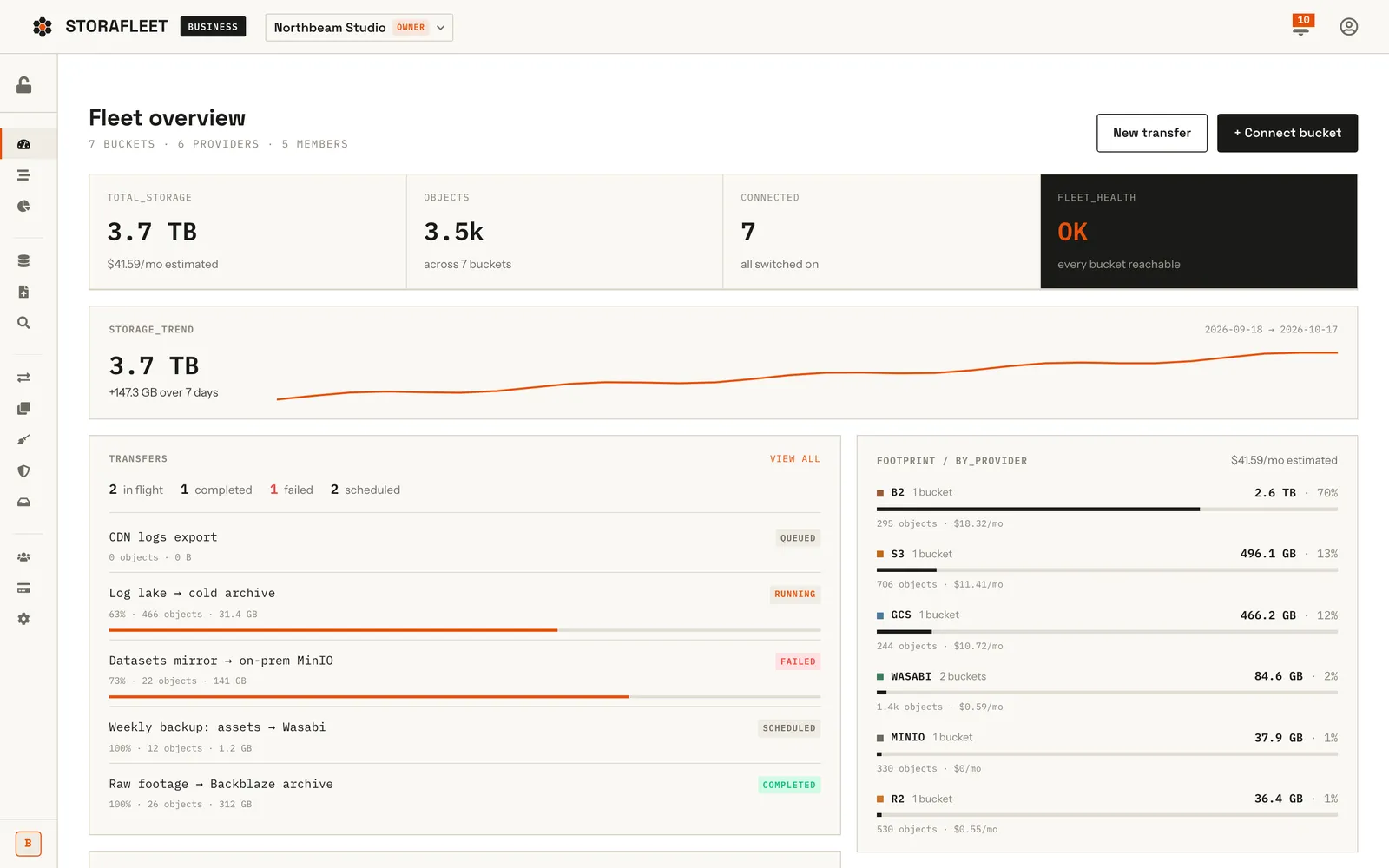
Storafleet fleet overview with storage totals, trend line, transfers list and per-provider footprint barsFeatured
Saasfor Storafleet

Storafleet — Multi-Cloud Storage Control Plane

Storafleet is CountryDevs' own SaaS control plane for object storage. Teams connect buckets they already own on 50+ providers, including AWS S3, Cloudflare R2, Backblaze B2, Wasabi and MinIO, then browse, migrate, search, secure and cost-check them from one console.

Next.js 15ReactRedux ToolkitNode.js+11
50+Storage providers in the connection roster
Case study
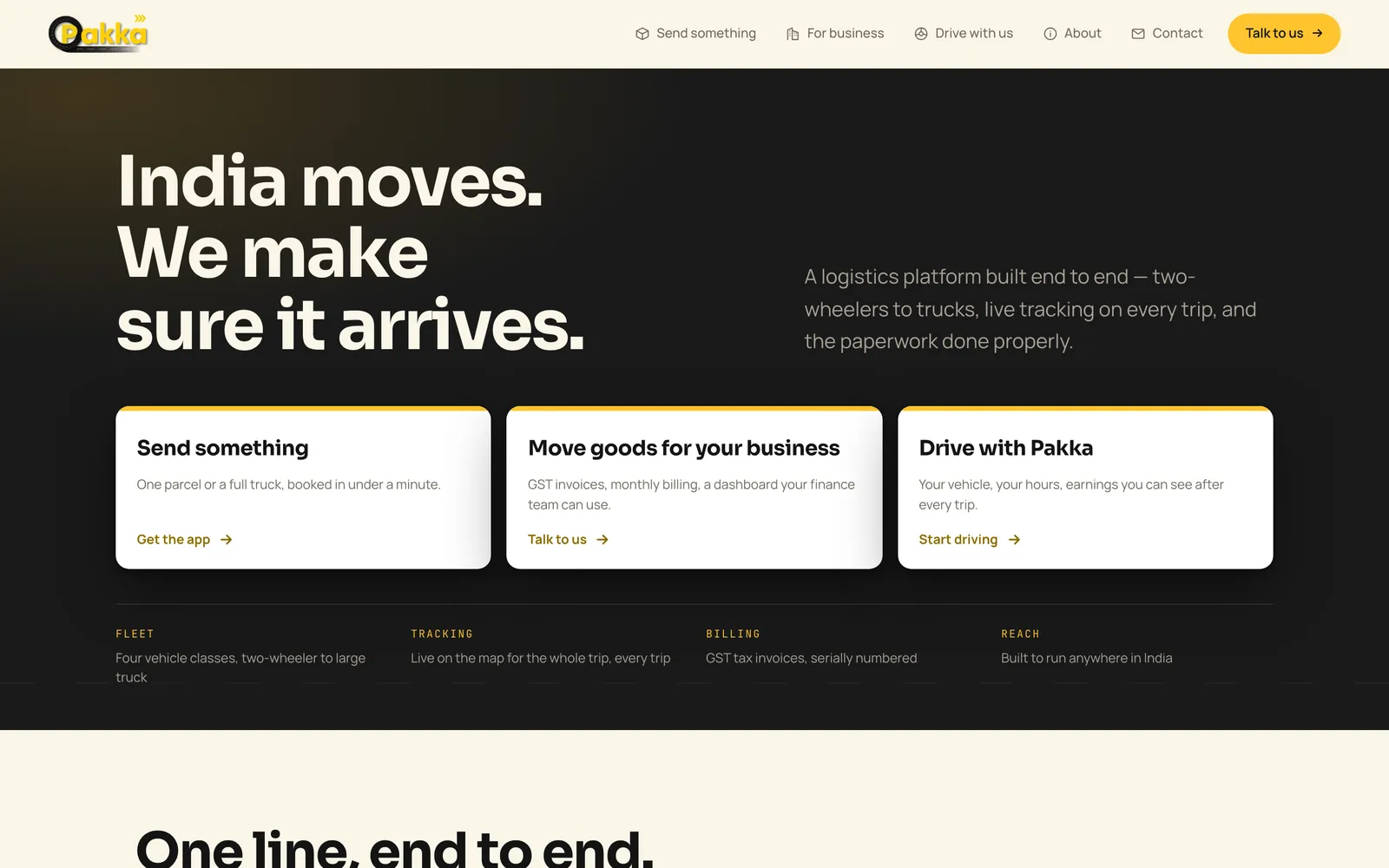
Pakka Logistics home page hero on desktopFeatured
Mobile Appfor Pakka Logistics

Pakka Logistics — Porter-Style Delivery Platform

Pakka Logistics is a Porter-style delivery platform for India. We built all of it: Android apps for customers and drivers, a business portal, an operations console and the website. The web platform is live; the Android apps are being prepared for Google Play.

React NativeTypeScriptRedux ToolkitNode.js+12
96.3%API routes exercised by a probe before launch (260 of 270)
Case study
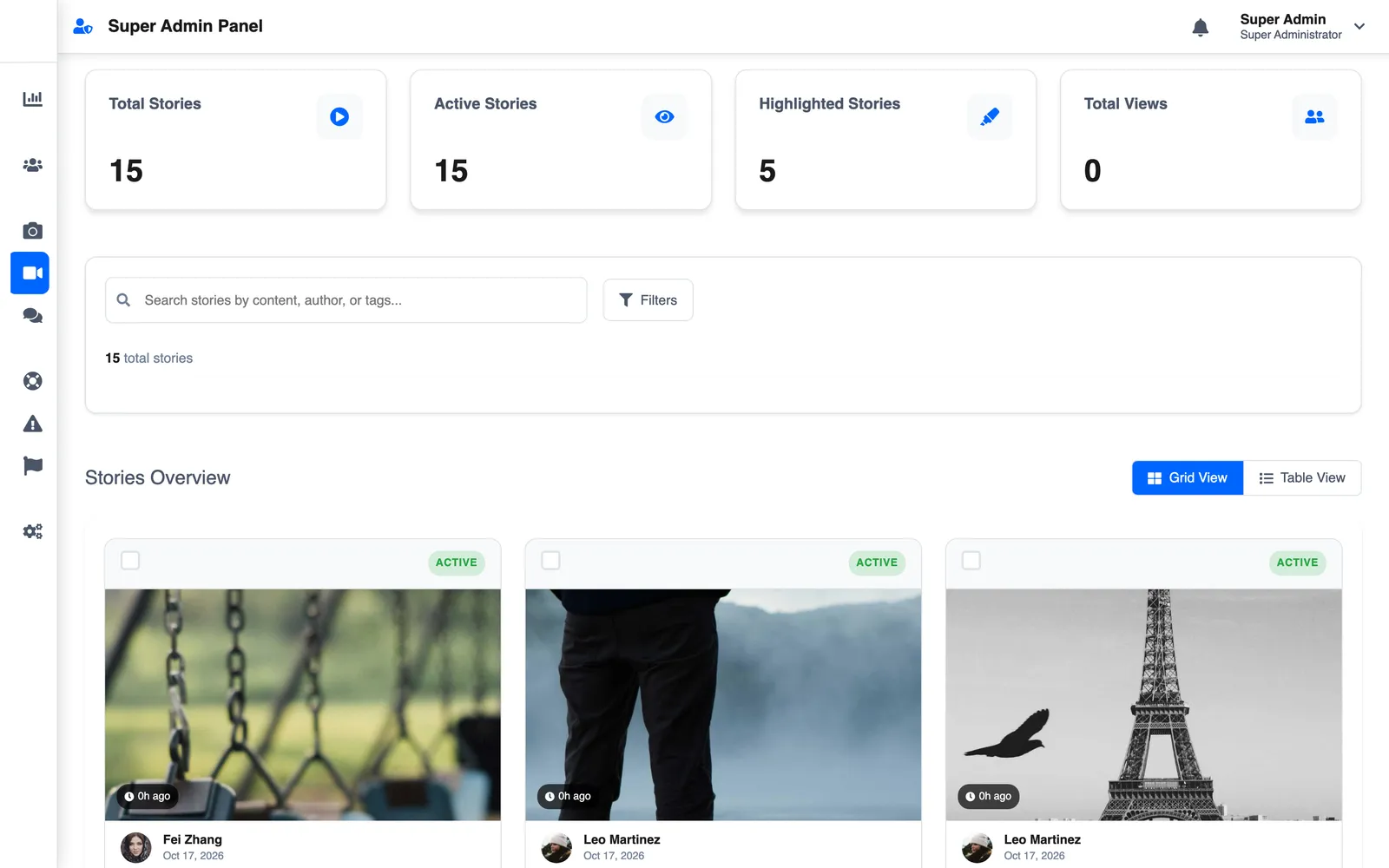
Superadmin stories grid with photo storiesFeatured
Mobile Appfor Slic Solutions Private Limited

LetSlic — Social Media App with Group Chat, Stories and Premium

LetSlic, listed on Google Play as Slic, is a social app for photo posts, 24-hour stories and real-time chat with group moderation. We built it for Slic Solutions Private Limited: the React Native app, two Node.js APIs, the superadmin console and the website, plus Premium and ads.

React NativeTypeScriptReduxNode.js+13
13Months from first commit to handover (Jun 2025 – Jul 2026)
Case study
Got a project?

Let's build the
next one together

Tell us what you're trying to ship. We'll come back with a scope, a timeline, and a fixed price — usually within 48 hours.

Not ready for a full build? Start with a fixed-price Discovery Sprint, or get a code audit of an app someone else built.